Hi,
I'd like some advice of the more knowledgeable proxmox users around on the forum.
Here's what happened:
- some time, months ago, my single proxmox machine got halted due to an unplanned power interruption.
- again a while later I started receiving error messages in my mailbox: SMART error (OfflineUncorrectableSector) detected on host: pve-1
Due to a total lack of time this error was not taken care of.
- yesterday we did have a planned power interruption, so I used the GUI to properly shutdown pve-1
- then later, while trying to power up again, I of course received more errors, all pointing to a disk failure
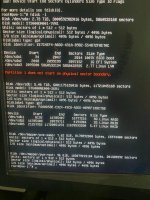
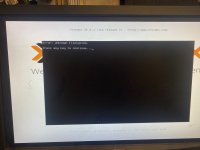
You'll find a couple of screenshots below.
Now my question:
- it seems LVM does not come online (due to the disk failure)
=> TASK ERROR: activating LV 'pve/data' failed: Activation of logical volume pve/data is prohibited while logical volume pve/data_tmeta is active.
- after another reboot, I was able to log in on the terminal, pve-1 did have no network connection, so I could only work on the physical machine itself
- I tried to run some SMART commands to check
- then after another reboot, and some more time, the network connection was reestablished, and I could again approach the GUI
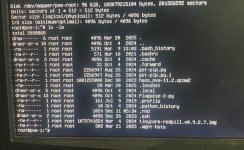
- the single one VM that I'd like to rescue is my Home Assistant install, doing an ls -la in terminal, shows the presence of haos_ova-11.2.qcow2, like this:
-rw-r--r-- 1 root root 1001259008 Dec 30 2023 haos_ova-11.2.qcow2
What can I do to rescue my HA VM?
- is the qcow2 file the VM or?
Some thoughts / idea's:
- I was already playing with the idea of setting up a 2nd proxmox installation, I'm still on Proxmox 8.2.7, and then maybe try to move the VM over to the new PVE-1?
Looking forward to any help, tips, suggestions & idea's & thanks for helping out!
I'd like some advice of the more knowledgeable proxmox users around on the forum.
Here's what happened:
- some time, months ago, my single proxmox machine got halted due to an unplanned power interruption.
- again a while later I started receiving error messages in my mailbox: SMART error (OfflineUncorrectableSector) detected on host: pve-1
Due to a total lack of time this error was not taken care of.
- yesterday we did have a planned power interruption, so I used the GUI to properly shutdown pve-1
- then later, while trying to power up again, I of course received more errors, all pointing to a disk failure
You'll find a couple of screenshots below.
Now my question:
- it seems LVM does not come online (due to the disk failure)
=> TASK ERROR: activating LV 'pve/data' failed: Activation of logical volume pve/data is prohibited while logical volume pve/data_tmeta is active.
- after another reboot, I was able to log in on the terminal, pve-1 did have no network connection, so I could only work on the physical machine itself
- I tried to run some SMART commands to check
- then after another reboot, and some more time, the network connection was reestablished, and I could again approach the GUI
- the single one VM that I'd like to rescue is my Home Assistant install, doing an ls -la in terminal, shows the presence of haos_ova-11.2.qcow2, like this:
-rw-r--r-- 1 root root 1001259008 Dec 30 2023 haos_ova-11.2.qcow2
What can I do to rescue my HA VM?
- is the qcow2 file the VM or?
Some thoughts / idea's:
- I was already playing with the idea of setting up a 2nd proxmox installation, I'm still on Proxmox 8.2.7, and then maybe try to move the VM over to the new PVE-1?
Looking forward to any help, tips, suggestions & idea's & thanks for helping out!