Request for Assistance: Shrinking Attached VM Disk Storage
- Thread starter a.motawea
- Start date
You are using an out of date browser. It may not display this or other websites correctly.
You should upgrade or use an alternative browser.
You should upgrade or use an alternative browser.

Please share this so we have an overview of your storage setup
Why do you want to do this? Storage is usually thin-allocated so if properly set up there's few disadvantages of having a oversized disk.
To avoid data loss you should create a backup and perhaps a snapshot first. Shrinking file systems or virtual disks is risky. I usually recommend booting the gparted iso to shrink the file system as you often have to move space around. How to shrink the virtual disk afterwards depends on the storage.
Bash:
# Also from inside the VM
lsblk -o+FSTYPE,PTTYPE

cat /etc/pve/storage.cfg
qm config VMIDHERE --currentTo avoid data loss you should create a backup and perhaps a snapshot first. Shrinking file systems or virtual disks is risky. I usually recommend booting the gparted iso to shrink the file system as you often have to move space around. How to shrink the virtual disk afterwards depends on the storage.
Last edited:

I am currently working on a project where I need to change the storage from the existing 5 TiB to an SSD. However, I am facing some issues with the transition, particularly because I only have 1 TiB available, and i want transferring data from my 5 TiB HDD. The total amount of data that needs to be transferred is approximately 200 GiB.Please share this so we have an overview of your storage setup
Why do you want to do this? Storage is usually thin-allocated so if properly set up there's few disadvantages of having a oversized disk.Bash:# Also from inside the VM lsblk -o+FSTYPE,PTTYPE cat /etc/pve/storage.cfg qm config VMIDHERE --current
To avoid data loss you should create a backup and perhaps a snapshot first. Shrinking file systems or virtual disks is risky. I usually recommend booting the gparted iso to shrink the file system as you often have to move space around. How to shrink the virtual disk afterwards depends on the storage.
also i don't have experience withe proxmox servers.
Please don't quote the complete message you're replying to. Mine is already above yours.
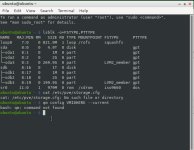
It looks like you don't even need to shrink anything inside the VM because the 5T~ disk only contains about 300G~ of partitions. We can just power off the VM and shrink the 5T virtual disk to 500G or so and the 1T one to 300G or so.
I need to see the other commands from the node side to tell you the commands for that. I expected that you run commands on the node by default, hence the
Technically you could also simply leave it as is as it's likely thin-provisioned so only the data matters, not the size of the disk.
It looks like you don't even need to shrink anything inside the VM because the 5T~ disk only contains about 300G~ of partitions. We can just power off the VM and shrink the 5T virtual disk to 500G or so and the 1T one to 300G or so.
I need to see the other commands from the node side to tell you the commands for that. I expected that you run commands on the node by default, hence the
also from inside the VM.Technically you could also simply leave it as is as it's likely thin-provisioned so only the data matters, not the size of the disk.
Last edited:
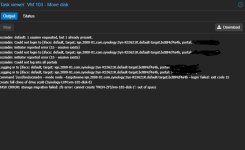
While attempting to move a disk in preparation for configuring replication on several VMs, I encountered an error that’s preventing the operation from completing. I’d appreciate your help in reviewing this issue.
My objective is to replicate the VMs, but the disk move fails with an error I can’t bypass. I’m trying to determine whether I should:
- Copy only the necessary data
- Shrink the disk before moving it
My objective is to replicate the VMs, but the disk move fails with an error I can’t bypass. I’m trying to determine whether I should:
- Copy only the necessary data
- Shrink the disk before moving it