Ok.
I was following this document - https://serverdecode.com/change-server-name-proxmox/ as I needed to change the server name - from pve to nocpve.
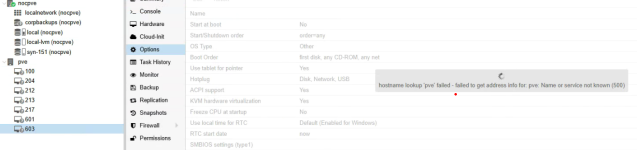
All went well, till I rebooted and now it's apparent that I'm missing something else, as my 'storage' areas and servers aren't available now.
I found this document - https://www.virtualizationhowto.com/2025/01/proxmox-storage-configuration-for-beginners/ - referencing the storage.cfg file and where the data actually lives, and if found on boot up. That's probably why i got an error on boot, but the server actually came up.
I can obliviously edit the /etc/pve/storage.cfg file but I presume that i need to make some other change - on the system so that at boot-up time, the new storage is found under the 'new name' for the server (was pve, now nocpve) so that all the storage (datastore) if found upon boot. I'll have to change the host files also, presumably, since their config files are now at the new location. What else have i missed and how do I clean this up?
I was following this document - https://serverdecode.com/change-server-name-proxmox/ as I needed to change the server name - from pve to nocpve.
All went well, till I rebooted and now it's apparent that I'm missing something else, as my 'storage' areas and servers aren't available now.
I found this document - https://www.virtualizationhowto.com/2025/01/proxmox-storage-configuration-for-beginners/ - referencing the storage.cfg file and where the data actually lives, and if found on boot up. That's probably why i got an error on boot, but the server actually came up.
I can obliviously edit the /etc/pve/storage.cfg file but I presume that i need to make some other change - on the system so that at boot-up time, the new storage is found under the 'new name' for the server (was pve, now nocpve) so that all the storage (datastore) if found upon boot. I'll have to change the host files also, presumably, since their config files are now at the new location. What else have i missed and how do I clean this up?