Hi all, I'm testing proxmox 5 beta 2.
I created a new container named 'test' (id 102).
How can I rename the vm?
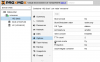
I created a new container named 'test' (id 102).
How can I rename the vm?



127.0.0.1 localhost
::1 localhost ip6-localhost ip6-loopback
ff02::1 ip6-allnodes
ff02::2 ip6-allrouters
# --- BEGIN PVE ---
xxx.xxx.xxx.xxx dev.exemple.com devExemple
# --- END PVE ---
127.0.0.1 localhost
::1 localhost ip6-localhost ip6-loopback
ff02::1 ip6-allnodes
ff02::2 ip6-allrouters
# --- BEGIN PVE ---
xxx.xxx.xxx.xxx dev.exemple.com dev
# --- END PVE ---
Sorry if this bumps an ancient thread, but I want to thank you for this simple response. It's 2024, I'm on Proxmox 8.2.7, and I had the same question... because when I looked at the DNS panel, my brain ignored the first row of the table thinking it was a header (like "Attribute" and "Value" or something). Just couldn't see that first table line as a table row to be read and edited. xDSelect the DNS panel, then change Hostname
We use essential cookies to make this site work, and optional cookies to enhance your experience.

