Remove "SPAM: "-Prefix from Mails if Deliver-Button is clicked

Mar 31, 2026
7
1
3
I've recently installed PMG 9.0. In our setting the quarantined mails are reviewed by admins. I would like to make a configuration that removes the prefix "SPAM: " from the subject if an admin hits the "Deliver" button. I found this post from 2023 where this was not possible at the time: Removing "SPAM" Modified Subject on Delivery?
The PMG version used back then was 7.3-4. Is it still not possible to do this with version 9.0?
If not: Is such a feature planned?
If yes: How can this be configured?
 
Last edited:
Thank you for your reply. I was considering that since that was the solution in the post I linked. However, after reading the admin guide I am somewhat unsure about how PMG exactly handles potential spam-mails:

It seems that per default-settings only mails with a spam-score of 3 or higher are put into quarantine. But regardless if the threshold is 3 or something else I am unsure about what happens with mails that have:

0 < spam-score < 3 (or whatever threshold is configured)

If those mails are delivered with an unaltered subject, then removing the prefix "SPAM: " indeed answers my question.

But if those mails are also delivered with a prefixed "SPAM: " in the subject, then I would like to remove the "SPAM: " prefix from mails that have been quarantined (spam-score >3) and deemed to be legitimate by admin by clicking the "Deliver"-button. Removing the "SPAM: " prefix if the the "Deliver"-button is clicked would of course work nicely for both scenarios, hence my original question.
 
Last edited:
Not sure I understand what exactly you are asking.

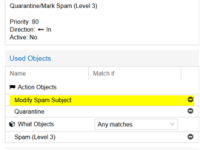
Somewhere in your PMG > Mail Filter there is an action that adds the SPAM: to the subject. By default it's called something like "Quarantine/Mark Spam (Level 3)". Edit it and remove the action object that adds the subject...

1775205005424.png
 
Last edited:
Yes, that setting is in:
Mail Filter -> Action Objects -> Modify Spam Subject

And in:
Mail Filter -> What Objects
there is an object called "Spam (Level 3)". If I understand it correctly the term level 3 here corresponds to spam-score 3.

And the rule you refer to:
Mail Filter -> Quarantine/Mark Spam (Level 3)
applies the action objects "Modify Spam Subject" and "Quarantine" to any what object "Spam (Level 3)" (that is, mails with a spam-score >= 3)

I am aware of that. What I'm confused about: Is the action object "Modify Spam Subject" ONLY applied in this rule? Or is it also applied for some/all mails with 0 < spam-score < 3 (somewhere else in the configuration that I am not aware of so far)?