

Hello,
I am new to the Proxmox world and have setup a Proxmox server. I had made good headway but broke something along the way so I chose to reload.
The Proxmox VE is on the first partition (RAID 1 array). The VM I had created lives on the 2nd partition (2nd array - RAID10). This was becuase my Dell Perc RAID controller
does not support ZFS from what I read. So I have a 'thinpool' on the 2nd array/volume.
I would like to either safely delete the VM disks and anything else taking up space on the 2nd volume, OR create a new VM and just point it to those VM disks.
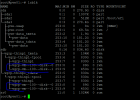
I had created an OS disk and a 2nd disk for storage. See the picture here. The vm disks are highlighted in blue below. Any thoughts on what route to go would be appreciated! Thanks,
I am new to the Proxmox world and have setup a Proxmox server. I had made good headway but broke something along the way so I chose to reload.
The Proxmox VE is on the first partition (RAID 1 array). The VM I had created lives on the 2nd partition (2nd array - RAID10). This was becuase my Dell Perc RAID controller
does not support ZFS from what I read. So I have a 'thinpool' on the 2nd array/volume.
I would like to either safely delete the VM disks and anything else taking up space on the 2nd volume, OR create a new VM and just point it to those VM disks.
I had created an OS disk and a 2nd disk for storage. See the picture here. The vm disks are highlighted in blue below. Any thoughts on what route to go would be appreciated! Thanks,
