

Remote Migration fails after updating certificates in target cluster

Cookiefamily

Well-Known Member
Jan 29, 2020
161
43
68
Germany
Hi, I wanted to migrate a VM from one cluster to another with PDM. I recently switched the certificates in the second (target) cluster to ACME provided ones (ACME directory is an internal CA though, not LE). I updated the certificates in PDM and the "Check Certificate" function is happy, all certificates match.
But when I hit migrate after setting the storage and target network parameters, I get the following error:
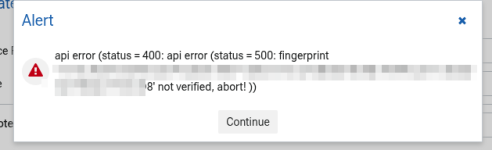
1782918497017.png
I assume this is a message from the source cluster, but I don't know how to get it to also accept the new fingerprints.
 
sorry for hijacking your thread, but I have the same issue, it seems. Same thing as in GUI but using the CLI for convenience (shell history etc.):

Source Cluster:

Code:
root@mox-pdm:~# proxmox-datacenter-manager-client remote probe-certificate mox mox01
Certificate is trusted (validates against the system certificate store).
root@mox-pdm:~# proxmox-datacenter-manager-client remote probe-certificate mox mox02
Certificate is trusted (validates against the system certificate store).
root@mox-pdm:~# proxmox-datacenter-manager-client remote probe-certificate mox mox03
Certificate is trusted (validates against the system certificate store).

Target Cluster:
Code:
root@mox-pdm:~# proxmox-datacenter-manager-client remote probe-certificate sumox sumox01
Certificate is trusted (validates against the system certificate store).
root@mox-pdm:~# proxmox-datacenter-manager-client remote probe-certificate sumox sumox02
Certificate is trusted (validates against the system certificate store).
root@mox-pdm:~# proxmox-datacenter-manager-client remote probe-certificate sumox sumox03
Certificate is trusted (validates against the system certificate store).

The API port of the target cluster actually replies with the expected SHA256 fingerprint and OpenSSL verify works correctly:
Code:
openssl s_client -connect sumox01:8006 < /dev/null 2>/dev/null| openssl x509 -fingerprint -sha256 -noout
sha256 Fingerprint=3D:DD:A0:E1:27:32:29:1D:33:C2:4C:8C:AB:B3:4C:5E:E3:E2:2F:22:C1:09:0E:BB:6A:E8:2E:58:21:27:A8:A5

Code:
openssl s_client -connect sumox01:8006 < /dev/null 
[...]
---
SSL handshake has read 3143 bytes and written 1613 bytes
Verification: OK
---
[...]
Verify return code: 0 (ok)
---
[...]

Still, I'm getting the error message that doesn't really help me, because I don't know what to fix:
Code:
root@mox-pdm:~# proxmox-datacenter-manager-client  pve qemu remote-migrate mox 121 sumox --map-bridge mgmt:mgmt --map-bridge lojumbo:lojumbo --map-storage pve_local:local_zfs01 --online --delete
Error: api error (status = 400: api error (status = 500: fingerprint '3D:DD:A0:E1:27:32:29:1D:33:C2:4C:8C:AB:B3:4C:5E:E3:E2:2F:22:C1:09:0E:BB:6A:E8:2E:58:21:27:A8:A5' not verified, abort!
))
api error (status = 400: api error (status = 500: fingerprint '3D:DD:A0:E1:27:32:29:1D:33:C2:4C:8C:AB:B3:4C:5E:E3:E2:2F:22:C1:09:0E:BB:6A:E8:2E:58:21:27:A8:A5' not verified, abort!
))

I'll probably try doing it without PDM next, maybe that will work?
 
Last edited:
"qm remote-migration" works flawlessly... Well, actually the linux VM (Proxmox Backup Server) dropped it's network connection for some reason and I needed to "ifup -a" on the console to restore connectivity, but otherwise it was fine:

Code:
root@mox02# qm remote-migrate 121 117 'apitoken=PVEAPIToken=root@pam!token=SECRET,host=sumox02.fqdn' --target-bridge 1 --target-storage local_zfs01 --online --delete

Establishing API connection with remote at 'sumox02.fqdn'
2026-11-12 11:45:55 conntrack state migration not supported or disabled, active connections might get dropped
2026-11-12 11:45:55 remote: started tunnel worker 'UPID:sumox02:0036C2AE:0C5FC8A3:6AF598E3:qmtunnel:117:root@pam!token:'
tunnel: -> sending command "version" to remote
tunnel: <- got reply
2026-11-12 11:45:55 local WS tunnel version: 2
2026-11-12 11:45:55 remote WS tunnel version: 2
2026-11-12 11:45:55 minimum required WS tunnel version: 2
websocket tunnel started
2026-11-12 11:45:55 starting migration of VM 121 to node 'sumox02' (sumox02.fqdn)
[...]

2026-11-12 11:48:13 average migration speed: 328.0 MiB/s - downtime 93 ms
2026-11-12 11:48:13 migration completed, transferred 16.0 GiB VM-state
2026-11-12 11:48:13 migration status: completed
[...]

2026-11-12 11:48:36 migration finished successfully (duration 00:02:41)
 
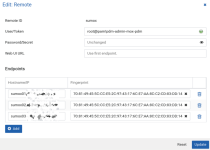
Aaand I found the issue in my case: For some reason the "check certificate" stuff replied with "everything OK" when in fact there was some other certificate fingerprint pinned in the config.

1794483359494.png
I just needed to remove the fingerprints and it worked again. I thought I had already removed the pinned Fingerprints via "check certificates", but obviously that didn't take or I was mistaken...
 
Last edited: