

I'm running PBS 4.2.6 on dedicated hardware, a N100 motherboard, 48 GB of memory, with an LSI HBA card in IT mode connected to eight SAS 4 TB disks. When I first set this up, I configured a single ZFS pool of all eight disks as follows:
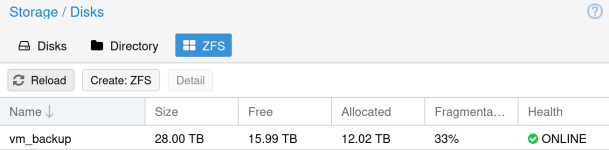
On this pool I have a single datastore, confusingly named vm_backup:
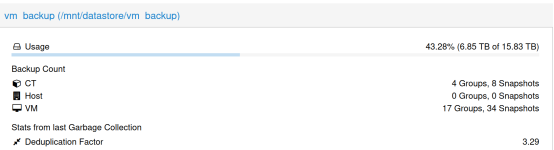
I am now revisiting my backup strategy. This server is offsite from my primary location and ISP throughput at both locations isn't great. My backups have been taking days, in some cases, and because I have only a single PVE server that reboots frequently due to updates, I run into the dirty bitmap issue, so differential backups aren't helping me here. The worst offenders are a couple of fileservers, one VM, one CT, with multi-terabyte storage drives.
My plan was to reduce the size of of the vm_backup datastore, install borgbackup, and start using borg to send my files to this same server. I know this isn't recommended but I'm not running an enterprise here, this is homelab central and I am trying to make do with the hardware and bandwidth I have. Where I have gotten stuck is all of the different values that I am seeing in terms of size. The command line says my pool is 25.5 TB in size, web GUI says 28 TB. The command line says my datastore is 14.4 TB in size, 6.23 TB used, web GUI says 15.83 TB in size, 6.85 TB used.
My questions:
Code:
# zpool status
pool: vm_backup
 state: ONLINE
  scan: scrub repaired 0B in 10:45:14 with 0 errors on Sun Sep 13 11:09:16 2026
config:

        NAME                        STATE     READ WRITE CKSUM
        vm_backup                   ONLINE       0     0     0
          raidz3-0                  ONLINE       0     0     0
            wwn-0x50014ee5aaabf054  ONLINE       0     0     0
            wwn-0x50000c0f01b23b70  ONLINE       0     0     0
            wwn-0x5000cca097281798  ONLINE       0     0     0
            wwn-0x50000c0f01b28180  ONLINE       0     0     0
            wwn-0x5000c500943880bb  ONLINE       0     0     0
            wwn-0x50000c0f01b6fe64  ONLINE       0     0     0
            wwn-0x50000c0f01b8a29c  ONLINE       0     0     0
        spares
          wwn-0x5000c500944814fb    AVAIL
Code:
# zpool list
NAME        SIZE  ALLOC   FREE  CKPOINT  EXPANDSZ   FRAG    CAP  DEDUP    HEALTH  ALTROOT
vm_backup  25.5T  10.9T  14.5T        -         -    33%    42%  1.00x    ONLINE  -
On this pool I have a single datastore, confusingly named vm_backup:
Code:
# zfs list -o space
NAME       AVAIL   USED  USEDSNAP  USEDDS  USEDREFRESERV  USEDCHILD
vm_backup  8.17T  6.23T        0B   6.23T             0B      1.25G
I am now revisiting my backup strategy. This server is offsite from my primary location and ISP throughput at both locations isn't great. My backups have been taking days, in some cases, and because I have only a single PVE server that reboots frequently due to updates, I run into the dirty bitmap issue, so differential backups aren't helping me here. The worst offenders are a couple of fileservers, one VM, one CT, with multi-terabyte storage drives.
My plan was to reduce the size of of the vm_backup datastore, install borgbackup, and start using borg to send my files to this same server. I know this isn't recommended but I'm not running an enterprise here, this is homelab central and I am trying to make do with the hardware and bandwidth I have. Where I have gotten stuck is all of the different values that I am seeing in terms of size. The command line says my pool is 25.5 TB in size, web GUI says 28 TB. The command line says my datastore is 14.4 TB in size, 6.23 TB used, web GUI says 15.83 TB in size, 6.85 TB used.
My questions:
- Why is there such a disparity between the command line values and the GUI values?
- Is it possible to limit the space consumed by a datastore?
- If so, what is the best way to do this? zfs set quota?
- Would creating a 2nd datastore, not configuring it in PVE for backup, and storing my borgbackup repository in its root folder be the easiest way to achive my workflow?
