Reboot stuck on GRUB and reinstall attempt doesn't get past Install screen

Sgingold

New Member
Apr 2, 2026
5
0
1
Hi all. First time poster here. I am extremely stuck. I have a 2-node PVE cluster. The second node is on a Minisforum NAB5. A few days ago, I started getting this error in the Proxmox UI:

hostname lookup 'pve1' failed - failed to get address info for: pve1: Name or service not known (500)

I hooked up a monitor and keyboard to the Minisforum and rebooted and got stuck at the GRUB menu:
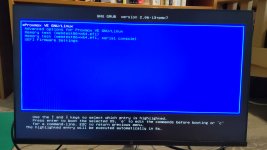
image20260402_101609070.jpg
After a few seconds, the first option runs, I get a black screen that says

Booting 'Proxmox VE GNU/Linux'
Loading Linux 6.8.12-15-pve ...
Loading initial ramdisk ...

Then the Minisforum logo, then
Welcome to GRUB!

All four of the selections in the Advanced options also return me to GRUB.
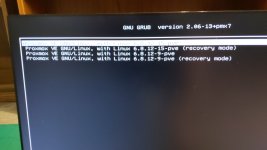
image20260402_102638991.jpg

Secure boot is disabled, UEFI is selected, and there's no fastboot option in the BIOS.
Next, I tried a fresh install using the Proxmox 9.1 iso from a USB using balena etcher which is the tool I used for my successful prior installs. I changed the boot order to USB and rebooted. First I see the message:

error: file 'boot/' not found

Then the first install screen:

image20260402_103602403.jpg
The first option just reboots the Minisforum and I land right back here. I tried adding rootdelay=10 to the GRUB configuration but that didn't help.
The second option also just reboots and returns to this screen. I followed the advice in other threads about adding NOMODESET to the config, also without success.
The four install options in the Advanced Options menu (Graphical, Terminal UI, and Serial Console Debug modes and Automated) also just bring me back here.
The big bummer is that Rescue Boot also doesn't work. When I select it I see:

LVM Rescue Boot...
EFI stub: Loaded initrd from LINUX_EFI_INITRD_MEDIA_GUID device path
EFI stub: Measured initrd data into PCR 9

After that there's a bunch of output that flashes on the screen, then the Minisforum boots back to this same installer screen. I can't access the shell so I can't do the troubleshooting steps found here.

I've also tried installing 8.4 and 6.4, same problem. I've searched to see if might somehow be caused by the node being part of a cluster but I don't think it's that. I'm stumped. Any suggestions would be greatly appreciated.
 
That GRUB loop after the kernel starts loading is a frustrating one. What's happening is the kernel and initrd load successfully but then something during early boot fails and the UEFI firmware cycles back to the GRUB menu rather than showing you a panic or error. On mini PCs like the Minisforum NAB5 this is often a storage driver timing issue where the NVMe isn't initialised fast enough, or the EFI boot entry itself has gone stale.

For the USB install problem first: Balena Etcher has had trouble with hybrid ISO images on UEFI-only systems. If you have a Windows machine available, try Rufus instead with GPT partition scheme and DD image mode. On Linux, writing with dd directly is more reliable than Etcher:

dd if=proxmox-ve_9.1.iso of=/dev/sdX bs=1M status=progress

For the existing install, go into your UEFI settings and look at the UEFI Boot Manager or boot order list. Delete any stale Proxmox entries and leave only your USB. Mini PCs like the NAB5 sometimes keep old EFI boot entries that loop you back to GRUB even when a new install should be running.

If you can get any other Linux live USB to boot (Ubuntu, Debian, anything), try mounting the Proxmox root partition and checking /var/log/syslog for why the kernel bailed. Also run nvme smart-log /dev/nvme0 to check drive health, a failing NVMe would explain both the boot loop and the install failures at once.

One more thing worth checking: the Minisforum NAB5 had BIOS updates in 2023-2024 that improved UEFI boot compatibility. Check their support page or the Minisforum forum to see if you're on the latest firmware.
 
Thanks for your response. No luck yet, unfortunately. I tried booting with two different USBs after writing with dd and got a "error: unknown filesystem" error on both and then returned to the installer screen. I'm back to writing with balena etcher since I had luck with it before.
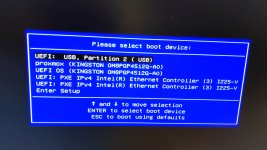
Then I got to the UEFI Boot Manager by hitting F7 on startup but I am unable to delete all the other Proxmox entries here:

image20260402_181356600.jpg

I know there's a command line utility called efibootmgr for deleting these but I can't access the shell to use it. If anyone knows how to delete these entries from the UEFI boot manager, please let me know how.
I'm about to try installing Ubuntu to mount the Proxmox root partition and see if there's anything going on there. Any other suggestions are much appreciated. I've dumped a couple days into this already and it's maddening.
 
Same problem when trying to install Ubuntu. I get to the GRUB screen, select Try or Install Ubuntu, it reboots, I get the error: file 'boot/' not found error, and back to the GRUB menu. Unless there's a way I'm unaware of to delete every option from the boot menu except the USB I want to install from without access to a shell, I think I'm stuck. In addition, I can't access the shell in the other node in my cluster since this node is down (apparently a known issue) so my entire Proxmox is basically broken. Feel free to toss me some ideas.
 
I just flashed the latest firmware following instructions here and that didn't resolve the issue. I'm still in the GRUB loop. I'll poke around for a bit longer but if no one can come up with a fix then I'm stuck buying a new mini pc, moving my hardware to it, and reinstalling Proxmox there. Not ideal but I can't think of another solution.
 
The "error: unknown filesystem" with dd nearly always comes from leftover GPT or EFI partition remnants on the USB that GRUB reads before the ISO gets control. Before dd-ing the ISO, wipe the drive first:

sudo wipefs -a /dev/sdX
sudo sgdisk --zap-all /dev/sdX
sudo dd if=proxmox.iso of=/dev/sdX bs=4M status=progress conv=fsync

That clears the old partition table so there is nothing stale for GRUB to trip on.

For the EFI entries: most Minisforum units ship with a UEFI Shell built into the firmware. From the UEFI setup screen (Del or F2 on POST) look under Boot for "Launch EFI Shell from filesystem device" or similar. From there you can remove the bad entries cleanly:

Shell> bcfg boot dump -v
(note the numbers of the broken Proxmox entries)
Shell> bcfg boot rm 00
Shell> bcfg boot rm 01
(numbering resets each time you remove one, so check with dump after each removal)

If there is no shell option, look for "Restore Defaults" or "Reset NVRAM" in the Advanced or Boot menu. On most mini PCs this wipes all EFI boot variables back to firmware defaults and you get a clean slate for the USB installer.

If dd is still giving you trouble after wiping, Ventoy is worth trying. It creates a proper EFI-compatible partition structure and handles hybrid ISOs better than Etcher or raw dd. Just copy the Proxmox ISO onto the Ventoy USB once it is set up.

One more thing once you do get the installer running: before clicking Install, drop to a shell (Ctrl+Alt+F2) and run efibootmgr -v to see all the stale entries and delete them with efibootmgr -b XXXX -B before the new install writes its own entry. Saves you from the same problem after reinstall.
 
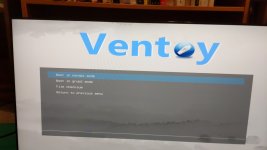
Thanks for replying again. I tried all your suggestions and the installer just can't get past the first screen. Here's my most recent attempt using Ventoy:

image20260404_191419697.jpg

Here's the latest iso. I hit enter and get here:image20260404_191426507.jpg

Enter again
image20260404_191434923.jpg

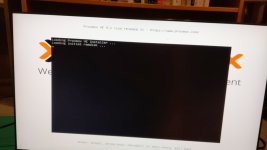
Just like earlier, after hitting enter for any of these or the Advanced install options, the following text shows up, the system reboots, and I am brought back to the first screenshot above
image20260404_191437310.jpg

For the UEFI shell part, this Minisforum doesn't come with shell access from the UEFI setup screen but I managed to load an EFI shell onto a separate USB, boot into the shell, remove all other boot options except the Ventoy USB with the proxmox iso, and boot into it. But yeah, I can't get into the installer. Someone suggesting flashing older Minisforum firmware and trying again. Does that seem worthwhile?