rclone synced backups smaller than local backups?

bape

New Member
Apr 19, 2025
8
1
3
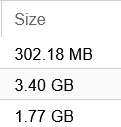
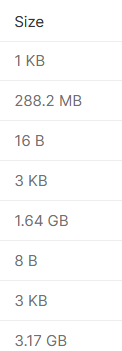
I used rclone and synced my backups to a cloud service. I noticed the files uploaded were smaller than my local backups?

Local
1748195880588.png

Cloud
1748195907954.png
 
not sure what Promox uses

I was able to find from here
Oh, and in general the following bases are used:

  • memory -> base two bytes, i.e., KiB (210), MiB (220) GiB (230), and so on.
  • storage -> base 10 bytes, i.e., KB (103), MB (106), GB (109), and so on.
  • network transfer/bandwidth -> base 10 bits/second Kb/s or Kbps (103 bits/second, with 8 bit = 1 byte that then equals to 1.25 KB/s, which is the same as 1.25 * 103 Bytes/second), ...

My cloud storage is Mega (I'm not sure what units they are using)

The difference is most likely both are using different units for storage

I will test my cloud backups when I get a chance and make sure they work
 
It depends on how you measure size - the actual reported file size should be the same, but the space the file covers may vary with compression (e.g. with ZFS) or even, when the original file was sparse, if the filesystem is actually the same on both source and target: Rsync detects holes and does not transfer them, thus the resulting target file may take up less space.

 
Last edited:
See if you can compare the size in bytes. Or find another way to compare both files. rsync most likely works fine and it's just the various GUIs that try to show large numbers in a compactly in different ways. None of this is really related to Proxmox and it's just a misunderstanding about units.
 
Last edited: