Ransomware protected offsite copy with PBS

sbarmen

Member
Dec 28, 2023
22
25
18
Norway
www.barmen.no
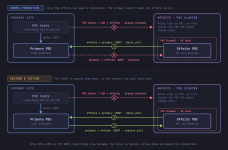
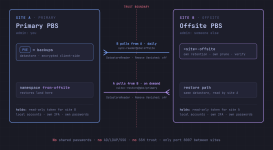
Hey community, we are (my company and my team) developing a ransomware safe offsite protection solution for my customers and I have made a this design to explain it:
1792581530581.png

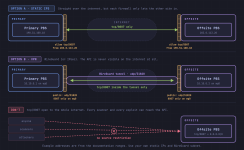
The basic principle is that we separate as much as possible. Right now I want to use TLS with firewall blocking to ensure 1-1 communication only on the API port (8007) and the encryption is there in two layers, both the encrypted backup data and the TLS "tunnel". Both sides have static IPs so that should work. If a customer does not want to expose the API port to us, then we need to add IPSec or Wireguard VPN as an option.

Here is a full blog post writeup of the concept: https://www.sbarmen.no/posts/ransomware-safe-offsite-backups-pbs/

I have this setup in my lab for now and it works perfectly. Next step is building it into our service delivery rig as a customer offering. In that offering I will also store the datastore on NFS with immutable snapshots as an option.

What do you gents think about this approach? Am I on the right track? Any suggestions?
 
Last edited:
All in all a sensible approach. I would also close port 8007 on the remote for your local infrastructure though. Because then even if a bad actor managed access to all local nodes including the PBS and has a working PBS exploit he can't do anything on the remote PBS.
For restore you could have some way to temporay open port 8007. I would also use a dedicated VPN (wireguard link or something like that) for the communication between the nodes.
 
  • Like
Reactions: UdoB and sbarmen
Thanks for the response @Johannes S this is valuable. I will rethink the restore part. There is no issues asking the customer to call us to open the port/access in case they need a restore. Only downside is in the odd situation where this is urgently needed in the middle of the night. I will rethink this and discuss with the team. We have a 24x7 so it could work ...

We have also discussed VPN. We could do that but is it strictly needed? The setup has 2 layers of encryption at the moment, adding VPN is even one more layer.

In case the customer does not have a static IP, or they cannot expose the API to us we will run a wireguard client on the customers PBS to open a tunnel for us to pull the data over. We could of course use this as the preferred method, and then use firewall on our side to control access to the API and block all other ports.... (Rambling on here.... )
 
Last edited:
  • Like
Reactions: Johannes S
Imho not being able to access the remote PBS is the only way to avoid getting hurt by privilege escalation for the read-only token.
In theory S3 storage might also work ( since many cloud storage providers allow limiting access to append-only ) but I'm not sure whether PBS support this.
 
Append only does not work unless you accept limitless growth on the S3 bucket. You have to tune prune and GC.

I think you are right though. Will rework the design with my team and build that into the process.

Will also update the article. Thanks again!
 
  • Like
Reactions: Johannes S
We have also discussed VPN. We could do that but is it strictly needed? The setup has 2 layers of encryption at the moment, adding VPN is even one more layer.
The point being is that the open ports can't be accessed from the outside world so you are not vulnerable due to a potential not-yet-patched issue in PBS. An alternative proposed by @meyergru is to limit the access to api-only access with a reverse proxy: https://forum.proxmox.com/threads/u...-pbs-exposition-to-api-endpoints-only.182188/
 
A bit late to this, but one thing for the customer offering side. The pull design stops a compromised primary from deleting the offsite copy, but the offsite still faithfully pulls whatever got backed up, including VMs the attacker had been sitting in for a couple of weeks. Verify jobs won't catch that, they check the chunks are intact, not what's inside the guest.

Two things I'd build in from day one. Keep a few protected snapshots on the offsite going back further than feels necessary, monthly ones are fine, set there so nothing on the customer side can unprotect them. And agree with the customer up front how you'll pick which snapshot to bring back after an incident, for example browsing files in two or three candidates or booting one on an isolated network before anything goes near production. When it's real, that decision is where most of the time goes.

Disclosure: I'm founder and CEO of CyberSnap.
 
My go-to retention policy is typically approximately: 2 yearly, 9 monthly, 3 weekly, 5 daily, 12 hourly.
 
  • Like
Reactions: Johannes S
To clarify, backups during production hours CAN be tricky in some cases. Probably the two biggest issues and their solutions:
- extra load caused by the backups: greatly limit the number of simultaneous backups and throttle the transfer throughput.
- guest stalls due to the snapshot filesystem freeze/thaw, especially databases: disable freeze/thaw for these backups and run other backups or dumps after hours at the application level to get the guaranteed consistent backups.
 
  • Like
Reactions: Johannes S
A few operational details still need attention.

Who owns the encryption keys? If the customer loses theirs, the offsite backups are useless. If you hold them, you're taking on the responsibility of protecting all their data.

The initial full backup could take weeks on a slow connection. Shipping a disk for seeding may seem old-school, but it gets the job done.

Protected restore points can't be pruned, so plan remote storage capacity upfront to avoid surprises later.

And don't forget the 3 a.m. recovery runbook. Make sure it's clear who handles the restore, how to access the recovery path, and how quickly it can be done before you start selling the service.
 
  • Like
Reactions: Johannes S
Actually, right now I run backups about every 20 minutes for powered-on VMs. Powered-off VMs get a reduced schedule of some handful of hours, due to our lovely friend the dirty-bitmap.
Interesting approach. A few thoughts from running something similar:


The dirty bitmap only lives in the running QEMU process. A full shutdown or a restart of the VM throws it away, so the next backup has to read the whole disk again. PBS deduplication means only changed chunks are uploaded, but the read I/O on the source storage still happens. For VMs that are powered off, nothing is changing anyway, so a slow schedule costs you nothing in RPO. You’re already doing that, which is right.


With a 20 minute schedule, the bigger concern is the running VMs. Every run puts copy before write overhead on guest I/O. If you’re on PVE 8.2 or later, it’s worth turning on backup fleecing to a fast local storage so busy databases don’t stall. You still have up to 20 minutes of data loss, and once you have a lot of VMs, the jobs can start overlapping.


If what you really want is a tight RPO rather than frequent restore points, it may be cleaner to split the two jobs. Use replication for RPO: ZFS storage replication can run as often as every minute inside a cluster, and pve‑zsync works for a node outside it. Then keep PBS on a more relaxed schedule for retention and ransomware protection. Backups give you history, replication gives you recency, and making one tool do both usually hurts.
 
  • Like
Reactions: Johannes S
The dirty bitmap is definitely a stick in the eye that hopefully will be improved soon. A lot of people would be happy even if it's opt-in with warnings and strict requirements, such as a mandatory full backup every X number of forced-to-be-clean bitmap backups.

I do throttle the backup jobs for the offline VMs to reduce the load, although I don't have issues without it either.

My PVE backups go to an all-flash PBS server, but I did enable fleecing once the feature appeared to be mature. Ultimately, I mostly run this tight schedule because I can. Only ~30 running VMs so the backups complete in about 25-45 seconds on three hosts simultaneously. Prune and garbage collection are somewhat aggressive and I only keep 2-3 weeks on that PBS server. A much larger HDD-based PBS server gets turned on every so often for a pull sync and that is where the longer retention is located.

I also do run ZFS replication on all the VMs on a schedule of a handful of minutes or less typically. Ceph and HA would be "better" in that regard, but those are a single point of failure and more fragile than the configuration I've settled on. Some hits to the soft underbelly proved that in my testing.
 
That’s a well thought out setup. All flash PBS for short retention with a pull sync to cheaper storage is a good split, and ZFS replication every few minutes covers most node failures.

The gap I usually see in this design is a site or cluster level event. ZFS replication stays inside the cluster, so if the whole cluster goes down (power, storage, or ransomware reaching the hosts), you’re back to restoring from PBS one VM at a time. Bringing 30 VMs back in the right order is where the hours go.

On the bitmap, QEMU can persist dirty bitmaps, but only on qcow2. Proxmox wants a fix that covers raw storage like ZFS, LVM and Ceph too, which is why it is still an open request (Bugzilla 3233). Until then a shutdown means a full read on the next backup. The cleaner long term answer is a write journal below the VM, which records every change as it happens, so a shutdown or restart loses nothing and there is no rescan.

Full disclosure, I work on this problem at KVMDR: near sync replication to an independent second cluster, with ordered failover, failback and test runs on an isolated network