

I have a Dell T430 server that I am using for my homelab, running PVE 9.2.3. Ever since installing an Intel ARC 310 graphics card for passthrough into my primary Docker host about two months ago, I have been getting intermittent crashes which don't result in any journald entries. I've tried the following:
However, after a "real" crash, no subfolders with crash data showed up under /var/crash. I attempted to trigger a crash using echo c > /proc/sysrq-trigger which did crash the machine, but again, no subfolders appeared. I tried crashing the machine a second time, and checked the system console. Here's what I found:
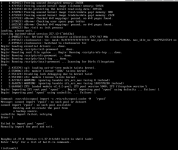
The console stops responsing to keyboard input at this point. It appears that the failure of the pool import may be contributing to the lack of crash data. Any suggestions on how to resolve this?
Thanks!
- Ran healthchecks on the hardware
- Dell's built-in utility detected a "PCIe - Training Error: Link Degraded maxWidth x8, negWidth x2, slot 4" which was my PERC 310 HBA card. I removed, cleaned the contacts of, and reinstalled the card, and that error has not yet returned.
- Verified that X2APIC Mode, SR-IOV Global Enable, I/OAT DMA Engine were all enabled in the BIOS
- Installed an HDMI display emulator on the ARC
- Attempted to enable kdump
Code:
root@t430-pve:~# kdump-config show
DUMP_MODE:              kdump
USE_KDUMP:              1
KDUMP_COREDIR:          /var/crash
crashkernel addr: 0x4a000000
0x1fff000000
   /var/lib/kdump/vmlinuz: symbolic link to /boot/vmlinuz-7.0.12-1-pve
kdump initrd:
   /var/lib/kdump/initrd.img: symbolic link to /var/lib/kdump/initrd.img-7.0.12-1-pve
current state:    ready to kdump

crashkernel suggested size: 905M

kexec command:
  /sbin/kexec -p -s --command-line="BOOT_IMAGE=/vmlinuz-7.0.12-1-pve root=ZFS=/ROOT/pve-1 ro root=ZFS=rpool/ROOT/pve-1 boot=zfs nomodeset noresume mitigations=auto intel_iommu=on iommu=pt fsck.mode=auto fsck.repair=yes init_on_alloc=1 init_on_free=1 hpet=disable clocksource=tsc tsc=reliable nmi_watchdog=1 reset_devices systemd.unit=kdump-tools-dump.service nr_cpus=1 irqpoll usbcore.nousb" --initrd=/var/lib/kdump/initrd.img /var/lib/kdump/vmlinuz
Code:
 kdump-tools.service - Kernel crash dump capture service
     Loaded: loaded (/usr/lib/systemd/system/kdump-tools.service; enabled; preset: enabled)
     Active: active (exited) since Mon 2026-06-29 14:43:34 EDT; 27min ago
 Invocation: b05b4f02b384451e99aa7005cb1d16b6
    Process: 2612 ExecStartPre=/usr/share/kdump-tools/kdump_mem_estimator (code=exited, status=0/SUCCESS)
    Process: 2619 ExecStart=/etc/init.d/kdump-tools start (code=exited, status=0/SUCCESS)
   Main PID: 2619 (code=exited, status=0/SUCCESS)
   Mem peak: 35M
        CPU: 1.050s

Jun 29 14:43:33 t430-pve systemd[1]: Starting kdump-tools.service - Kernel crash dump capture service...
Jun 29 14:43:33 t430-pve kdump-tools[2619]: Starting kdump-tools:
Jun 29 14:43:33 t430-pve kdump-tools[2623]: Creating symlink /var/lib/kdump/vmlinuz.
Jun 29 14:43:33 t430-pve kdump-tools[2623]: Creating symlink /var/lib/kdump/initrd.img.
Jun 29 14:43:34 t430-pve kdump-tools[2623]: loaded kdump kernel.
Jun 29 14:43:34 t430-pve systemd[1]: Finished kdump-tools.service - Kernel crash dump capture service.
However, after a "real" crash, no subfolders with crash data showed up under /var/crash. I attempted to trigger a crash using echo c > /proc/sysrq-trigger which did crash the machine, but again, no subfolders appeared. I tried crashing the machine a second time, and checked the system console. Here's what I found:
The console stops responsing to keyboard input at this point. It appears that the failure of the pool import may be contributing to the lack of crash data. Any suggestions on how to resolve this?
Thanks!

