

RAM Usage measure from GUI and from VM

fedex03

New Member
Jul 25, 2024
19
0
1
Hello everyone,

I can't understand why the Proxmox GUI is reporting me RAM consumption that is not the same as detected in the VM.

For example, I have an Ubuntu Linux VM with 6 GB of RAM.
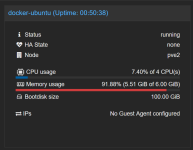
2024-11-11 13_04_17-pve2 - Proxmox Virtual Environment – Mozilla Firefox.png

Proxmox reports me a 91% utulization (5.46 GB/6 GB), while the free command reports:

2024-11-11 13_04_58-192.168.10.3.png

In fact, the Free command shows only 283 Mb free at the source of a utilization of 3.4 GB.
Where did the remaining GB of RAM go?

Thank you all for your help.
 
Hi,

first of, there are lots of threads about this topic :)

The tl;dr is that the host of course sees (and reports) the total memory usage, including buffers/caches used by the kernel - most prominently the disk/page cache is most cases. Unused RAM is wasted RAM - so the kernel happily uses free RAM for caching, which is included in the

So that's where most of the discrepancy will come from.
 
Hi,

first of, there are lots of threads about this topic :)

The tl;dr is that the host of course sees (and reports) the total memory usage, including buffers/caches used by the kernel - most prominently the disk/page cache is most cases. Unused RAM is wasted RAM - so the kernel happily uses free RAM for caching, which is included in the

So that's where most of the discrepancy will come from.
Hi @cheiss,

thank you for the reply.. I'm sorry I was lazy..

I'll increase the RAM!

Thanks!
 
Don't look at the "free" column, look at the "available" column.
There is more than 2,5Gb RAM available for applications and services.
I think you don't have to increase the RAM but it's never wrong.
 
  • Like
Reactions: UdoB