Raid 0 pool with 2 disks

moored99

Member
Jul 27, 2023
4
0
6
I am aware of the problems of creating raid 0 no redundency etc, but I need to create a raid 0 with 2 drives for testing.

Going through the Storage, Raid 0 is not an option.

Can sombody provide the corect syntax this is as far as I have got.

zpool create -f -o ashift=12 -o cachefile=-0 compression=lz4 VM-Drives /dev/nvme1n1 /dev/nvme2n1

I am getting: missing '=' for -o option
 
-o cachefile=-0 is most likely the issue. It should be -o cachefile=none if you actually want to disable it. So the full command would look like this:
Code:
zpool create -f -o ashift=12 -o cachefile=none -O compression=lz4 VM-Drives /dev/nvme1n1 /dev/nvme2n1

But keep in mind that if you disable the cachefile, the pool won't be imported automatically after a reboot, and you'll have to import it manually via zfs import VM-Drives. That probably isn't a good idea if you plan to run VMs on it. ;)

So If you don't want to disable it, just leave the option out, and ZFS will automatically use /etc/zfs/zpool.cache

Code:
zpool create -f -o ashift=12 -O compression=lz4 VM-Drives /dev/nvme1n1 /dev/nvme2n1

Alternatively, if for whatever reason you need to, you could specify a custom location: cachefile=/custom/path
 
Last edited:
  • Like
Reactions: UdoB
Thanks for the reply that created the ZFS storage.
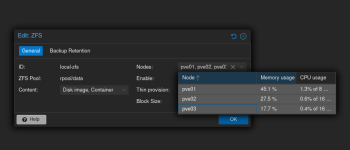
I am building a 2 server simple cluster, is there a command to make the drive show up in the shared Datacenter storage, I want the second server with the 2 drives to be avaialble as a simple replication for the first server.
I can blow away the VM-Drives setup if I need to issue another zpool command.
 
Last edited:
I've edited my post above since Proxmox doesn't seem to rely on the cache file to automatically import pools. I'd say you can generally just omit this option on Proxmox, i.e. you neither have to enable nor disable it explicitly.

Regarding your question about replication: I have never really used it myself. But it can be set up in the UI, and the only prerequisite I am aware of is that the Proxmox storage name and ZFS pool name must match on both nodes for replication to work. If that's the case you can then enable the storage for all hosts under 'Datacenter' > 'Storage'.
Bildschirmfoto vom 2026-03-31 17-02-19.png
 
Last edited: