

Question: After joining a pve node to a cluster, one disc has the same name

Bamsefar

Member
Nov 19, 2023
11
1
8
So I have, nowdays, two pve nodes, and they are available on the same cluster, and looks like this:
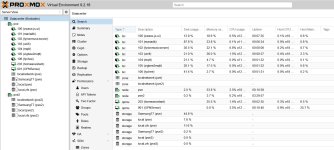
Proxmox_disc_question.jpg

pve2 has - as one can see - three discs. However the one called "SamsungT7" does not exist, it is a USB disc attached to the first pve node. Or am I missing something vital here?

Do note that only the name is the same - the disc space and so on is not the same. So it is different physical discs as I see this.
 
Last edited:
I think the problem is that the USB storage was configured only on pve2 before it was added to the cluster.

Since the cluster was created on pve1, the /etc/pve configuration from pve1 becomes the cluster configuration and is synced to the other nodes when they join.

So the storage configuration for the USB disk on pve2 should have been added to /etc/pve/storage.cfg on pve1 before joining pve2 to the cluster.

Code:
dir: usb-storage
    path /mnt/usb-storage
    content backup,iso
    nodes pve2

This way the storage is part of the cluster configuration, but is only available on pve2.

So basically, the storage should have been configured on pve1 first, not only on pve2.
 
Okay - I think I follow, but just to be sure, because it happened like this:

The SamsungT7 USB disc is attached to the first pve node since well when that node was created a year or two ago (it was a 8.2, nowdays upgraded to 9.2.x), which is where I created the cluster. I then added the pve2 node to that cluster, and I had a few problems like .pem file but that seems to have somehow fixed itself (which is never does, so I currently do not trust the cluster and need to figure out that also, but the messages in the log on pve says it is OK and certificates seems to be okay....).
 
ok, my bad :)

If the Samsung T7 was already connected to the pve1, and the cluster was created on pve1, then the storage configuration should already have been part of /etc/pve/storage.cfg on pve1.

When pve2 was joined, storage configuration was then synced to pve2. If the storage is physically connected only to pve1, it should also be restricted to pve1 using the nodes option.

So the important thing is to check what is currently in /etc/pve/storage.cfg and which node the Samsung T7 storage is assigned to.

The certificate/.pem issue is a separate problem. If the cluster is currently showing OK and the certificates look correct, I would still check pvecm status and the cluster/corosync logs journalctl -b -u pve-cluster -u Corosync
 
  • Like
Reactions: Bamsefar
Fixed the SamsungT7 - edit the Storage on Datacenter level to only accept SamsungT7 on pve node. Big thanks!

Now the rest....
 
  • Like
Reactions: xybo