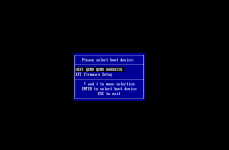
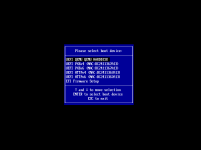
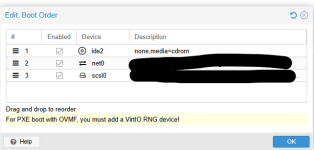
So it seems like we are seeing an issue where if we have a VM that uses UEFI BIOS type but also with any of the x86-64-v* CPU types we don't see any Pxe boot options.
If we switch the CPU type to say "host" the Pxe boot option appears. It also works with "Skylake-Server-v4" type.
I'm not sure if there is something I'm missing here?
I'm surprised that I'm seeing this behavior as I thought the boot order options was a function of the BIOS not the CPU type
I attached are some screenshots showing the difference in the boot menu between having CPU type = host vs any of the x86-64 types.
We would like to use the x86-64 type in order for us to migrate between our hosts and clusters of different CPU families easily.
Are other people seeing this?
PVE: 9.1.4 and 9.1.6 ( latest on no subscription repo )
build a VM
BIOS = OVMF (UEFI )
CPU type = choose any of the x86-64-v*
Boot up and enter boot menu. Do you see a selection of Pxe boot options?
Switch CPU type to something else ( host, Skylake-Server-v*, etc ). Do you know see the pxe boot options
If we switch the CPU type to say "host" the Pxe boot option appears. It also works with "Skylake-Server-v4" type.
I'm not sure if there is something I'm missing here?
I'm surprised that I'm seeing this behavior as I thought the boot order options was a function of the BIOS not the CPU type
I attached are some screenshots showing the difference in the boot menu between having CPU type = host vs any of the x86-64 types.
We would like to use the x86-64 type in order for us to migrate between our hosts and clusters of different CPU families easily.
Are other people seeing this?
PVE: 9.1.4 and 9.1.6 ( latest on no subscription repo )
build a VM
BIOS = OVMF (UEFI )
CPU type = choose any of the x86-64-v*
Boot up and enter boot menu. Do you see a selection of Pxe boot options?
Switch CPU type to something else ( host, Skylake-Server-v*, etc ). Do you know see the pxe boot options