Pxe boot issue with VM using UEFI BIOS + x86-64-v* CPU type

deebsr

New Member
Nov 17, 2025
27
12
3
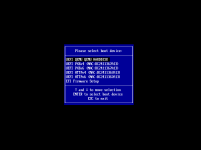
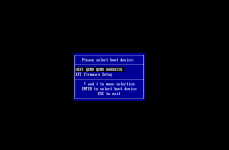
So it seems like we are seeing an issue where if we have a VM that uses UEFI BIOS type but also with any of the x86-64-v* CPU types we don't see any Pxe boot options.
If we switch the CPU type to say "host" the Pxe boot option appears. It also works with "Skylake-Server-v4" type.
I'm not sure if there is something I'm missing here?
I'm surprised that I'm seeing this behavior as I thought the boot order options was a function of the BIOS not the CPU type

I attached are some screenshots showing the difference in the boot menu between having CPU type = host vs any of the x86-64 types.
We would like to use the x86-64 type in order for us to migrate between our hosts and clusters of different CPU families easily.

Are other people seeing this?

PVE: 9.1.4 and 9.1.6 ( latest on no subscription repo )

build a VM
BIOS = OVMF (UEFI )
CPU type = choose any of the x86-64-v*

Boot up and enter boot menu. Do you see a selection of Pxe boot options?
Switch CPU type to something else ( host, Skylake-Server-v*, etc ). Do you know see the pxe boot options
 

Attachments

  • CPU_type_x86_64_v.png
    CPU_type_x86_64_v.png
    5.9 KB · Views: 5
  • CPU_type_host.png
    CPU_type_host.png
    8.9 KB · Views: 6
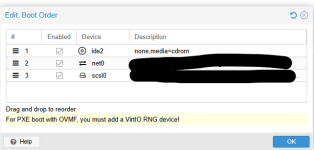
So digging into this a bit more it seems that the x86-64-v* CPu types are missing the RDRAND an RDSEED instructions. These are apparently needed for EFI to generate the entropy during the init. Adding the VirtIO RNG to the VM now allows us to boot using PXE while also using the x86-64-v4 CPU type to maintain migration capability.

So why is this being blocked on these CPU types? it would be much cleaner solution to allow us to use the rng being passed from the CPU rather than have to use the host OS and pass that though....
Looking at Vmware EVC modes it seems like they pass the RDRAND and RDSEED instructions with their masking?

To me this seems like a bug? Seems odd to have to request this as a "feature"
 
  • Like
Reactions: pulipulichen
Update: So I upgraded our cluster to the 9.2.3 version which brought in the Custom CPU model feature.

I created a custom CPU model that basically used the kvm64 as the base model and then added all the flags that I saw listed at https://pve.proxmox.com/pve-docs/chapter-qm.html#_qemu_cpu_types

Basically this made a x86-64-v4 CPU type. I then went in and added +rdrand & +rdseed

From the /etc/pve/virtual-guest/cpu-models.conf file....

Code:
cpu-model: Test-x86_v4_base
        flags +aes;+avx;+avx2;+avx512bw;+avx512cd;+avx512dq;+avx512f;+avx512vl;+bmi1;+bmi2;+cx16;+f16c;+fma;+lahf-lm;+movbe;+pcid;+pni;+popcnt;+rdrand;+rdseed;+sse4.1;+sse4.2;+ssse3;+xsave
        reported-model kvm64

After this I was now able to boot with PXE.

Now I guess the question is what else should be enabled here? anything else that should be here?

I'm wondering what are we loosing with using these QEMU cpu types over just going with a Baseline Intel CPU type ( say Skylake Server_v4 or v5 ).

I'd like to find a CPU type that I can use that would be used across all my CPUs like how I setup EVC in VMware ( ie "host" will not work as I have both Skylake and Cascade Lake CPU hosts ).
 
You can probably use "Skylake-Server-v4". Generally you want every feature turned on that is supported by every CPU in your cluster. I don't know specifically for cascade lake vs skylake, but usually just picking the one that still works with your oldest hardware works. I would try doing a few migrations back and forth to be sure, and when you have found a CPU setting that works for you, just use it for everything.
 
that's what I was thinking too. however I'm curious to know more about these QEMU specific CPU types? why are they generally recommended as the defaults? Speaking of defaults is there any way to change the default CPU type at a cluster level for a new VM being created?
 
I don't know the full back story, but from what I understand, people got tired of trying to remember if skylake is newer than than lake mead, or older than clear water forest, or whatever. Even if they used numbers history tells us that the marketing people wouldn't be able to resist messing with the number for non-technical reasons in a way that would ruin its usefulness. Add in AMD and their marketing jerks and we are doomed to never have it be easy.

So somebody (I am not sure who, but I think it was a colab with intel and AMD engineers and some compiler devs) decided to define some subsets to make this just a bit easier, and thus was born "x86-64-v3" and some other such labels. I believe these are made more by observation, like 'every CPU since some time has supported features x,y, and z, so I guess we can add those and call it the new v4'. These are not just qemu concepts, you can tell your gcc compiler to build code with hardware optimizations for "x86-64-v2" to get a binary that runs in a lot of places or "x86-64-v4" for a binary that won't run on my workstation, but will be faster on those where it does run. For a real-world example, CachyOS has a reputation of running some things faster, and part of how they got it is that they have a repo with packages built for "x86-64-v4" for those whose hardware can benefit from it.

So these qemu options are just qemu versions of those terms used more broadly in the industry. They are recommended as defaults because it's usually good enough to try 2 or 3 of them to find one that works. For 90% of people that gets you close enough to not care to put in the effort to dig more.

And I don't know of a way to change the default. I mostly deploy VMs through an ansible playbook so I just set the CPU I wanted there. But before that I just got in the habbit of selecting "haswell" or whatever it was I used at the time.
 
  • Like
Reactions: deebsr