

in https://pve.proxmox.com/wiki/Ceph_Pacific_to_Quincy
Which....how do I discover the fs_name?
from https://docs.ceph.com/en/latest/cephfs/administration/
when I do this as root on all my pve nodes:
FWIW:
root@pve1:~# cat /etc/pve/storage.cfg
root@pve1:~# cat /etc/pve/ceph.conf
I'm at a loss. What next?
thanks!
Followup:
looking at this later I did see this:
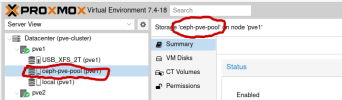
There is the same entry ceph-pve-pool on the other two nodes pve2 and pve3.
but when I tried "ceph-pve-pool":
Disable standby_replay ceph fs set <fs_name> allow_standby_replay falseWhich....how do I discover the fs_name?
from https://docs.ceph.com/en/latest/cephfs/administration/
ceph fs ls List all file systems by name.when I do this as root on all my pve nodes:
root@pve3:~# ceph fs lsNo filesysystems enabled.FWIW:
root@pve1:~# cat /etc/pve/storage.cfg
dir: local path /var/lib/vz content iso,vztmpl,backuprbd: ceph-pve-pool content rootdir,images krbd 0 pool ceph-pve-pooldir: USB_XFS_2T path /media/USB_XFS_2T content images prune-backups keep-all=1 shared 0root@pve1:~# cat /etc/pve/ceph.conf
[global] auth_client_required = cephx auth_cluster_required = cephx auth_service_required = cephx cluster_network = 10.55.10.0/28 fsid = 7cc47e3a-da1f-4d60-94df-449fef782cb6 mon_allow_pool_delete = true mon_host = 10.55.10.2 10.55.10.3 10.55.10.4 ms_bind_ipv4 = true ms_bind_ipv6 = false osd_pool_default_min_size = 2 osd_pool_default_size = 3 public_network = 10.55.10.0/28[client] keyring = /etc/pve/priv/$cluster.$name.keyring[mon.pve1] public_addr = 10.55.10.2[mon.pve2] public_addr = 10.55.10.3[mon.pve3] public_addr = 10.55.10.4I'm at a loss. What next?
thanks!
Followup:
looking at this later I did see this:
There is the same entry ceph-pve-pool on the other two nodes pve2 and pve3.
but when I tried "ceph-pve-pool":
root@pve1:~# ceph fs set ceph-pve-pool allow_standby_replay falseError ENOENT: Filesystem not found: 'ceph-pve-pool'
Last edited:
