pve2 node of cluster (3 nodes) not visible (?) in the web management

dbrega

New Member
Sep 6, 2025
15
0
1
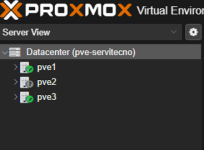
The pve2 of pve cluster (3 nodes) is not visible in the management web.
1771063797412.png
Pve2 node running a vm and also work.
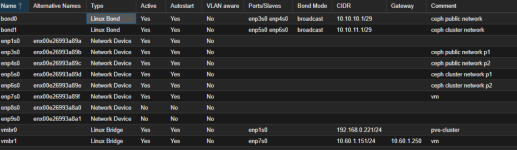
Below is a screenshot of the pve1 network card settings
1771065712793.png

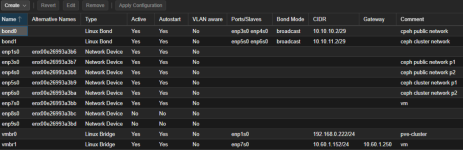
Below is a screenshot of the pve2 network card settings.
1771065919062.png

Below is a screenshot of the pve2 network card settings.
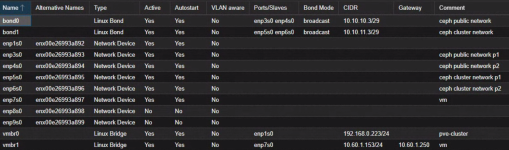
1771065947151.png

I make some check in all pve nodes throught ssh console.
All ip address are ok
I tested ping from all ip interfaces to other pve nodes:
- from pve1 to pve2 is it ok (all network tested)
- from pve1 to pve3 is it ok (all network tested)
- from pve2 to pve1 is it ok (all network tested)
- from pve2 to pve3 is it ok (all network tested)
- from pve3 to pve1 is it ok (all network tested)
- from pve3 to pve2 is it ok (all network tested)
How can I see the cause of this problem?
 
I am not an expert, but I would check these:
journalctl -xeu corosync.service && systemctl status corosync

And probably restart the service.
 
There is no way to debug without logs and detailed configuration (/etc/pve/corosync.conf etc etc ..) ;-)
 
  • Like
Reactions: odhiambo
This looks like an unstable and underperforming network. Also, we need more logs, longer timeframes for all nodes.
 
Last edited:
This looks like an unstable and underperforming network. Also, we need more logs, longer timeframes for all nodes.
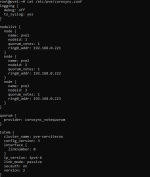
OK, if you tell me what to do and what to share, I'll do it immediately.I'll tell you that Ceph is also configured on the cluster with a full mesh configuration, and the Ceph part isn't having any problems.Thanks in advance for your help.
 
Can you show us the following
on pve1:
Code:
pvecm status
pvecm nodes

on pve2:
Code:
pvecm status
pvecm nodes
Code:
systemctl status corosync --no-pager
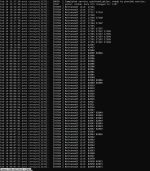
journalctl -u corosync -b -n 200 --no-pager


and as a safe first-aid you can try this on the problem node:
Code:
systemctl restart corosync
systemctl restart pve-cluster

and check with
Code:
pvecm status
 
Last edited:
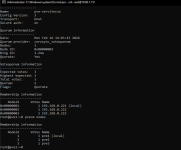
Can you show us the following
on pve1:
Code:
pvecm status
pvecm nodes
This is the answer
1771247191229.png
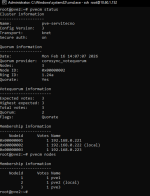
on pve2:
Code:
pvecm status
pvecm nodes
This is the answer
1771247277371.png
Code:
systemctl status corosync --no-pager
[/QUOTE]
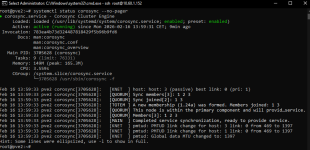
This is the answer
[ATTACH type="full" size="1158x562"]95867[/ATTACH]
[QUOTE="mohamed-ali, post: 838463, member: 308871"]

[CODE]
journalctl -u corosync -b -n 200 --no-pager
The answer is in the next messagge
 

Attachments

  • 1771247368877.png
    1771247368877.png
    456.3 KB · Views: 3
From what i can see from the logs all the nodes are in the Cluster & voting normally, but the corosync “link” to node 3 is/was broken (or flapping).

Have you tried to restart the services( corosync, pve-cluster ) ? or even restart the Node(pve2)?
 
Have you tried to restart the services( corosync, pve-cluster ) ? or even restart the Node(pve2)?
I also only try to restart the services (corsync and pve-cluster) in each nodes (pve1, pve2, pve3).
I didn't want to restart the pve2 node because I would like to understand if it is possible to avoid this action by trying to find the cause of the problem without necessarily restarting.