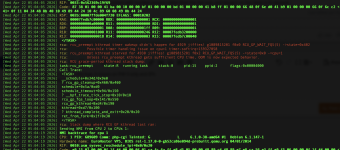
If I backup VM A, VM B (and all other VMs on the host) will repeatedly stall.
This is similar to a problem in other threads, but the kernel bug responsible is (supposedly) fixed. In other words, I'm seeing a regression.
I can trigger the problem by starting a large enough backup. After about 20-30GB transferred, (though not reliably) all the VMs will stall and freeze for usually approximately the same amount of time (around 24-25 seconds) repeatedly..
Meanwhile, the backup task that creates this issue:
It's obviously not ideal that all our stuff is only about 80% online at night if every 5 minutes there's a 25-second freeze.
I've tried various things to solve the problems, but nothing seems to change anything about this, I'm just wildly guessing of course. I've tried meddling with:
- The hard drive settings of the VM being backed up.
- The CPU settings of the VM that's stalling. I've tried switching it between 'host' and hard-coded the exact type, and switching off the 'pcid' flag. Neither had any effect.
On a host in question, uname -a returns
which should be recent enough to not run into the earlier posted issues at https://forum.proxmox.com/threads/rcu_sched-self-detected-stall-on-cpu-during-the-backup.149200/.
Here's a syslog from a third VM on the same host via the console during said backup:
This is similar to a problem in other threads, but the kernel bug responsible is (supposedly) fixed. In other words, I'm seeing a regression.
I can trigger the problem by starting a large enough backup. After about 20-30GB transferred, (though not reliably) all the VMs will stall and freeze for usually approximately the same amount of time (around 24-25 seconds) repeatedly..
Code:
2026-01-09T09:51:32.612759+00:00 hostname kernel: rcu: INFO: rcu_preempt detected stalls on CPUs/tasks:
2026-01-09T09:51:32.612857+00:00 hostname kernel: rcu:         6-...0: (1 GPs behind) idle=671c/1/0x4000000000000000 softirq=23114/23115 fqs=2465
2026-01-09T09:51:32.612863+00:00 hostname kernel: rcu:         (detected by 7, t=5252 jiffies, g=50317, q=1305 ncpus=8)
2026-01-09T09:51:32.612865+00:00 hostname kernel: Sending NMI from CPU 7 to CPUs 6:
2026-01-09T09:51:32.612897+00:00 hostname kernel: rcu: rcu_preempt kthread starved for 2475 jiffies! g50317 f0x0 RCU_GP_DOING_FQS(6) ->state=0x0 ->cpu=0
2026-01-09T09:51:32.612900+00:00 hostname kernel: rcu:         Unless rcu_preempt kthread gets sufficient CPU time, OOM is now expected behavior.
2026-01-09T09:51:32.612902+00:00 hostname kernel: rcu: RCU grace-period kthread stack dump:
2026-01-09T09:51:32.612904+00:00 hostname kernel: task:rcu_preempt     state:R  running task     stack:0     pid:18    tgid:18    ppid:2      flags:0x00004000
2026-01-09T09:51:32.612906+00:00 hostname kernel: Call Trace:
2026-01-09T09:51:32.612907+00:00 hostname kernel:  <TASK>
2026-01-09T09:51:32.612908+00:00 hostname kernel:  ? asm_sysvec_apic_timer_interrupt+0x1a/0x20
2026-01-09T09:51:32.612910+00:00 hostname kernel:  ? sched_clock_cpu+0xf/0x1d0
2026-01-09T09:51:32.612916+00:00 hostname kernel:  ? psi_task_switch+0x9d/0x290
2026-01-09T09:51:32.612918+00:00 hostname kernel:  ? __schedule+0x505/0xc00
2026-01-09T09:51:32.612919+00:00 hostname kernel:  ? __pfx_rcu_gp_kthread+0x10/0x10
2026-01-09T09:51:32.612920+00:00 hostname kernel:  ? __cond_resched+0x48/0x70
2026-01-09T09:51:32.612921+00:00 hostname kernel:  ? rcu_gp_fqs_loop+0x341/0x530
2026-01-09T09:51:32.612922+00:00 hostname kernel:  ? rcu_gp_kthread+0xdc/0x1a0
2026-01-09T09:51:32.612924+00:00 hostname kernel:  ? kthread+0xd2/0x100
2026-01-09T09:51:32.612925+00:00 hostname kernel:  ? __pfx_kthread+0x10/0x10
2026-01-09T09:51:32.612926+00:00 hostname kernel:  ? ret_from_fork+0x34/0x50
2026-01-09T09:51:32.612928+00:00 hostname kernel:  ? __pfx_kthread+0x10/0x10
2026-01-09T09:51:32.612929+00:00 hostname kernel:  ? ret_from_fork_asm+0x1a/0x30
2026-01-09T09:51:32.612930+00:00 hostname kernel:  </TASK>
2026-01-09T09:51:32.612931+00:00 hostname kernel: rcu: Stack dump where RCU GP kthread last ran:
2026-01-09T09:51:32.612932+00:00 hostname kernel: Sending NMI from CPU 7 to CPUs 0:
2026-01-09T09:51:32.612938+00:00 hostname kernel: NMI backtrace for cpu 0
2026-01-09T09:51:32.612939+00:00 hostname kernel: CPU: 0 UID: 0 PID: 979 Comm: php-fpm8.1 Not tainted 6.12.48+deb13-amd64 #1  Debian 6.12.48-1
2026-01-09T09:51:32.612941+00:00 hostname kernel: Hardware name: QEMU Standard PC (i440FX + PIIX, 1996), BIOS rel-1.17.0-0-gb52ca86e094d-prebuilt.qemu.org 04/01/2014
2026-01-09T09:51:32.612943+00:00 hostname kernel: RIP: 0010:native_write_msr+0xa/0x30
2026-01-09T09:51:32.612945+00:00 hostname kernel: Code: c5 00 66 66 2e 0f 1f 84 00 00 00 00 00 0f 1f 00 90 90 90 90 90 90 90 90 90 90 90 90 90 90 90 90 f3 0f 1e fa 89 f0 89 f9 0f 30 <66> 90 c3 cc cc cc cc 48 c1 e2 20 48 89 d6 31 d2 48 09 c6 e9 2e 2a
2026-01-09T09:51:32.612951+00:00 hostname kernel: RSP: 0018:ffffa3a200927820 EFLAGS: 00000002
2026-01-09T09:51:32.612953+00:00 hostname kernel: RAX: 00000000000000fb RBX: ffff9168002a1980 RCX: 0000000000000830
2026-01-09T09:51:32.612955+00:00 hostname kernel: RDX: 0000000000000004 RSI: 00000000000000fb RDI: 0000000000000830
2026-01-09T09:51:32.612956+00:00 hostname kernel: RBP: 0000000000000004 R08: 0000000000000001 R09: 0000000000000000
2026-01-09T09:51:32.612957+00:00 hostname kernel: R10: 0000000000000018 R11: 0000000000000002 R12: ffff916937c00001
2026-01-09T09:51:32.612958+00:00 hostname kernel: R13: 0000000000036080 R14: 0000000000000004 R15: 0000000000000083
2026-01-09T09:51:32.612959+00:00 hostname kernel: FS:  00007f35f1e38fc0(0000) GS:ffff916937a00000(0000) knlGS:0000000000000000
2026-01-09T09:51:32.612964+00:00 hostname kernel: CS:  0010 DS: 0000 ES: 0000 CR0: 0000000080050033
2026-01-09T09:51:32.612966+00:00 hostname kernel: CR2: 00007fcc3c001e28 CR3: 0000000102a78000 CR4: 0000000000152ef0
2026-01-09T09:51:32.612967+00:00 hostname kernel: Call Trace:
2026-01-09T09:51:32.612968+00:00 hostname kernel:  <TASK>
2026-01-09T09:51:32.612969+00:00 hostname kernel:  x2apic_send_IPI+0x49/0x50
2026-01-09T09:51:32.612970+00:00 hostname kernel:  ttwu_queue_wakelist+0xdd/0x100
2026-01-09T09:51:32.612972+00:00 hostname kernel:  try_to_wake_up+0x1f5/0x680
2026-01-09T09:51:32.612973+00:00 hostname kernel:  ? filename_lookup+0xde/0x1d0
2026-01-09T09:51:32.612975+00:00 hostname kernel:  ep_autoremove_wake_function+0x19/0x50
2026-01-09T09:51:32.612976+00:00 hostname kernel:  __wake_up_common+0x78/0xa0
2026-01-09T09:51:32.612978+00:00 hostname kernel:  __wake_up_sync+0x36/0x50
2026-01-09T09:51:32.612980+00:00 hostname kernel:  ep_poll_callback+0x1da/0x2d0
2026-01-09T09:51:32.612981+00:00 hostname kernel:  __wake_up_common+0x78/0xa0
2026-01-09T09:51:32.612982+00:00 hostname kernel:  __wake_up_sync_key+0x3b/0x60
2026-01-09T09:51:32.612983+00:00 hostname kernel:  sock_def_readable+0x42/0xc0
2026-01-09T09:51:32.612988+00:00 hostname kernel:  unix_dgram_sendmsg+0x596/0x9b0
2026-01-09T09:51:32.612990+00:00 hostname kernel:  ____sys_sendmsg+0x3a0/0x3d0
2026-01-09T09:51:32.612991+00:00 hostname kernel:  ___sys_sendmsg+0x9a/0xe0
2026-01-09T09:51:32.612992+00:00 hostname kernel:  __sys_sendmsg+0x7a/0xd0
2026-01-09T09:51:32.612993+00:00 hostname kernel:  do_syscall_64+0x82/0x190
2026-01-09T09:51:32.612994+00:00 hostname kernel:  ? do_syscall_64+0x8e/0x190
2026-01-09T09:51:32.613000+00:00 hostname kernel:  ? __rseq_handle_notify_resume+0xa2/0x4a0
2026-01-09T09:51:32.613001+00:00 hostname kernel:  ? aa_sk_perm+0x46/0x210
2026-01-09T09:51:32.613002+00:00 hostname kernel:  ? do_sock_getsockopt+0x1ce/0x210
2026-01-09T09:51:32.613003+00:00 hostname kernel:  ? arch_exit_to_user_mode_prepare.isra.0+0x16/0xa0
2026-01-09T09:51:32.613004+00:00 hostname kernel:  ? arch_exit_to_user_mode_prepare.isra.0+0x16/0xa0
2026-01-09T09:51:32.613005+00:00 hostname kernel:  ? syscall_exit_to_user_mode+0x37/0x1b0
2026-01-09T09:51:32.613006+00:00 hostname kernel:  ? do_syscall_64+0x8e/0x190
2026-01-09T09:51:32.613012+00:00 hostname kernel:  ? arch_exit_to_user_mode_prepare.isra.0+0x16/0xa0
2026-01-09T09:51:32.613014+00:00 hostname kernel:  ? syscall_exit_to_user_mode+0x37/0x1b0
2026-01-09T09:51:32.613214+00:00 hostname kernel:  ? do_syscall_64+0x8e/0x190
2026-01-09T09:51:32.613219+00:00 hostname kernel:  ? arch_exit_to_user_mode_prepare.isra.0+0x77/0xa0
2026-01-09T09:51:32.613220+00:00 hostname kernel:  entry_SYSCALL_64_after_hwframe+0x76/0x7e
2026-01-09T09:51:32.613222+00:00 hostname kernel: RIP: 0033:0x7f35f1699687
2026-01-09T09:51:32.613229+00:00 hostname kernel: Code: 48 89 fa 4c 89 df e8 58 b3 00 00 8b 93 08 03 00 00 59 5e 48 83 f8 fc 74 1a 5b c3 0f 1f 84 00 00 00 00 00 48 8b 44 24 10 0f 05 <5b> c3 0f 1f 80 00 00 00 00 83 e2 39 83 fa 08 75 de e8 23 ff ff ff
2026-01-09T09:51:32.613232+00:00 hostname kernel: RSP: 002b:00007ffc90944a40 EFLAGS: 00000202 ORIG_RAX: 000000000000002e
2026-01-09T09:51:32.613233+00:00 hostname kernel: RAX: ffffffffffffffda RBX: 00007f35f1e38fc0 RCX: 00007f35f1699687
2026-01-09T09:51:32.613234+00:00 hostname kernel: RDX: 0000000000004000 RSI: 00007ffc90944ae0 RDI: 000000000000000a
2026-01-09T09:51:32.613235+00:00 hostname kernel: RBP: 00007ffc90944c70 R08: 0000000000000000 R09: 0000000000000000
2026-01-09T09:51:32.613236+00:00 hostname kernel: R10: 0000000000000000 R11: 0000000000000202 R12: 00007ffc90944ae0
2026-01-09T09:51:32.613242+00:00 hostname kernel: R13: 00007ffc90944ba0 R14: 000000000000000a R15: 0000000000000000
2026-01-09T09:51:32.613244+00:00 hostname kernel:  </TASK>
Meanwhile, the backup task that creates this issue:
Code:
{{guestname}}
INFO: starting new backup job: vzdump 126 --mode snapshot --notification-mode notification-system --node pve1 --notes-template '{{guestname}}' --storage vm_backups --compress zstd --remove 0
INFO: Starting Backup of VM 126 (qemu)
INFO: Backup started at 2026-01-09 10:45:48
INFO: status = running
INFO: VM Name: <vmname>
INFO: include disk 'scsi0' 'spool:vm-126-disk-0' 40G
INFO: include disk 'scsi1' 'spool:vm-126-disk-1' 1T
INFO: backup mode: snapshot
INFO: ionice priority: 7
INFO: skip unused drive 'vm_mover:126/vm-126-disk-0.vmdk' (not included into backup)
INFO: skip unused drive 'vm_mover:126/vm-126-disk-1.vmdk' (not included into backup)
INFO: pending configuration changes found (not included into backup)
INFO: creating vzdump archive '/mnt/pve/vm_backups/dump/vzdump-qemu-126-2026_01_09-10_45_48.vma.zst'
INFO: started backup task '7cf6c7f6-59f2-449c-9cd9-412ee76c2da2'
INFO: resuming VM again
INFO:   0% (1.0 GiB of 1.0 TiB) in 3s, read: 341.9 MiB/s, write: 325.3 MiB/s
INFO:   1% (10.8 GiB of 1.0 TiB) in 42s, read: 256.3 MiB/s, write: 251.2 MiB/s
INFO:   2% (21.4 GiB of 1.0 TiB) in 1m 54s, read: 150.8 MiB/s, write: 144.7 MiB/s
INFO:   3% (32.1 GiB of 1.0 TiB) in 4m 12s, read: 79.5 MiB/s, write: 78.0 MiB/s
INFO:   4% (42.8 GiB of 1.0 TiB) in 6m 39s, read: 74.9 MiB/s, write: 73.6 MiB/s
INFO:   5% (53.3 GiB of 1.0 TiB) in 7m 14s, read: 306.0 MiB/s, write: 300.3 MiB/s
It's obviously not ideal that all our stuff is only about 80% online at night if every 5 minutes there's a 25-second freeze.
I've tried various things to solve the problems, but nothing seems to change anything about this, I'm just wildly guessing of course. I've tried meddling with:
- The hard drive settings of the VM being backed up.
- The CPU settings of the VM that's stalling. I've tried switching it between 'host' and hard-coded the exact type, and switching off the 'pcid' flag. Neither had any effect.
On a host in question, uname -a returns
Code:
Linux pve1 6.14.8-2-pve #1 SMP PREEMPT_DYNAMIC PMX 6.14.8-2 (2025-07-22T10:04Z) x86_64 GNU/Linuxwhich should be recent enough to not run into the earlier posted issues at https://forum.proxmox.com/threads/rcu_sched-self-detected-stall-on-cpu-during-the-backup.149200/.
Here's a syslog from a third VM on the same host via the console during said backup:
Code:
Message from syslogd@hostnameC at Jan  9 10:49:26 ...
 kernel:[1449174.012517] watchdog: BUG: soft lockup - CPU#5 stuck for 36s! [apache2:3231215]

Message from syslogd@hostnameC at Jan  9 10:49:27 ...
 kernel:[1449174.426248] Uhhuh. NMI received for unknown reason 00 on CPU 3.

Message from syslogd@hostnameC at Jan  9 10:49:27 ...
 kernel:[1449174.426257] Dazed and confused, but trying to continue

Message from syslogd@hostnameC at Jan  9 10:51:39 ...
 kernel:[1449307.167684] Uhhuh. NMI received for unknown reason 10 on CPU 3.

Message from syslogd@hostnameC at Jan  9 10:51:39 ...
 kernel:[1449307.167694] Dazed and confused, but trying to continue

Message from syslogd@hostnameC at Jan  9 10:51:39 ...
 kernel:[1449307.167721] Uhhuh. NMI received for unknown reason 00 on CPU 3.

Message from syslogd@hostnameC at Jan  9 10:51:39 ...
 kernel:[1449307.167724] Dazed and confused, but trying to continue

Message from syslogd@hostnameC at Jan  9 10:51:48 ...
 kernel:[1449315.715501] watchdog: BUG: soft lockup - CPU#0 stuck for 38s! [apache2:3230816]

Message from syslogd@hostnameC at Jan  9 10:52:27 ...
 kernel:[1449354.345701] Uhhuh. NMI received for unknown reason 00 on CPU 1.

Message from syslogd@hostnameC at Jan  9 10:52:27 ...
 kernel:[1449354.345708] Dazed and confused, but trying to continue

Message from syslogd@hostnameC at Jan  9 10:52:27 ...
 kernel:[1449354.347910] watchdog: BUG: soft lockup - CPU#1 stuck for 55s! [apache2:3231815]

Message from syslogd@hostnameC at Jan  9 10:52:45 ...
 kernel:[1449373.118286] Uhhuh. NMI received for unknown reason 00 on CPU 6.

Message from syslogd@hostnameC at Jan  9 10:52:45 ...
 kernel:[1449373.118296] Dazed and confused, but trying to continue

Message from syslogd@hostnameC at Jan  9 10:52:45 ...
 kernel:[1449373.120504] watchdog: BUG: soft lockup - CPU#6 stuck for 98s! [fping:3232488]

Message from syslogd@hostnameC at Jan  9 10:52:48 ...
 kernel:[1449376.127611] watchdog: BUG: soft lockup - CPU#7 stuck for 23s! [systemd-coredum:3232609]

Message from syslogd@hostnameC at Jan  9 10:52:48 ...
 kernel:[1449376.147550] watchdog: BUG: soft lockup - CPU#2 stuck for 30s! [fping:3232594]

Message from syslogd@hostnameC at Jan  9 10:53:41 ...
 kernel:[1449428.476318] Uhhuh. NMI received for unknown reason 00 on CPU 4.

Message from syslogd@hostnameC at Jan  9 10:53:41 ...
 kernel:[1449428.476325] Dazed and confused, but trying to continue

Message from syslogd@hostnameC at Jan  9 10:54:02 ...
 kernel:[1449449.654508] Uhhuh. NMI received for unknown reason 30 on CPU 6.

Message from syslogd@hostnameC at Jan  9 10:54:02 ...
 kernel:[1449449.654516] Dazed and confused, but trying to continue
Last edited: