PVE 9.1 Installation on Dell R515

SpongeRob

Member
Nov 29, 2021
27
5
23
Co. Donegal, Eire
Original thread title was "Reflashing Dell PERC Help" however that's kinda been resolved for now but this is all related.
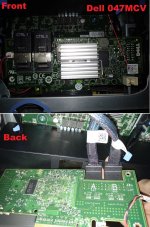
dellperc.jpg

Trying to flash my IR controller to IT mode.

Made the mistake of not writing down my SAS address, like a noob so it's going to be all zeros going forward!

Card is listed as 2008(B2), command was run sas2flsh -c 0 -o -f 2118it.bin -b mptsas2.rom

Adapter Selected is a LSI SAS: SAS2008(??)

Executing Operation: Flash Firmware Image

Firmware Image has a Valid Checksum.

Firmware Image compatible with Controller.

Valid NVDATA Image found.

Valid Initialization Image verified.
Valid BootLoader Image verified.

Chip is in FAULT state. Attempting Host Boot...
Firmware Host Boot Successful !
Writing Current MfgPage2 Settings to NVRam
Failed to validate MfgPage2 !
Due to error remaining commands will not be executed.
Unable to Process Commands.
Exiting SAS2Flash.

Tried to reflash 2118it.bin - FAILED ON VALIDATING MfgPage2
Tried to reflash 2118p7.bin - FAILED ON VALIDATING MfgPage2

Any help extremely gratefully rec'd, thank-you in advance :-)

EDIT : Been using these two as references, https://return-to-libc.com/posts/dell-h200-it-mode/ & https://ikus-soft.com/en_CA/blog/techies-10/how-to-flash-an-lsi-sas2008-controller-for-zfs-62
 
Last edited:
I use this, https://fohdeesha.com/docs/perc.html, to flash 12th-gen Dell PERCs to IT-mode with no issues in production.

Don't skip any steps and take your time. Don't forget to flash the BIOS/UEFI ROMs to allow booting off Proxmox.
Thanks for the reply dude.

12th gen PERCS, so 2012 era? Kinda fits the servers year of manufacture, however I've just ordered a new card (and I'm hoping it's preflashed)

Hopefully all will be good going forward, but I'll update the thread next month once it's arrived. Thanks again
:cool:
 
Thanks for the reply dude.

12th gen PERCS, so 2012 era? Kinda fits the servers year of manufacture, however I've just ordered a new card (and I'm hoping it's preflashed)

Hopefully all will be good going forward, but I'll update the thread next month once it's arrived. Thanks again
:cool:

Sounds good.

I've moved on to 13th-gen Dells and swapped out the Dell PERCs for Dell HBA330s which is a true HBA/IT-mode controller.
 
  • Like
Reactions: SpongeRob
OK guys, lets revive this thread!!

So I've finally had my replacement controller arrive from China. Installed it and ofc it's 5mm too big to fit into the same slot as before (the internal middle one), so I then had to order longer mini-SAS leads.. and finally its powered up again.

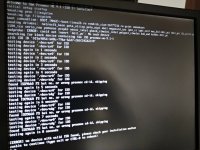
I've had absolutely zero luck attempting to install PVE 9.1 :rolleyes:

At first I was thinking it's because I'm using a newer PC (i.e. with Secureboot) so I'm not getting the BIOS option in Rufus 'Target System', only UEFI (not CSM) so I whipped out an older PC, grabbed a spare HDD and reinstalled W7 x86. Then in doing so, I realised the 'Target System' is set (and unchangable) depending on the MBR/GPT and the format of the USB. So finally I got PVE 9.1 onto a 4GB USB.

However, I'm obviously still working in the dark as I just cannot get it installed. I'm writing this post to hopefully save me some time. My next experiment is to use my W7 x86 PC to attempt to connect to iDrac(6) and get the .ISO on that way.

Suggestions PLEASE!!!
 

Attachments

  • IMG_20260222_152305.jpg
    IMG_20260222_152305.jpg
    1.2 MB · Views: 5
Last edited:
OK, so for an update.. I've managed to get the 'Virtual CD' working using PVE9.1 and iDRAC6, however this same error is still present.

I'll attach a better screenshot once I get it of my phone, also I will try PVE 8.4 and let you guys know
:cool:
 
OK, OK.. talking to myself again it seems, well should anybody be future searching maybe they'll find this post helpful (hopefully)

Here's a quick run down of my testing..

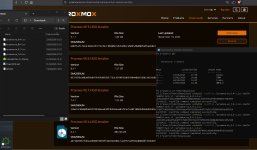
FIRST and I know this is a slight pain, but check your downloaded ProxMox.ISO's checksum (hash) to ensure your download isnt corrupted. (as my PVE 8.4 was)

If using Windows (like me) open PowerShell and type:

certutil -hashfile .\proxmox-ve_X.X-1.iso sha256 (replacing the X's for your version) and compare it to the hash on ProxMox's download page.

ProxMox Hashes.jpg

Once you've done that, at least you know that you have a good download to work from.

UEFI booting on a Dell R515 I would say, isn't the most reliable from what little research I've done on these forums.

Here's my image directory - https://postimg.cc/gallery/0mh3nvj

1 - UEFI Booting on Dell R515
2 - UEFI - PVE 9.1 using param "nomodetest"
3W - UEFI - PVE 8.4 nomodetest
4 - UEFI - PVE 7.4 nomodetest
5W - UEFI - PVE 6.4 nomodetest or leaving params as default
6 - BIOS Booting on Dell R515
7 - BIOS - PVE 9.1 nomodetest
8W - BIOS - PVE 8.4 nomodetest
8W - BIOS - PVE 8.4 nomodetest raid=noautodetect
8W - UEFI - PVE 8.4 Minor note (obvs Grub and EFI don't play well but it will continue to install)
9 - BIOS - PVE 7.4 nomodetest
10W - BIOS - PVE 6.4 nomodetest or leaving params as default
11 - UEFI - PVE 9.4 using default params will hang system (as will they all, except PVE 6.4)

So thankfully I now have PVE 8.4 installed and I have been pulling my hair out for the last two days working on this.

If anybody knows how or why I cannot install PVE 9.1 I'd really appreciate the knowledge please. Thanks in advance.
 
Last edited: