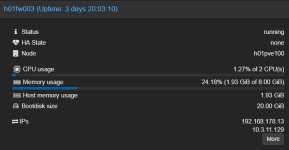
Hello together,
currnetly I'm running PVE version 9.1.5 on two HPE DL360 G10 as a two node cluster without HA.
On host #1 I installed two VMs (IPfire 2.29 U199, Linux Kernel 6.12.58-ipfire #1 SMP PREEMPT_DYNAMIC) for testing an development and also one LXC and two other Linux (openSuSE 15.6) machines.
Host #2 is used for some further VMs (Win/Linux).
Now the problem I'm facing:
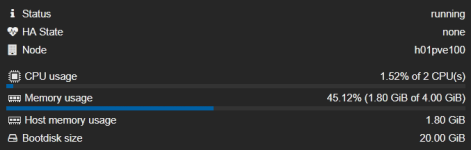
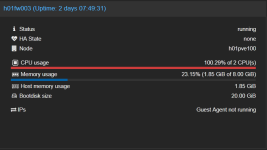
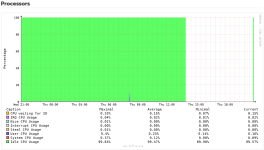
The two IPfire VMs (103, 104) are freezing randomly (between 10 Minutes and 5 Days) without any visible reason. The VM which fails uses >100% CPU and isn't responding to ping or any other type of access. The only possible solution to get it back on live is to hard reset the VM. All other VMs on the host are running as expected (console/network/web interface....).
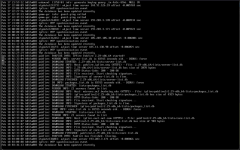
During the freeze I checked all available logs on the PVE host as also on the VM. Unfortunately there isn't any hint about the reason of the failure. No scheduled tasks, no migration/backup or other administrative tasks running.
The same promlem with IPfire VM (103) has happend formerly on a single PVE host running on version 8.4.1.
The second VM (104) was installed from scratch with most of the recomended default settings for Linux VMs. This machine is also freezing randomly.
I tried to use different settings for the VM hardware like core/sockets/type for the CPU, used different virtual SCSI controllers, disabled ACPI support, moved the VM to second host, and many many more... I also stressed all available search functions in the www and tested lots of hints mentioned there.
Nothing has solved the issue until today.
I would appreciate any hint what else I can check / change / do to solve this annoying issue.
Many thanks in advance and happy virtualizing,
Jörg
currnetly I'm running PVE version 9.1.5 on two HPE DL360 G10 as a two node cluster without HA.
On host #1 I installed two VMs (IPfire 2.29 U199, Linux Kernel 6.12.58-ipfire #1 SMP PREEMPT_DYNAMIC) for testing an development and also one LXC and two other Linux (openSuSE 15.6) machines.
Host #2 is used for some further VMs (Win/Linux).
Now the problem I'm facing:
The two IPfire VMs (103, 104) are freezing randomly (between 10 Minutes and 5 Days) without any visible reason. The VM which fails uses >100% CPU and isn't responding to ping or any other type of access. The only possible solution to get it back on live is to hard reset the VM. All other VMs on the host are running as expected (console/network/web interface....).
During the freeze I checked all available logs on the PVE host as also on the VM. Unfortunately there isn't any hint about the reason of the failure. No scheduled tasks, no migration/backup or other administrative tasks running.
The same promlem with IPfire VM (103) has happend formerly on a single PVE host running on version 8.4.1.
The second VM (104) was installed from scratch with most of the recomended default settings for Linux VMs. This machine is also freezing randomly.
I tried to use different settings for the VM hardware like core/sockets/type for the CPU, used different virtual SCSI controllers, disabled ACPI support, moved the VM to second host, and many many more... I also stressed all available search functions in the www and tested lots of hints mentioned there.
Nothing has solved the issue until today.
I would appreciate any hint what else I can check / change / do to solve this annoying issue.
Many thanks in advance and happy virtualizing,
Jörg
Code:
Package Versions:

Header
Proxmox
Virtual Environment 9.1.5
Node 'h01pve100'
CPU usage

0.22% of 20 CPU(s)

IO delay

0.00%
Load average

0.13,0.12,0.09
RAM usage

24.97% (23.47 GiB of 93.98 GiB)

KSM sharing

0 B
/ HD space

0.14% (2.96 GiB of 2.09 TiB)

SWAP usage

N/A
CPU(s)

20 x Intel(R) Xeon(R) Gold 5115 CPU @ 2.40GHz (1 Socket)
Kernel Version

Linux 6.17.9-1-pve (2026-01-12T16:25Z)
Boot Mode

Legacy BIOS
Manager Version

pve-manager/9.1.5/80cf92a64bef6889
Repository Status

Proxmox VE updates Non production-ready repository enabled!
()
proxmox-ve: 9.1.0 (running kernel: 6.17.9-1-pve)
pve-manager: 9.1.5 (running version: 9.1.5/80cf92a64bef6889)
proxmox-kernel-helper: 9.0.4
proxmox-kernel-6.17.9-1-pve-signed: 6.17.9-1
proxmox-kernel-6.17: 6.17.9-1
proxmox-kernel-6.17.2-1-pve-signed: 6.17.2-1
ceph-fuse: 19.2.3-pve4
corosync: 3.1.9-pve2
criu: 4.1.1-1
frr-pythontools: 10.4.1-1+pve1
ifupdown2: 3.3.0-1+pmx12
intel-microcode: 3.20251111.1~deb13u1
ksm-control-daemon: 1.5-1
libjs-extjs: 7.0.0-5
libproxmox-acme-perl: 1.7.0
libproxmox-backup-qemu0: 2.0.2
libproxmox-rs-perl: 0.4.1
libpve-access-control: 9.0.5
libpve-apiclient-perl: 3.4.2
libpve-cluster-api-perl: 9.0.7
libpve-cluster-perl: 9.0.7
libpve-common-perl: 9.1.7
libpve-guest-common-perl: 6.0.2
libpve-http-server-perl: 6.0.5
libpve-network-perl: 1.2.5
libpve-rs-perl: 0.11.4
libpve-storage-perl: 9.1.0
libspice-server1: 0.15.2-1+b1
lvm2: 2.03.31-2+pmx1
lxc-pve: 6.0.5-4
lxcfs: 6.0.4-pve1
novnc-pve: 1.6.0-3
proxmox-backup-client: 4.1.2-1
proxmox-backup-file-restore: 4.1.2-1
proxmox-backup-restore-image: 1.0.0
proxmox-firewall: 1.2.1
proxmox-kernel-helper: 9.0.4
proxmox-mail-forward: 1.0.2
proxmox-mini-journalreader: 1.6
proxmox-offline-mirror-helper: 0.7.3
proxmox-widget-toolkit: 5.1.5
pve-cluster: 9.0.7
pve-container: 6.1.1
pve-docs: 9.1.2
pve-edk2-firmware: 4.2025.05-2
pve-esxi-import-tools: 1.0.1
pve-firewall: 6.0.4
pve-firmware: 3.17-2
pve-ha-manager: 5.1.0
pve-i18n: 3.6.6
pve-qemu-kvm: 10.1.2-6
pve-xtermjs: 5.5.0-3
qemu-server: 9.1.4
smartmontools: 7.4-pve1
spiceterm: 3.4.1
swtpm: 0.8.0+pve3
vncterm: 1.9.1
zfsutils-linux: 2.4.0-pve1
Code:
VM 103:

#[WAN] [LAN] [WLANs] IPFire - Test Firewall Guest Access
agent: 1
allow-ksm: 0
balloon: 0
boot: order=scsi0;ide2
cores: 2
cpu: x86-64-v2-AES
hotplug: 0
ide2: none,media=cdrom
memory: 4096
meta: creation-qemu=9.2.0,ctime=1768461064
name: h01fw003
net0: virtio=BC:24:11:05:1D:AC,bridge=vmbr2
net1: virtio=BC:24:11:35:E4:49,bridge=vmbondbr1,tag=312
net2: virtio=BC:24:11:81:84:E7,bridge=vmbondbr0,tag=10
numa: 0
ostype: l26
scsi0: vmdata1:vm-103-disk-0,size=20G
smbios1: uuid=00d0ee2c-922e-47a6-8b4b-c20ed3955b8d
sockets: 1
startup: order=5
tablet: 0
tags: lan;wlan;wan
vmgenid: 0beab8a8-ae6a-43d1-a4d5-1b03232b5beb
Code:
VM 104:

#[WAN] [LAN] [DMZ] IPFire - Test Firewall IT DMZ
agent: 1
allow-ksm: 0
balloon: 0
boot: order=scsi0;ide2;net0
cores: 2
cpu: x86-64-v2-AES
ide2: none,media=cdrom
memory: 4096
meta: creation-qemu=10.1.2,ctime=1771670010
name: h01fw004
net0: virtio=BC:24:11:F3:E8:DF,bridge=vmbondbr0,tag=10
net1: virtio=BC:24:11:31:18:C0,bridge=vmbr10,tag=500
net2: virtio=BC:24:11:9E:CC:E7,bridge=vmbr2
numa: 0
ostype: l26
scsi0: vmdata1:vm-104-disk-0,size=20G
smbios1: uuid=978b7e34-9f7c-4b9b-b36e-ad93aa2a1954
sockets: 1
tags: lan;dmz;wan
vmgenid: 95bd9ffd-3eee-4638-b0bf-d37ad58cbe14