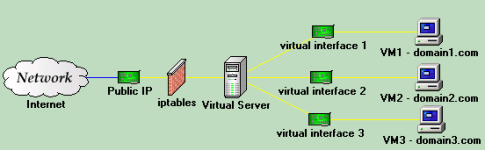
root@proxmox1:/etc/iptables# ifconfig
dummy0 Link encap:Ethernet HWaddr b2:b3:2f:22:a2:8b
inet6 addr: fe80::b0b3:2fff:fe22:a28b/64 Scope:Link
UP BROADCAST RUNNING NOARP MTU:1500 Metric:1
RX packets:0 errors:0 dropped:0 overruns:0 frame:0
TX packets:202 errors:0 dropped:0 overruns:0 carrier:0
collisions:0 txqueuelen:0
RX bytes:0 (0.0 B) TX bytes:13008 (12.7 KiB)
eth0 Link encap:Ethernet HWaddr f0:de:f1:b4:32:ce
inet addr:192.168.5.86 Bcast:192.168.5.255 Mask:255.255.255.0
inet6 addr: fe80::f2de:f1ff:feb4:32ce/64 Scope:Link
UP BROADCAST RUNNING MULTICAST MTU:1500 Metric:1
RX packets:212682 errors:0 dropped:0 overruns:0 frame:0
TX packets:147653 errors:0 dropped:0 overruns:0 carrier:0
collisions:0 txqueuelen:1000
RX bytes:87827013 (83.7 MiB) TX bytes:30997638 (29.5 MiB)
Interrupt:30 Base address:0xc000
lo Link encap:Local Loopback
inet addr:127.0.0.1 Mask:255.0.0.0
inet6 addr: ::1/128 Scope:Host
UP LOOPBACK RUNNING MTU:16436 Metric:1
RX packets:32956 errors:0 dropped:0 overruns:0 frame:0
TX packets:32956 errors:0 dropped:0 overruns:0 carrier:0
collisions:0 txqueuelen:0
RX bytes:5808135 (5.5 MiB) TX bytes:5808135 (5.5 MiB)
venet0 Link encap:UNSPEC HWaddr 00-00-00-00-00-00-00-00-00-00-00-00-00-00-00-00
inet6 addr: fe80::1/128 Scope:Link
UP BROADCAST POINTOPOINT RUNNING NOARP MTU:1500 Metric:1
RX packets:0 errors:0 dropped:0 overruns:0 frame:0
TX packets:0 errors:0 dropped:3 overruns:0 carrier:0
collisions:0 txqueuelen:0
RX bytes:0 (0.0 B) TX bytes:0 (0.0 B)
veth101.0 Link encap:Ethernet HWaddr e2:20:39:38:92:b4
inet6 addr: fe80::e020:39ff:fe38:92b4/64 Scope:Link
UP BROADCAST RUNNING MULTICAST MTU:1500 Metric:1
RX packets:25570 errors:0 dropped:0 overruns:0 frame:0
TX packets:36673 errors:0 dropped:3 overruns:0 carrier:0
collisions:0 txqueuelen:0
RX bytes:1227705 (1.1 MiB) TX bytes:52585011 (50.1 MiB)
vmbr1 Link encap:Ethernet HWaddr b2:b3:2f:22:a2:8b
inet addr:10.10.10.1 Bcast:10.10.10.255 Mask:255.255.255.0
inet6 addr: fe80::b0b3:2fff:fe22:a28b/64 Scope:Link
UP BROADCAST RUNNING MULTICAST MTU:1500 Metric:1
RX packets:25716 errors:0 dropped:0 overruns:0 frame:0
TX packets:36720 errors:0 dropped:0 overruns:0 carrier:0
collisions:0 txqueuelen:0
RX bytes:1308007 (1.2 MiB) TX bytes:53108975 (50.6 MiB)
root@proxmox1:/etc/iptables# brctl show
bridge name bridge id STP enabled interfaces
vmbr1 8000.b2b32f22a28b no dummy0
veth101.0
root@proxmox1:/etc/iptables# vzctl enter 101
entered into CT 101
root@ticket:/# ip r
10.10.10.0/24 dev eth0 proto kernel scope link src 10.10.10.2
default via 10.10.10.1 dev eth0
root@ticket:/# ping 192.168.5.1
PING 192.168.5.1 (192.168.5.1) 56(84) bytes of data.
64 bytes from 192.168.5.1: icmp_req=1 ttl=63 time=0.621 ms
^C
--- 192.168.5.1 ping statistics ---
1 packets transmitted, 1 received, 0% packet loss, time 0ms
rtt min/avg/max/mdev = 0.621/0.621/0.621/0.000 ms
root@ticket:/# exit
logout
exited from CT 101
root@proxmox1:/etc/iptables# cat loadfw.sh
#!/bin/sh
PATH='/sbin'
iptables -F
iptables -X
iptables -Z
iptables -t nat -F
iptables -P FORWARD DROP
iptables -P INPUT DROP
iptables -P OUTPUT ACCEPT
iptables -A INPUT -i lo -j ACCEPT
iptables -A OUTPUT -o lo -j ACCEPT
iptables -A INPUT -m state --state INVALID -j DROP
iptables -A INPUT -i eth0 -p tcp -m tcp --tcp-flags SYN,ACK SYN,ACK -m state --state NEW -j DROP
iptables -A INPUT -i eth0 -p tcp -m tcp ! --tcp-flags SYN SYN -m state --state NEW -j DROP
iptables -A INPUT -m state --state RELATED,ESTABLISHED -j ACCEPT
iptables -A INPUT -i eth0 -p tcp -m tcp -j ACCEPT
iptables -t nat -A PREROUTING -i eth0 -p tcp -m tcp --dport 80 -j DNAT --to-destination 10.10.10.2:80
iptables -t nat -A POSTROUTING -s 10.10.10.2 -o eth0 -j MASQUERADE
iptables -A FORWARD -d 10.10.10.2 -p tcp -m tcp --dport 80 -j ACCEPT
iptables -A FORWARD -s 10.10.10.0/255.255.255.0 -i vmbr1 -o eth0 -j ACCEPT
iptables -A FORWARD -d 10.10.10.0/255.255.255.0 -i eth0 -o vmbr1 -m state --state RELATED,ESTABLISHED -j ACCEPT
iptables -A OUTPUT -m state --state RELATED,ESTABLISHED -j ACCEPT
iptables -A OUTPUT -o eth0 -j ACCEPT
iptables -A OUTPUT -o vmbr1 -j ACCEPT
iptables -A OUTPUT -o eth0 -p icmp -m icmp --icmp-type 8 -j ACCEPT
#iptables