Hi I am new to Proxmox - this is my second time trying Proxmox - i stopped using it because of the issue I am having now
I am using an old AMD desktop with a 3000 series - with a Synology NAS supplying storage via NFS
I had not installed the QEMM agent inside the guest
guest has been up for 2 weeks no issue
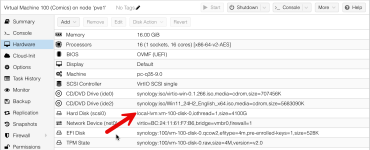
it has now crashed and i am stuck at this stage see attached picture
I then tried to deploy a new a new VM and got this error
()Task viewer: VM 102 - CreateOutputStatusStopDownloadFormatting '/mnt/pve/synology/images/102/vm-102-disk-0.qcow2', fmt=qcow2 cluster_size=65536 extended_l2=off preallocation=metadata compression_type=zlib size=540672 lazy_refcounts=off refcount_bits=16
transferred 0.0 B of 528.0 KiB (0.00%)
transferred 528.0 KiB of 528.0 KiB (100.00%)
transferred 528.0 KiB of 528.0 KiB (100.00%)
efidisk0: successfully created disk 'synology:102/vm-102-disk-0.qcow2,efitype=4m,pre-enrolled-keys=1,size=528K'
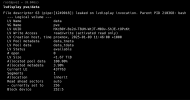
WARNING: Thin pool pve/data is out of data space.
TASK ERROR: unable to create VM 102 - lvcreate 'pve/vm-102-disk-0' error: Cannot create new thin volume, free space in thin pool pve/data reached threshold.
now I have not setup thin provisioing and i have around 15TB of diskspace free on my NAS
i have restarted Proxmox once and the guest many times
I am using an old AMD desktop with a 3000 series - with a Synology NAS supplying storage via NFS
I had not installed the QEMM agent inside the guest
guest has been up for 2 weeks no issue
it has now crashed and i am stuck at this stage see attached picture
I then tried to deploy a new a new VM and got this error
()Task viewer: VM 102 - CreateOutputStatusStopDownloadFormatting '/mnt/pve/synology/images/102/vm-102-disk-0.qcow2', fmt=qcow2 cluster_size=65536 extended_l2=off preallocation=metadata compression_type=zlib size=540672 lazy_refcounts=off refcount_bits=16
transferred 0.0 B of 528.0 KiB (0.00%)
transferred 528.0 KiB of 528.0 KiB (100.00%)
transferred 528.0 KiB of 528.0 KiB (100.00%)
efidisk0: successfully created disk 'synology:102/vm-102-disk-0.qcow2,efitype=4m,pre-enrolled-keys=1,size=528K'
WARNING: Thin pool pve/data is out of data space.
TASK ERROR: unable to create VM 102 - lvcreate 'pve/vm-102-disk-0' error: Cannot create new thin volume, free space in thin pool pve/data reached threshold.
now I have not setup thin provisioing and i have around 15TB of diskspace free on my NAS
i have restarted Proxmox once and the guest many times