Proxmox VE Ceph Compatibility with Dell PERC H965i on PowerEdge R670

dung.pm

New Member
Jun 18, 2025
21
2
3
Hello everyone,

I am currently setup a Ceph deployment on Proxmox VE and would like to ask about compatibility and performance considerations when using a Dell PERC H965i RAID controller.
Hardware setup:
  • 5x Dell PowerEdge R670 servers
  • Each server equipped with PERC H965i
  • Disks configured as Non-RAID
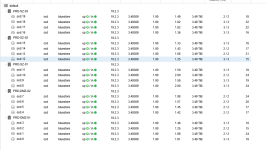
  • Each node has 4 OSDs (~3.5 TiB per OSD)
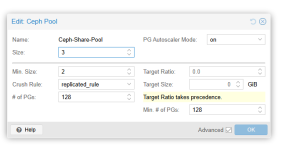
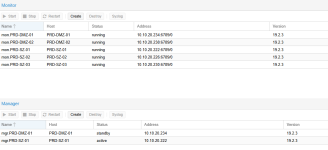
Ceph cluster: (details shown in the attached screenshot)
1782876261433.png
1782876288566.png
1782876331447.png
Issue:

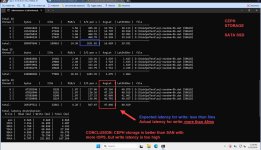
Although the cluster is functioning normally, I am observing that Ceph performance is lower than expected, especially under write workloads. Latency and throughput are not consistent with what I would expect from this hardware configuration.
1782876375298.jpeg
Questions:
  • Is the PERC H965i considered suitable for Ceph when using Non-RAID/JBOD mode?
  • Does this controller introduce any hidden overhead or caching behavior that could impact Ceph performance?
  • Are there any recommended driver, firmware, or tuning settings for this controller in a Ceph environment?
I suspect that the RAID controller layer might be affecting write performance, but I would appreciate confirmation or real-world experience from others who have used similar setups. Thank you in advance for your insights.
 
  • Is the PERC H965i considered suitable for Ceph when using Non-RAID/JBOD mode? No
  • Does this controller introduce any hidden overhead or caching behavior that could impact Ceph performance? Yes, latency is higher
  • Are there any recommended driver, firmware, or tuning settings for this controller in a Ceph environment? Not really as it is not a recommended controller.

    More info here: https://docs.ceph.com/en/latest/start/hardware-recommendations/#controllers
 
  • Like
Reactions: dung.pm
Odd
  • Is the PERC H965i considered suitable for Ceph when using Non-RAID/JBOD mode? No
  • Does this controller introduce any hidden overhead or caching behavior that could impact Ceph performance? Yes, latency is higher
  • Are there any recommended driver, firmware, or tuning settings for this controller in a Ceph environment? Not really as it is not a recommended controller.

    More info here: https://docs.ceph.com/en/latest/start/hardware-recommendations/#controllers
Odd, the article you referenced states:

'Many RAID HBAs can be configured with an IT-mode “personality” or “JBOD mode” for streamlined operation'

I've used "JBOD mode" without issues on the past, both for Ceph and ZFS. It disables block mapping/virtualization and regular RAID processing.

Wrong configuration: RAID0 with 1 drive.
 
It is not ideal but may work, however you seem to be experiencing rather high latency, that might be a total red herring, if it's possible to get a plain HBA you might get a better experience.

Can you easily get info if you to a smartctl -a to one of your disks? (as I have yet to work with that particular raid card)
 
Ceph sets you back a quarter of a century even with this nice new hosts - look at your 8K random MiB/s figures. Switching to HBAs instead of the H965is won't improve things either, because it’s the communication between the hosts that generates the latency.
 
  • Like
Reactions: dung.pm
Do you use 100G for Ceph public and private networks?
A slow network would explain the high latencies you experience ...

What ssd's are you using?
 
your pg number seem quite low, it could impact write performance with pg_lock.

try to set pg target ratio to 1.0 in your ceph pool


Also, verify in your bios that your server is set to max performance profile. (you want cpu always at their max frequency to lower latency)
Thanks, I’ll apply those changes in pg to 512, and check the results later.
 
  • Is the PERC H965i considered suitable for Ceph when using Non-RAID/JBOD mode? No
  • Does this controller introduce any hidden overhead or caching behavior that could impact Ceph performance? Yes, latency is higher
  • Are there any recommended driver, firmware, or tuning settings for this controller in a Ceph environment? Not really as it is not a recommended controller.

    More info here: https://docs.ceph.com/en/latest/start/hardware-recommendations/#controllers
Thanks for the details. I checked the Ceph recommendations and also Proxmox documentation, and the H965i doesn’t seem to be a recommended Ceph controller, especially since it only offers Non-RAID mode and not a true IT/HBA mode.

https://pve.proxmox.com/wiki/Raid_controller#PERC/LSI_(native_in-kernel_driver)
 
Do you use 100G for Ceph public and private networks?
A slow network would explain the high latencies you experience ...

What ssd's are you using?
I’m using 10 GbE for the Ceph network and SATA III SSDs, so this setup is not high enough for Ceph ?
 
I am not sure exactly where the issue lies, but here are some things to consider:
- SSDs need to be proper enterprise grade with PLP so that they will acknowledge writes once they land in DRAM cache, rather than the flash. Provide the SSD model info so this can be verified.
- It's common for RAID controllers with a battery-backed cache to disable the drive's cache by default to guarantee no writes are lost. Perhaps there is a setting in your configuration that is disabling the SSD caching while it may not be explicitly necessary in this specific configuration.
- If there is some odd interaction when using these SSDs in non-RAID mode, you could experiment with creating multiple, single drive RAID0 arrays within the controller and then providing those to Ceph (be sure to enable write-back caching if the controller has a battery-backed cache). Also, you will probably need to monitor the drives at the Dell server hardware level, since this may not be passed to Ceph.
https://www.ibm.com/docs/en/storage...onsiderations-using-raid-controller-osd-hosts
https://docs.redhat.com/en/document...eral-principles#hardware-selection-avoid-raid
 
With 10G networking latencies will be higher.
Some users on this forum which deployed ceph for customers recommend at least 25G but they mostly go with 100G networking nowadays.

What SATA SSD's? Consumer grade? Enterprise grade?
If you use cheap QLC ssd's then your latencies make sense, if you use enterprise grade ssd's with PLP then i would suspect networking to be the bottleneck.

And as J-Rod mentioned, if the raid controller disabled the drives cache that will impact latencies.