Proxmox stuck after upgrade from 8.4.19 to 9.x

Jun 25, 2026
7
1
3
Hello,

I have upgraded our first node of a 3-node cluster from 8.4.19 to 9.x.

I have all done I needed to do: tested on a test-cluster, took my time, checked everything multiple times before moving to the next step and yet, the thing I always fear when I perform a upgrade happend: a non responsive PVE. It hangs on on /dev/mapper/pve-root

no-boot.jpg

I can ping the GUI IP but it is not loading
I can't start a SSH session on that IP

specifications:
PVE-enterprise
FRR
CEPH
NIC pinning
PBS (upgraded to 4.x)

What can I do to restore functionality?
 
Last edited:
Can you access the local console or does the boot stall before that?
If you can, what does journalctl tell you?

If not and assuming you use systemd-boot, you should try booting into rescue mode by manually adding systemd.unit=rescue.target to the end of the linux line in your bootloader. From there, check any previous problematic boots with journalctl -b -1 (or -2, -3, etc. to show to a problematic boot).
 
Last edited:
  • Like
Reactions: pve-root
Can you access the local console or does the boot stall before that?
If you can, what does journalctl tell you?

If not and assuming you use systemd-boot, you should try booting into rescue mode by manually adding systemd.unit=rescue.target to the end of the linux line in your bootloader. From there, check any previous problematic boots with journalctl -b -1 (or -2, -3, etc. to show to a problematic boot).
Thank you for your reaction.

It stops at the screen attached in the previous post and doesn't go further

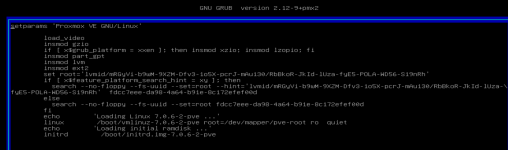
Currently, I have access via ilo and can see this screen before it stops:
1782386786371.png

after e:
1782387101915.png


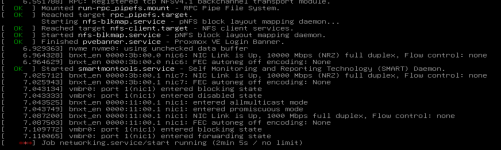
update: I deleted quiet at the end of the "linux" line and after boot it hangs here:
1782387706148.png
 
Last edited:
Clear, so something is wrong with your network configuration after the upgrade.

You can add systemd.mask=networking.service to the linux line in grub (once) to prevent the networking.service from starting. Your system should continue to boot without network. Once you have a prompt you can investigate your networking setup and try to reboot.
 
  • Like
Reactions: Impact and pve-root
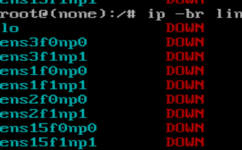
Thank you again, I was already further and added a # before all my networking.
I'm trying to login as root now but in the password is a symbol. When I type this symbol it ads a ^ in front of it.
 
I've run into this issue multiple times in the past.

IF you have linux kernel 6.1 in your available kernels to boot, you can live with it and just pin that kernel. Going forward, you should consider upgrading your motherboard to something from this decade ;)
 
  • Like
Reactions: bbgeek17
ok, then that forces me to ground 0.

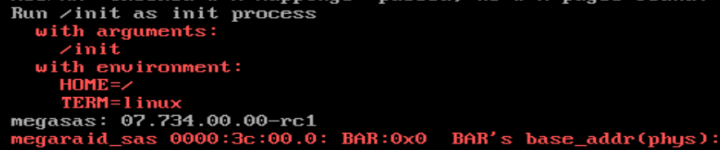
Without resorting to screencaps, what is the actual issue? the screencap in OP does not lend itself to any actual issue; the screencaps you had showing various "red" items dont necessarily correlate to problems (although you will probably need to tweak your grub default to account for the bar address relocation; search for your generation chipset for potential arguments.)