

Proxmox setup with RAID 1-configuration on USB attached storage

whostolemyname

New Member
Mar 1, 2026
3
1
3
Hello everyone
I am just fiddeling around with learning to operate Proxmox on a Asus NUC, that has been bought recently to set up a backup server. It consists of an internal NVMe and an ICYBox with 4 3,5" Harddisks of 8TB each, the Box being attached to the NUC by USB-C
Before starting with Proxmox, I had yet only installed a lean Debian13 administered through Cockpit/Webmin and a (somewhat faulty) RAID had been configured by means of mdadm.
I have read a bit in the meantime, and recognized, that the preferred (and supported) way of achieving this seems to be the use of ZFS during the installation routine of Proxmox, but I'm not all sure, if my understanding is correct. The goal should be to use the NVMe as System disk and the 4 disks (or let's say 2x2disks in case of RAID1) as data disks for various tasks such as running a backup server and storing data of docker containers and/or applications such as Nextcloud.
This is my configuration at this point, but I assume that this should still be the right moment to restart from scratch to setup the whole thing properly:
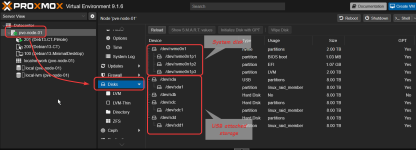
1772546895528.png

Grateful for any hints, thoughts and advice pointing me to the right direction.

Andreas
 
Welcome, @whostolemyname
I'm not commenting on your particular hardware. Just generally. A few points, in no particular order.

1) Keeping the backups on the same disks as the primary data is not very safe.
2) Though not optimal, you can build Proxmox Backup Server as a virtual machine in the PVE host, but the PBS should use other disks than PVE for VMs.
3) ZFS datastore for Proxmox Backup Server can be absolutely well set up after the installation of the operating system.
4) ZFS datastore for PBS is good.
5) Don't mix mdadm RAID with ZFS. ZFS works best with separate particular disks, from which it builds its own RAID.
6) Mdadm RAID is not officially supported by Proxmox.

I'm sure other users of the Forum can give you better and more detailed advice :-).
 
Depending on the needs of the original poster, it may work enough well :) .
I'm writing this from my own experience in a lab. So, @whostolemyname , don't feel discouraged. If you have no faster disks at the moment, use HDDs. Slow backup is better than no backup! ;-)
 
  • Like
Reactions: Johannes S
Regarding mdadm:
https://pve.proxmox.com/wiki/Software_RAID#mdraid
I agree with both gurubert and onslow that ssd is the prefered way to go for a PBS datastore but backup on hdd is still better than no backup. One possible workaround around the slow IOPS of HDDs can be to use smaller SSDs as special device. The idea is to store small files and metadata on the ssd and everything else on the HDD:
https://pve.proxmox.com/wiki/ZFS_on_Linux#sysadmin_zfs_special_device

This has some caveats though:
  • It will speedup garbage collection of ProxmoxBackupServer a lot, since garbage collection mainly works with metadata
  • Other tasks (backup, restore, verify) will profit too but not so much since they mostly writeto /read from the HDD
  • The redundancy of the SSDs should match the HDDs (e.G. two SSDs mirror on special device, two HDD mirror or three HDD RAIDZ). If the special device is lost, you can't access anything else. The same is true the other round: If very hdd fail you also can't access the data anymore.
This is under the assumption that you have a dedicated server for the BackupServer. If you need to run the PBS on the same host as ProxmoxVE you should use external USB discs as removable datastore but then I wouldn't use ZFS but XFS or ext4. In that case I would use at least two or three different discs and store one of them outside your place (e.g. at a family members place) so you have also an offsite copy.
Personally I prefer a vserver as offsite PBS or (if you have the budget) a managed PBS instance like the one offered by Inett or tuxis.nl (there are other providers but they all are in the price region of 0,02 € per GB or 20 € per TB). A cheap alternative could be an old pc at a family member or friends place.
PBs also now allows using S3 cloud storage but that feature is still in technology preview thus I wouldn't relie on it as sole offsite backup.
 
Last edited:
  • Like
Reactions: UdoB and Onslow
Hi all,
I didn't expect to get so much feedback in no time. Thank you all. I'll try to go through it to reflect my understanding of what's been said.

@Onslow
1) Keeping the backups on the same disks as the primary data is not very safe.
Maybe I wasn't precise. I don't intend to mix the backup (for instance raid 1 disks 1&2) with the data (for instance raid 1 disks 3&4)​
2) Though not optimal, you can build Proxmox Backup Server as a virtual machine in the PVE host, but the PBS should use other disks than PVE for VMs.
As said above, the backup shall not be written to the Proxmox system disk (NVMe) but to the attached storage. However I'm not sure about my understanding of PBS, my idea was simply running rsync as cronjob from within a VM or container. The data to be backuped is mainly residing on a separate NAS.​
I'm aware of these points but have no experience with ZFS, but starting from scratch with configuring the RAID on installation was what I meant by saying​
I assume that this should still be the right moment to restart from scratch to setup the whole thing properly in my original post​
@gurubert
Let's say, I'm not a business, the backup would run overnight and for now I'm expecting the HDDs to be sufficient, even though you're right, the better is the enemy of the good ;-)​
@Johannes S
I will have to plough through these linked documents. I appreciate all of your contributions, but I believe that it's partly beyond my scope. Before starting with Proxmox, the backup server was simply a headless Debian13 with the attached RAID disks. Unfortunately before getting to the point to start running the Rsync job by cron, I got my leg broken due to clear ice. That kept me from proceeding and at the same time it allowed me to get in touch with this whole Proxmox business.​
What am I trying to point out here: I'm not out for a highend business solution with high availability but then again I don't want to tinker with my data.​

 
Last edited:
my idea was simply running rsync as cronjob from within a VM or container.
Of course this approach is better than no backup, but it's far from optimal.

If somehow the data are modified / deleted by mistake or encrypted by ransomware, then rsync will happily overwrite previous copies with fresh copies (which happened to be broken, encrypted etc.) or even will remove (some) files in the backup if rsync is configured to maintain exact copy (i.e. removing files which stopped to exist).

Contrary, PBS lets you keep multiple versions of the data. PBS is very effective. It deduplicates data. It doesn't store multiple segments of the same data. It adds only the changed segments. This way you can can make backups frequently (I think daily in your use case is OK) and keep a few tens (or more) of versions without substantial increasing the storage usage.

The data to be backuped is mainly residing on a separate NAS.

OK, as you previously didn't mention about the NAS, I thought that the plan was to keep "primary" data on two or four of these disks in the USB box.
BTW, it's good to backup not only data from separate NAS or disks, but also VMs' and CTs' systems and their configurations used by the hypervisor (i.e. by the PVE node).
 
  • Like
Reactions: Johannes S
starting from scratch with configuring the RAID on installation was what I meant
Note that RAID gives you only redundancy, not backup. If the data are modified by mistake or by someone hostile, you have only redundant garbage, not the data you expect to have.

I think you can omit SSD and ZFS and off-site PBS if you want, that's OK.
But I recommend at least the following or some variant of this:

If you need to run the PBS on the same host as ProxmoxVE you should use external USB discs as removable datastore but then I wouldn't use ZFS but XFS or ext4. In that case I would use at least two or three different discs and store one of them outside your place (e.g. at a family members place) so you have also an offsite copy.

In case you can't have / don't want separate multiple external disks for removable datastores, I think you can use mirrored (RAID1) two disks in the USB box you own, as a removable datastore for PBS. But multiple versions of backups are highly recommended and PBS delivers it for free and efficiently.

edit: PBS also backups OSes of VMs' and of CTs', which I mentioned in the previous post.

Have a look at https://pbs.proxmox.com/docs/
If after reading it you have particular questions, you can ask.

Good luck! :)
 
Last edited:
  • Like
Reactions: Johannes S
Hi @Onslow, thank you so much for the time you're taking. Apologies for not having mentioned the NAS before, at times we tend to think that things are apparent, while they are not, don't we?
The NAS is a nice but comparatively old device (HP ProLiant MicroServer G1610T), which is why I intend to use the newer and assumingly faster NUC as a backup server. I am aware, that a RAID is not a backup, RAID 1 for the backup disks to me appears to be a solution for simply beeing able to restore from a backup in case of a failure of either one of the disks in the RAID. The backup itself is a script as per this script from ctaas.de (Site in german, credit to Arno Schröder) to prevent from the scenario that you described, where the backup automatically overwrites valid data with corrupted data.
I do not necessarily stick to rsync, but I felt that it provides all necessary functionality if setup properly and considered it a widespread, well documented and robust solution. In general, I am a little bit cautious with putting all eggs in one basket (in this case Proxmox), but if PBS proves to be the better solution, then be it.
It seems it will take me a while to get through the https://pbs.proxmox.com/docs/ you had recommended, but afterwards, I'll get back.
Thank you so far.
 
  • Like
Reactions: Onslow