Proxmox on a Cisco UCS 240-M5 and issues with the VIC 1457

jlo

New Member
Jun 25, 2026
6
0
1
Hoping that someone can point me in a direction please?

I am having some issues with being able to use the VIC 1457 on my proxmox build (current at 9.2.3 but installed about a year ago and I think it was 8.7.X

For the original installation I used only the 2 x onboard interfaces and they work just fine, however I am now trying to bring up a 10G connection over fiber on the VIC 1457 MLOM card.

The interfaces do show up in the proxmox interface and I do see link on my Catalyst 2960X switch, however cannot ping the interface. I have gone through the CIMC and turned off all kinds of bits and currently have them in 'physical NIC mode'
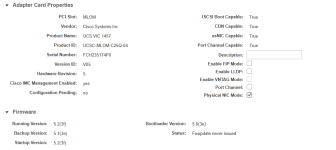
1782359935532.png

I have also turned off the FEC and have changed the VLAN mode to Access...
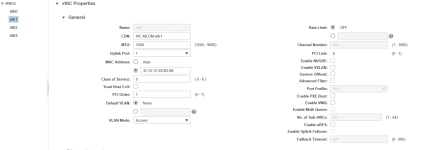
1782360040667.png

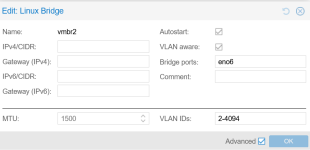
I create a bridge interface and use one of the NIC interfaces, but cannot ping the IP on the bridge
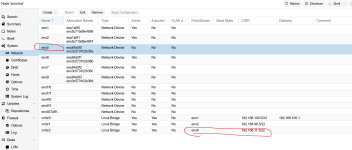
1782360172334.png

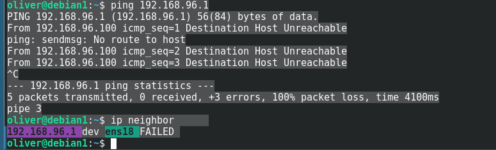
Interestingly, what I see on switch versus on the Proxmox CLI shows a different MAC...
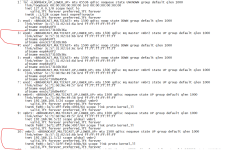
1782360332004.png

and

1782360822481.png

Thus the MAC/interface that proxmox and the CIMC show is not what is showing up on my switch..

Any ideas? what am I missing?

Thanks, Jeff
 
Thanks, being a network guy this would infer that I need to change the switch config to be a trunk and to specify a single or range of vlans present in the trunk.

How do I then specify which VLAN to use on the servers side it the VIDS are 2-4094? or would I specify a single vlan ID in the bridge-vids field? And a follow up question would then be - if I wanted to use multiple vlans on the port, would I have multiple bridge definitions in proxmox that use the same physical port?
 
Yes you can start with bridge-vids 2-4094 as on the example. Later if this help to bring the interface working, you can adjusted to allow only the needed VLAN, as this advised from both security and performance wise.

Regarding the second question, yes correct for example from pve-doc [0]:
Example: Use VLAN 5 for the Proxmox VE management IP with VLAN aware Linux bridge
auto lo
iface lo inet loopback

iface eno1 inet manual


auto vmbr0.5
iface vmbr0.5 inet static
address 10.10.10.2/24
gateway 10.10.10.1

auto vmbr0
iface vmbr0 inet manual
bridge-ports eno1
bridge-stp off
bridge-fd 0
bridge-vlan-aware yes
bridge-vids 2-4094

[0] https://pve.proxmox.com/pve-docs/pve-admin-guide.html#_vlan_on_the_host
 
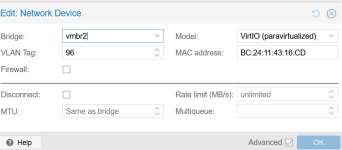
still no joy. I have the bridge set up as a trunk now and do see the correct MAC of the guest on the switch but no bidir traffic. From what I can see on the server the reply traffic is not making it back to the guest.

If I change the NIC on the guest to the bridge that is not vlan aware, it works no issues...

here is the current setup...

more /etc/network/interfaces
# network interface settings; autogenerated
# Please do NOT modify this file directly, unless you know what
# you're doing.
#
# If you want to manage parts of the network configuration manually,
# please utilize the 'source' or 'source-directory' directives to do
# so.
# PVE will preserve these directives, but will NOT read its network
# configuration from sourced files, so do not attempt to move any of
# the PVE managed interfaces into external files!

auto lo
iface lo inet loopback

iface eno1 inet manual

iface eno5 inet manual

iface eno6 inet manual

iface eno2 inet manual

iface enx927af91f187d inet manual

iface ens1f0 inet manual

iface ens1f1 inet manual

iface ens4f0 inet manual

iface ens4f1 inet manual

iface eno7 inet manual

iface eno8 inet manual

auto vmbr0
iface vmbr0 inet static
address 192.168.100.5/24
gateway 192.168.100.1
bridge-ports eno1
bridge-stp off
bridge-fd 0

auto vmbr1
iface vmbr1 inet static
address 192.168.96.5/22
bridge-ports eno2
bridge-stp off
bridge-fd 0

auto vmbr2
iface vmbr2 inet manual
bridge-ports eno6
bridge-stp off
bridge-fd 0
bridge-vlan-aware yes
bridge-vids 2-4092

source /etc/network/interfaces.d/*

____________________________________________________

and on my switch -

interface TenGigabitEthernet1/0/1
description **** Proxmox 10G - eno5/vmbr2 ****
switchport mode trunk
spanning-tree portfast

________________________________________________________

If I use vmbr1 all works just fine. If I use vmbr2 it does not... frustrating

.
 
What is the destination you are trying to reach? Is it the IP of a Virtual Machine, or an IP you assigned directly to the vmbr2 bridge? Also, from where are you testing the ping, source and destination
 
it probably matters, on the guest, I am not seeing the MAC of the destination - only incomplete.


1782611346016.png

it kine of looks like the traffic is not making it back to the guest?
 
this particular IP is the gateway and is a physical device outside of the proxmox build. I do see the MAC of the guest on the gateway and do see the MAC of both on the switch on the correct interfaces.

and after installing net-tools, I have verified that the packet count on TX packets is the same after trying to ping the gateway. the traffic is not making it back to the guest.
 
Last edited:
I think because the traffic will come back via vmbr1 because vmbr1 has an ip in the same gateway range.
Try to set the ip in vmbr2 instead of vmbr1