Wenn INTEL für deinen NUC das anbietet, wäre das sinnvoll.Ich hab noch diesen Hinweis auf dem Bildschirm (nicht aber auf der Konsole) finden können:
Code:kvm_intel: L1TF CPU bug present and SMT on, data leak possible. See CVE-2018-3846 and https://kernel.org/doc/html/latest/admin-guide/hw-vuln/l1tf.html for details.
https://www.thomas-krenn.com/de/wiki/L1TF
Was tun ? Sollte ich das BIOS updaten ?


Proxmox Oberfläche nach Stromausfall nicht mehr erreichbar
- Thread starter lethuer
- Start date
You are using an out of date browser. It may not display this or other websites correctly.
You should upgrade or use an alternative browser.
You should upgrade or use an alternative browser.

Wo finde ich das ?Wenn INTEL für deinen NUC das anbietet, wäre das sinnvoll.
https://www.intel.de/content/www/de...0/intel-nuc-kit-nuc6i5syh/specifications.html
ist es das ? Hier steht was von einem Update auf SY0042
https://www.intel.de/content/www/de...bios-version-change-and-milestone-update.html
Finde leider nur das pdf aber nicht die Datei die hier gezeigt wird (SY0073).
https://youtu.be/2bEvt7qYxjQ?is=y7CxFBAMs3F8uymb
In einem Community Beitrag wird erwähnt, dass SY0073 wohl gelöscht wurde und es hängt wenigstens ein File „sy0072.bio“ dran.
Kann man das nirgends offiziell laden ?
https://community.intel.com/t5/Mobi...revious-Version-BIOS-Image/m-p/1701867#M84678
Last edited:
Entweder muss man sich bei Intel anmelden um die Treiber zu sehen oder das wurde bereits eingespart.
Welches BIOS ist eigentlich aktuell auf der Maschine drauf?
OB du dem Community Beitrag nutzen willst musst selber entscheiden.
Ebenso diese Quelle hier:
https://drivers.softpedia.com/dyn-search.php?search_term=NUC6i5SYH
Hier ist auch der BIOS 0073:
https://drivers.softpedia.com/get/BIOS/Intel/Intel-NUC6i5SYH-NUC-Kit-BIOS-0073.shtml
Ob das deine Meldung wegdrückt keine ahnung. Evtl fehlen aber auch in der installation die intel Microcodes
Googlesuche mit "proxmox intel microcode core i5 gen 6"
Welches BIOS ist eigentlich aktuell auf der Maschine drauf?
OB du dem Community Beitrag nutzen willst musst selber entscheiden.
Ebenso diese Quelle hier:
https://drivers.softpedia.com/dyn-search.php?search_term=NUC6i5SYH
Hier ist auch der BIOS 0073:
https://drivers.softpedia.com/get/BIOS/Intel/Intel-NUC6i5SYH-NUC-Kit-BIOS-0073.shtml
Versions:
- ME Firmware: 11.8.79.3722
- Memory Reference Code: Based on 1.9.0.0
- Integrated Graphics Option ROM: Build 1070 PC 14.34
- Integrated Graphics UEFI Driver: 9.0.1045
- SATA RAID Option ROM: 14.8.0.2377
- AHCI Code: AHCI_10
- LAN Option ROM: 0.1.04
- Visual BIOS: 2.2.23
New Fixes/Features:
- Updated BIOS code for security fixes.
- Update ME to 11.8.79.3722
Ob das deine Meldung wegdrückt keine ahnung. Evtl fehlen aber auch in der installation die intel Microcodes
Googlesuche mit "proxmox intel microcode core i5 gen 6"
BIOS Version:Welches BIOS ist eigentlich aktuell auf der Maschine drauf?
Current Version: SYSKLi35.86A.0042.2016.0409.1246
Updating to Revision: SYSKLi35.86A.0073.2020.0909.1625
Das Update selber hat aber an der Meldung nichts verändert.
Wenn ich bei google
proxmox intel microcode core i5 gen 6 eingebe kommt diese anleitung:Daher wollte ich dieser anleitung folgen was aber auch nicht geklappt hat.
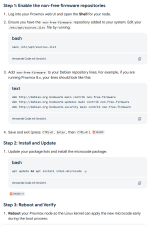
Code:
root@pve:~# grep -E 'family|model|stepping|microcode' /proc/cpuinfo | head -5
cpu family      : 6
model           : 78
model name      : Intel(R) Core(TM) i5-6260U CPU @ 1.80GHz
stepping        : 3
microcode       : 0xf0
root@pve:~# nano /etc/apt/sources.list
root@pve:~# apt update && apt install intel-microcode -y
Hit:1 http://deb.debian.org/debian trixie InRelease
Get:2 http://security.debian.org/debian-security trixie-security InRelease [43.4 kB]
Get:3 http://deb.debian.org/debian trixie-updates InRelease [47.3 kB]
Hit:5 http://download.proxmox.com/debian/ceph-squid trixie InRelease
Hit:7 http://download.proxmox.com/debian/ceph-tentacle trixie InRelease
Hit:9 http://download.proxmox.com/debian/pve trixie InRelease
Ign:4 https://www.debian.org bookworm InRelease
Ign:6 https://www.debian.org bookworm-updates InRelease
Ign:8 https://www.debian.org bookworm-security InRelease
Err:10 https://www.debian.org bookworm Release
  404  Not Found [IP: 130.89.148.77 443]
Err:11 https://www.debian.org bookworm-updates Release
  404  Not Found [IP: 130.89.148.77 443]
Err:12 https://www.debian.org bookworm-security Release
  404  Not Found [IP: 130.89.148.77 443]
Error: The repository 'http://debian.org bookworm Release' does not have a Release file.
Notice: Updating from such a repository can't be done securely, and is therefore disabled by default.
Notice: See apt-secure(8) manpage for repository creation and user configuration details.
Error: The repository 'http://debian.org bookworm-updates Release' does not have a Release file.
Notice: Updating from such a repository can't be done securely, and is therefore disabled by default.
Notice: See apt-secure(8) manpage for repository creation and user configuration details.
Error: The repository 'http://debian.org bookworm-security Release' does not have a Release file.
Notice: Updating from such a repository can't be done securely, and is therefore disabled by default.
Notice: See apt-secure(8) manpage for repository creation and user configuration details.
Last edited:

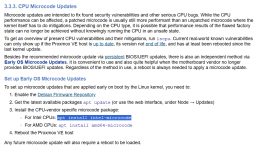
Die korrekte Prozedur ist in der PVE Doku beschrieben. Bookworm ist eine ältere Debian Version. Inkompatibel mit PVE 9 und Repos zu mischen sorgt für Probleme. Mach das wieder rückgängig.
In einer neuen PVE 9 Installation sollte das eh schon installiert und konfiguriert sein.

In einer neuen PVE 9 Installation sollte das eh schon installiert und konfiguriert sein.
Last edited:
hab die 3 links ausMach das wieder rückgängig.
nano /etc/apt/sources.list wieder raus genommen.Die korrekte Prozedur ist in der PVE Doku beschrieben
Code:
root@pve:~# lscpu
Architecture:                x86_64
  CPU op-mode(s):            32-bit, 64-bit
  Address sizes:             39 bits physical, 48 bits virtual
  Byte Order:                Little Endian
CPU(s):                      4
  On-line CPU(s) list:       0-3
Vendor ID:                   GenuineIntel
  Model name:                Intel(R) Core(TM) i5-6260U CPU @ 1.80GHz
    CPU family:              6
    Model:                   78
    Thread(s) per core:      2
    Core(s) per socket:      2
    Socket(s):               1
    Stepping:                3
    CPU(s) scaling MHz:      93%
    CPU max MHz:             2900.0000
    CPU min MHz:             400.0000
    BogoMIPS:                3600.00
    Flags:                   fpu vme de pse tsc msr pae mce cx8 apic sep mtrr pge mca cmov pat pse36 clflush dts acpi mmx fxsr sse sse2 ss ht tm pbe syscall nx pdpe1gb rdtscp lm constant_tsc art arch_perfmon pebs bts rep_good nopl xtopology nonstop_tsc cpuid
                              aperfmperf pni pclmulqdq dtes64 monitor ds_cpl vmx est tm2 ssse3 sdbg fma cx16 xtpr pdcm pcid sse4_1 sse4_2 x2apic movbe popcnt tsc_deadline_timer aes xsave avx f16c rdrand lahf_lm abm 3dnowprefetch cpuid_fault epb pti ssbd ibrs
                              ibpb stibp tpr_shadow flexpriority ept vpid ept_ad fsgsbase tsc_adjust bmi1 avx2 smep bmi2 erms invpcid mpx rdseed adx smap clflushopt intel_pt xsaveopt xsavec xgetbv1 xsaves dtherm ida arat pln pts hwp hwp_notify hwp_act_window
                              hwp_epp vnmi md_clear flush_l1d arch_capabilities
Virtualization features:
  Virtualization:            VT-x
Caches (sum of all):
  L1d:                       64 KiB (2 instances)
  L1i:                       64 KiB (2 instances)
  L2:                        512 KiB (2 instances)
  L3:                        4 MiB (1 instance)
NUMA:
  NUMA node(s):              1
  NUMA node0 CPU(s):         0-3
Vulnerabilities:
  Gather data sampling:      Vulnerable: No microcode
  Ghostwrite:                Not affected
  Indirect target selection: Not affected
  Itlb multihit:             KVM: Mitigation: Split huge pages
  L1tf:                      Mitigation; PTE Inversion; VMX conditional cache flushes, SMT vulnerable
  Mds:                       Mitigation; Clear CPU buffers; SMT vulnerable
  Meltdown:                  Mitigation; PTI
  Mmio stale data:           Mitigation; Clear CPU buffers; SMT vulnerable
  Old microcode:             Not affected
  Reg file data sampling:    Not affected
  Retbleed:                  Mitigation; IBRS
  Spec rstack overflow:      Not affected
  Spec store bypass:         Mitigation; Speculative Store Bypass disabled via prctl
  Spectre v1:                Mitigation; usercopy/swapgs barriers and __user pointer sanitization
  Spectre v2:                Mitigation; IBRS; IBPB conditional; STIBP conditional; RSB filling; PBRSB-eIBRS Not affected; BHI Not affected
  Srbds:                     Mitigation; Microcode
  Tsa:                       Not affected
  Tsx async abort:           Not affected
  Vmscape:                   Mitigation; IBPB before exit to userspace
root@pve:~# apt update
Get:1 http://security.debian.org/debian-security trixie-security InRelease [43.4 kB]
Hit:2 http://deb.debian.org/debian trixie InRelease
Hit:3 http://deb.debian.org/debian trixie-updates InRelease
Hit:4 http://download.proxmox.com/debian/ceph-squid trixie InRelease
Hit:5 http://download.proxmox.com/debian/ceph-tentacle trixie InRelease
Get:6 http://download.proxmox.com/debian/pve trixie InRelease [3,534 B]
Fetched 46.9 kB in 1s (59.4 kB/s)
All packages are up to date.
root@pve:~# apt install intel-microcode
intel-microcode is already the newest version (3.20251111.1~deb13u1).
Summary:
  Upgrading: 0, Installing: 0, Removing: 0, Not Upgrading: 0
Last edited:
Das heißt mit dieser Meldung muss und kann ich leben ?Ich hab noch diesen Hinweis auf dem Bildschirm (nicht aber auf der Konsole) finden können:
Code:kvm_intel: L1TF CPU bug present and SMT on, data leak possible. See CVE-2018-3846 and https://kernel.org/doc/html/latest/admin-guide/hw-vuln/l1tf.html for details.
https://www.thomas-krenn.com/de/wiki/L1TF
Was tun ? Sollte ich das BIOS updaten ?
Das musst du dir schon selber beantworten.Das heißt mit dieser Meldung muss und kann ich leben ?
Anders geantwortet : Wenn der Hersteller keine Updates mehr anbietet, dann ist das Gerät End Of Life!Anders gefragt: gibt es noch Dinge die ich tun kann oder bin ich mit dem BIOS Update am technischen Ende angekommen ?