

proxmox no boot (please help)
- Thread starter fusion
- Start date
You are using an out of date browser. It may not display this or other websites correctly.
You should upgrade or use an alternative browser.
You should upgrade or use an alternative browser.
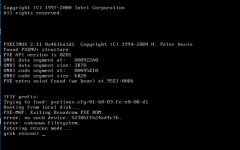
Hi fusion,
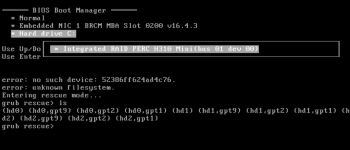
the server is booting from ethernet connection, try to boot to hard drive from bios.
in the bios, can you see hard disks?
the server is booting from ethernet connection, try to boot to hard drive from bios.
in the bios, can you see hard disks?
Try to boot with a rescue CD, then mount your drives, chroot and run again update-grub
( i.e.: system-rescue-cd )
( i.e.: system-rescue-cd )
/etc/default/grub try add rootdelay
GRUB_CMDLINE_LINUX="root=ZFS=rpool/ROOT/pve-1 boot=zfs rootdelay=20"
/etc/default/zfs try add
ZFS_INITRD_PRE_MOUNTROOT_SLEEP='10'
and
ZFS_INITRD_POST_MODPROBE_SLEEP='10'
GRUB_CMDLINE_LINUX="root=ZFS=rpool/ROOT/pve-1 boot=zfs rootdelay=20"
/etc/default/zfs try add
ZFS_INITRD_PRE_MOUNTROOT_SLEEP='10'
and
ZFS_INITRD_POST_MODPROBE_SLEEP='10'
hmmm why update-grub2 ? i'm using grub here..
it seems it doesn't see zfs ... do you have pve 5.1 with zfs?
could you see your data from rescue cd?
it seems it doesn't see zfs ... do you have pve 5.1 with zfs?
could you see your data from rescue cd?
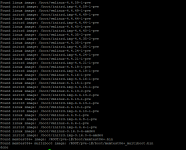
Ok, and then? does it boots?
look at this:
https://forum.proxmox.com/threads/new-zfs-3-4-install-booting-to-grub-rescue-prompt.21642/
and this:
https://forum.proxmox.com/threads/crashes-with-zfs-root-and-stuck-on-grub-rescue-prompt.34172/
look at this:
https://forum.proxmox.com/threads/new-zfs-3-4-install-booting-to-grub-rescue-prompt.21642/
and this:
https://forum.proxmox.com/threads/crashes-with-zfs-root-and-stuck-on-grub-rescue-prompt.34172/
it seems an hardware problem described in the proxmox wiki...
could you export with zfs-send the pools to another machine?
My knowdedge stops here.. :-/
could you export with zfs-send the pools to another machine?
My knowdedge stops here.. :-/