

Good day,
I have one particular container where I run an apache web browser. Under /srv I have added a ZFS mount point in Proxmox for the data directory. For this to work properly, of course apache needs the permissions for /srv, so I did
chown www-data:www-data /srv
and it worked fine for several years.
Now, all of a sudden, every time I reboot my LXC, I always have the problem that this permission is messed up. Like on every reboot, the permissions of /srv are root:root, and my apache complains about wrong permissions. I then have to login and redo the permissions.
Funny enough, it is only on /srv, but the contents of that folder, i.e. the files for my apache, are absolutely fine and their permissions stay how they were, so I always have to change only the permissions of /srv.
I fixed it for now by adding an entry to the crontab, that on each reboot, executes again a
chown www-data:www-data /srv
and it works. However I think is not the proper way to do it, so I wonder why does this happen now and can I somehow make this permission stick to my /srv directory?
It is really nothing special, just an ordinary mount point that one can add in the Proxmox Web Gui
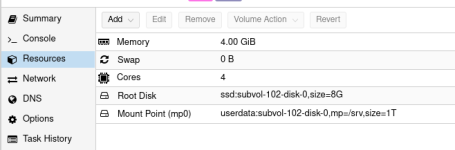
and it is on a ZFS dataset.
I have one particular container where I run an apache web browser. Under /srv I have added a ZFS mount point in Proxmox for the data directory. For this to work properly, of course apache needs the permissions for /srv, so I did
chown www-data:www-data /srv
and it worked fine for several years.
Now, all of a sudden, every time I reboot my LXC, I always have the problem that this permission is messed up. Like on every reboot, the permissions of /srv are root:root, and my apache complains about wrong permissions. I then have to login and redo the permissions.
Funny enough, it is only on /srv, but the contents of that folder, i.e. the files for my apache, are absolutely fine and their permissions stay how they were, so I always have to change only the permissions of /srv.
I fixed it for now by adding an entry to the crontab, that on each reboot, executes again a
chown www-data:www-data /srv
and it works. However I think is not the proper way to do it, so I wonder why does this happen now and can I somehow make this permission stick to my /srv directory?
It is really nothing special, just an ordinary mount point that one can add in the Proxmox Web Gui
and it is on a ZFS dataset.

