Nice analogy.Think of installing your Windows PC from scratch with a CD-ROM, or, an USB-Stick!
Thanks @dherzig You wrote "once you have a working USB device, you will have to decide which of your computers you turn into a PVE server!". This is assuming that I have already stood up the Proxmox VE, created a VMs and turn one of the VMs into a server? The problem is standing up that Proxmox VE and I'm having blockers with that.Hi Richard85,
once you have a working USB device, you will have to decide which of your computers you turn into a PVE server! Think of installing your Windows PC from scratch with a CD-ROM, or, an USB-Stick! So basically you'd plug the stick into the computer, reboot it and make sure it boots from the Stick -- here you'll find more installation instructions [0]. After the installation, you'd primarily be accessing it through the the webinterface from another computer, as PVE does not ship with a desktop environment by default.
Best,
Daniel
[0] https://pve.proxmox.com/pve-docs/pve-admin-guide.html#chapter_installation
Thanks @Azunai333.Nice analogy.
@Richard85 Just as a reminder: If you install a new operating system on a computer, you write over the existing data. This means that data is gone.
Backup the data on the installation target beforehand if you don't want to lose it. (But you can overwrite the new installed OS again, of course.)


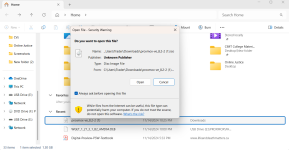
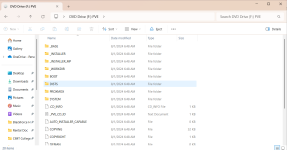
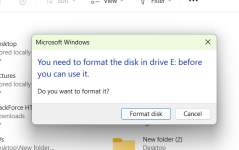
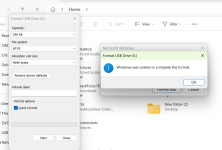
Thanks @fantic I have removed the USB but I still get this > https://app.screencast.com/0m6MHNG2cAkqVThe format of the USB once created, is other than windows will recognize so DO NOT Format the 2 USB drives!! Just cancel and eject and remove the USB drive when Etchy is done. It should work in the machine you want to install Proxmox.
So what I'm trying to do now is to move the ISO Image from the original folder in my File Explorer to the USB file. I guess this is what you are talking about(So that the ISO image is saved and opened from the USB file). However, if I tried that it asks to format my USB as you can see here but that also is not working > https://app.screencast.com/jLXVDMbE9pzIXI think the main question is going to be here is Where do you want to install Proxmox on? If it is on your windows machine, you need a bootable partition to do that in, you cannot install it on top of Windows itself.
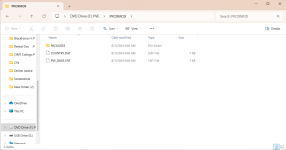
Ok. I think I get what you're saying better now. So essentially, the USB is now condemned and can no longer run on my windows machine? So when you say "put it nto the machine you want to install Proxmox on and boot from it.", can that machine be another windows PC or it must be something like a stand-a-alone server?The USB stick has been provided with the ISO file by Etcher which you used, after Etcher it told you it was not usable, this is because windows does not recognize the format used by Etcher on the USB stick.
So again when you start with Etcher and tell it to put the ISO on th USB stick you end up with a bootable UISB stick with Proxmox installer on it. Once Etcher is done eject the USB stick and ignore the format messages Windows is presenting you and remove the USB drive from your windfows machine and put it nto the machine you want to install Proxmox on and boot from it.
Thanks. So in a nutshell, any device whether it’s a window PC or stand-alone Server is compatible EXCEPT the original Window PC from where I downloaded the ISO image and burned to the USB?You now need to install it on the server by booting it up via USB
Both Windows PC and server are compatible
Yes, plan the equipment you want to install to meet your needsThanks. So in a nutshell, any device whether it’s a window PC or stand-alone Server is compatible EXCEPT the original Window PC from where I downloaded the ISO image and burned to the USB?
Great. Sorry I'm new to this. Apart from the RAM size, what more are necessary for meeting the compactible equipment requirement?Yes, plan the equipment you want to install to meet your needs
Yes. Thanks @gfngfn256 . To your point, I have limited knowledge of PROXMOX of any other VE. I am trying to understand it because it's the tool I am using in my training lab for practicalAs you have been advised, the USB flash-drive that has been flashed with Etcher, can then be used in ANY computer to install Proxmox.
What you have todo is start with a powered down computer & then boot it up using the USB flash-drive. Each BIOS can be different as to how to boot it up with the USB flash-drive. See your documentation.
WARNING! - PLEASE NOTE - THE COMPUTER DRIVE THAT YOU INSTALL PROXMOX ON WILL BE COMPLETLY WIPED - SO YOU WILL LOSE ALL DATA ON THAT DRIVE!
I must add; from your post it seems you have limited knowledge on installing (Linux) OS's on computers. I am not sure Proxmox is the best place for you to start. Maybe first dabble with a plain Linux distro & then eventually move up to a HV system? Are you sure you need Proxmox right now?
That's completely fine. Because it seems you aren't experienced in installation of another OS we are just careful to remind you, so you won't lose any important data for example on the installation target.To your point, I have limited knowledge of PROXMOX of any other VE. I am trying to understand it because it's the tool I am using in my training lab for practical
That's very thoughtful of you. I really appreciate you all. Thanks! I will now plan to get another PC to use as target. I will come back here if I run into any more issues and hopefully, I'll leverage your guidance again.That's completely fine. Because it seems you aren't experienced in installation of another OS we are just careful to remind you, so you won't lose any important data for example on the installation target.
Nobody wants data loss![]()
We use essential cookies to make this site work, and optional cookies to enhance your experience.