Proxmox help please

MEpke

Member
Sep 5, 2024
54
0
6
Hey everyone!

Long story short...

Dell R710 with:
- ssd 1tb for boot and images
-4 x4tb nas drives

Running proxmox 7.x and have a linux ubuntu vm with all my services as well as a zfs raid for the 4 disks.

As you see...everything is getting old and I've had a few scares that things are dying. I know I need to replace and upgrade

Servers are dumb expensive right meow due to the ram shortage and I'm trying to afford this sooner rather than later since this is a luxury, not a "need"

I have a backup up all my Dockge yaml's and a backup of all my important files, wedding photos, etc. from the 4tb raid on another drive so I'm safe for now.

Question...

I'm looking at servers or clustering. I've never clustered. Looking for suggestions. Building a server is dope, but still looks taxing. I would like to reuse the 4 x 3.5in HDDs.
I looked at mini pcs and would like 10gb network to future proof. I also am thinking of transcoding plex. A lot to think about.

Thanks for your help. I also need to figure out how to backup proxmox and move the whole things to whatever is decided.

Please help me, you're my only hope. :)
 
What is your budget, and why clustering?
Hey! Thanks for the reply.


I wanted to learn clustering if I don’t build a server. That’s one reason.

I want plenty of resources to tackle whatever projects I may have in the future. I was looking at dual epic 7532 processors. 32 core each.

I just like having options. Budget…I dont know..maybe 1500 or so?

I’d like it to be cheaper so I can upgrade. Trying to be realistic? I started at 150 plus the drives for the Dell r710 a thousand years ago. Haha
 
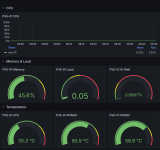
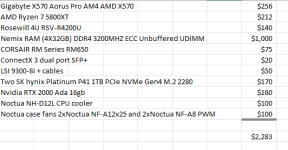
I think you can build a decent server for $1500, but you need to be realistic in your expectations. A dual Epyc motherboard will cost you $1500 alone. Never mind power supplies, RAM, etc. Plus, what kind of workloads are you going to run that you need that much horsepower? I just built a new rack mount server for myself. I really wanted to go AM5 with Epyc 4465P, but the cost of DDR5 memory just made that impossible. 4x32gb of DDR5 costs more than $3000. So Instead I went AM4. Not saying that my build is the right choice for you but just to give you a price benchmark I spent $2200 on the following. And I didn't include the cost of the four SM863 drives I already had. I use this machine to run 10 total VMs (three of which are websites, two Wordpress and one Discourse), and somewhere around 25 docker containers. And yet, my Ryzen 7 is really overkill. I am running below 5% CPU utilization most of the time. I might hit 35-40% when my K3S cluster (all VMs) are up and running. But that's it.


1771425721471.png


1771426076009.png
 
  • Like
Reactions: Johannes S
And yes, I found a fantastic deal on that RTX Ada 2000. I have no idea how I got that lucky!
I haven't looked at pricing so I'll take your word for it. Sounds like a badass system though. I am aware that the motherboards for dual were that much. i was also considering single CPU boards and they were "reasonable".

Honestly, I just like having future proofing.

I have one VM ubuntu with services like:

-plex
-rustdesk
-wireguard
-clonehero
-dockge
-arrstack
-esphome
-audiobookshelf
-kavita ebooks
-romm emulator for games in web player
-vaultwarden
-home assistant
-nginxproxymanager
and a few more for databasing.

Oh, and my important raid.

I just like spinning up vm's and having options. You know? I'm open to ideas and figuring out best bang for buck as long as it all works and lasts me a while. I'm a bit conservative with my budget due to just having a beautiful newborn. :)

I would like 10gb network for upscaling if I need to 2.5gb and up, etc.

I'm looking at your list as well.

Ideas?
 
All of what I am about to say is just a matter of preference, and not necessarily the right way or the best way. I use NVME drives for my VMs. Much better performance. I tend to not put a lot of data inside my VMs, which keeps them small, and as a result my 10 VMs only take up about 350GB of space. My NVME drives are only 1TB each, in a mirror. Spinning drives are much better for data storage. I would pass them through to a dedicated NAS VM. Something like Openmediavault, TrueNAS or just plain Debian running NFS and Samba. Mellanox ConnectX 3 cards are great for 10 gbe networking. Less than $20 on Ebay usually. But if you don't have a switch with SFP+ ports, you can find other good cards like Intel X540 on ebay for cheap. You don't need much of a GPU for video transcoding. Something like a cheap like a Nvidia Quadro P400 can be had for $25 and will do fine with transcoding. I like the idea of a separate video card because I think it is easier and cleaner to pass through to your docker VM.

Your workloads do not require very much CPU. Any mid tier desktop CPU will be fine. Finding a motherboard and CPU combo that will support ECC memory is probably the hardest part (assuming that matters to you. It may not). That's why I went AMD over Intel. My CPU and motherbard combo supports ECC RAM, and has enough slots for all the extras I wanted to plug in (10gbe NIC, HBA, GPU, two NVME drives). If you decide you don't need ECC memory, then lots of consumer hardware opens up to you. But only you can decide if that is a trade off you want to make.

I would get good with one server before venturing into clustering. I plan on setting up a cluster at some point, but I will probably do it with three NUC style devices or maybe some other mini PC like the Minisforum devices like an MS-01
 
All of what I am about to say is just a matter of preference, and not necessarily the right way or the best way. I use NVME drives for my VMs. Much better performance. I tend to not put a lot of data inside my VMs, which keeps them small, and as a result my 10 VMs only take up about 350GB of space. My NVME drives are only 1TB each, in a mirror. Spinning drives are much better for data storage. I would pass them through to a dedicated NAS VM. Something like Openmediavault, TrueNAS or just plain Debian running NFS and Samba. Mellanox ConnectX 3 cards are great for 10 gbe networking. Less than $20 on Ebay usually. But if you don't have a switch with SFP+ ports, you can find other good cards like Intel X540 on ebay for cheap. You don't need much of a GPU for video transcoding. Something like a cheap like a Nvidia Quadro P400 can be had for $25 and will do fine with transcoding. I like the idea of a separate video card because I think it is easier and cleaner to pass through to your docker VM.

Your workloads do not require very much CPU. Any mid tier desktop CPU will be fine. Finding a motherboard and CPU combo that will support ECC memory is probably the hardest part (assuming that matters to you. It may not). That's why I went AMD over Intel. My CPU and motherbard combo supports ECC RAM, and has enough slots for all the extras I wanted to plug in (10gbe NIC, HBA, GPU, two NVME drives). If you decide you don't need ECC memory, then lots of consumer hardware opens up to you. But only you can decide if that is a trade off you want to make.

I would get good with one server before venturing into clustering. I plan on setting up a cluster at some point, but I will probably do it with three NUC style devices or maybe some other mini PC like the Minisforum devices like an MS-01

I messaged you privately as to not take up space in the thread. I can post results at a later point. -Mike
 
There's no reason not to take up spce in the thread for stuff that might help out some other folks in the future. Just know Proxmox is very forgiving. I have run it on a DIY server based on a Ryzen 5 Pro chip, a HP Elite Mini 800G9 with an Intel i5-12500T chip, and a GMKtec G3 with an N100 chip. I have never had problems with any of them.
 
Last edited:
  • Like
Reactions: Johannes S