Proxmox GUI not opening but CLI does

mickyface

New Member
Jan 20, 2026
20
0
1
Hello Team,

Kindly assists I tried moving most of VMs from one PVE to another so that I can flash the server and upgrade it 9, but the memory on destination server spiked and the GUI is not accessible, I have shut down several VMs to free space but the issue remains the same. I can't access the GUI
 
Well, it seems you have multiple problems. The very first being the fact that noone here can actually help you while all relevant information is missing. What kind of answer do you actually expect from post #1?

Start with describing the old and the new system. Clustered? Kind of storage? CPU type? Ram? Network hardware? Your wrote "to free space" - of Ram or storage? On the configuration side post the output of pvesm status , and/or cat /etc/pve/storage.cfg of both systems. For your problem-VM add the output of qm config <vmid> . How - in detail - did you "move"?

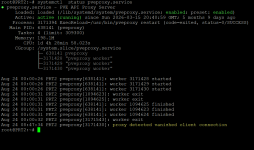
But first solve "the GUI is not accessible" problem. How did you test this? There are multiple possibilities: routing, IP-address conflicts, firewall/packet filters, dying pveproxy and so on. For this one you need to describe your network and show cat /etc/network/interfaces, again for both nodes - simply for comparison. To check pveproxy: systemctl status pveproxy.service.

This is the first round, more detailed ones will (probably) follow, when (hopefully) other forum members chime in.


PS: please use code-blocks, either by utilizing the "</>" symbol or by inserting [code]...[/code] manually for all terminal output.
 
  • Like
Reactions: Onslow
Well, it seems you have multiple problems. The very first being the fact that noone here can actually help you while all relevant information is missing. What kind of answer do you actually expect from post #1?

Start with describing the old and the new system. Clustered? Kind of storage? CPU type? Ram? Network hardware? Your wrote "to free space" - of Ram or storage? On the configuration side post the output of pvesm status , and/or cat /etc/pve/storage.cfg of both systems. For your problem-VM add the output of qm config <vmid> . How - in detail - did you "move"?

But first solve "the GUI is not accessible" problem. How did you test this? There are multiple possibilities: routing, IP-address conflicts, firewall/packet filters, dying pveproxy and so on. For this one you need to describe your network and show cat /etc/network/interfaces, again for both nodes - simply for comparison. To check pveproxy: systemctl status pveproxy.service.

This is the first round, more detailed ones will (probably) follow, when (hopefully) other forum members chime in.


PS: please use code-blocks, either by utilizing the "</>" symbol or by inserting [code]...[/code] manually for all terminal output.
Thanx UdoB pls find attached screen shots
1787567842978.png

So I manually backup vm on my PVE 1 to NAS attached NFS on the PVE and I was restoring all the vms to my PVE2 but the memory got spiked and the GUI disconnected am able to access the backend but GUI gives me this error. Please let me know what to provide again. grateful

1787568549844.png
 
Your GUI is working, this is an authentication issue.

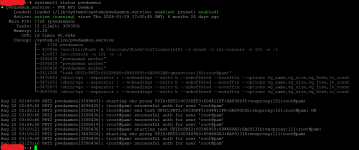
pveproxy only serves the page the login is handled by pvedaemon, you can check that with:
systemctl status pvedaemon

Are you sure you used the correct login details for the other node?
 
Your GUI is working, this is an authentication issue.

pveproxy only serves the page the login is handled by pvedaemon, you can check that with:
systemctl status pvedaemon

Are you sure you used the correct login details for the other node?
Thanks JohnnieKF

Yes please I used the correct logins that's the same logins for the ssh which is working. see attached as requested

1787571380735.png