

Hi,
I just updated my server from V6.4-13 to V7.2-7.
Now the GUI is not showing the Directory storages any more but in the folder view they are still visible:
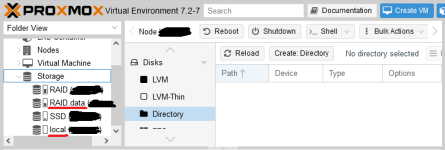
Also in the command line (pvesm status) they are shown properly:

This is the storage.cfg content:
If I create a new node, it is properly shown in the list.
How can I get my old Directory storages back into the list?
Thank you!
I just updated my server from V6.4-13 to V7.2-7.
Now the GUI is not showing the Directory storages any more but in the folder view they are still visible:
Also in the command line (pvesm status) they are shown properly:
This is the storage.cfg content:
Code:
dir: local
        path /var/lib/vz
        content vztmpl,iso

lvmthin: SSD
        thinpool data
        vgname ssd
        content images,rootdir
        nodes mynode1

zfspool: RAID
        pool RAID
        content rootdir,images
        mountpoint /RAID
        nodes mynode1
        sparse 0

dir: RAID.data
        path /RAID/data
        content vztmpl,snippets,iso,backup
        nodes mynode1
If I create a new node, it is properly shown in the list.
How can I get my old Directory storages back into the list?
Thank you!

