Proxmox error?!?!

CptnBlues63

New Member
Apr 11, 2024
7
1
3
I was running a test machine to familiarize myself with Proxmox.

The server is an HPE DL380 Gen9

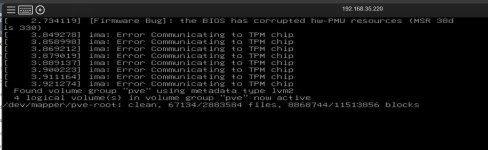
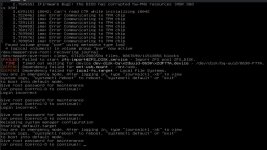
I rebooted the server and now it won't boot properly. I've double checked the hardware and can find no issue. Ran a service pack that updated all BIOS too and still won't boot. I have no idea what the problem could be and I think it's related to Proxmox because this last boot I did manually and selected the HDD boot (HDD has the Proxmox on it). It began booting and then this:
ProxmoxIssue.jpg

I'm really hoping someone can help because I'd like to recover it.

TIA
 
It seems like you have a USB disk in your fstab/systemd, and that disk has either failed or is not available any more. This blocks the normal boot.

Are you not able to enter the root password to access the rescue shell?

You can follow this guide https://pve.proxmox.com/wiki/Recover_From_Grub_Failure and remove the missing disk from boot sequence.


Blockbridge : Ultra low latency all-NVME shared storage for Proxmox - https://www.blockbridge.com/proxmox
 
It seems like you have a USB disk in your fstab/systemd, and that disk has either failed or is not available any more. This blocks the normal boot.

Are you not able to enter the root password to access the rescue shell?

You can follow this guide https://pve.proxmox.com/wiki/Recover_From_Grub_Failure and remove the missing disk from boot sequence.


Blockbridge : Ultra low latency all-NVME shared storage for Proxmox - https://www.blockbridge.com/proxmox
I'm embarrassed to admit, I had forgotten the root password. I had to mess around a bit but eventually got the right one and am now logged in.
Can you tell me what I need to do to remove the USB entry? Linux isn't my strong point and I'd prefer to have someone who really knows what they're doing guide me. TIA
 
Hi @CptnBlues63 ,
Keep in mind that this is not PVE specific, but rather generic Linux administration. Any publicly available resource can generically guide through this with sufficiently detailed prompt.

At a high level, either remove the systemd file:
rm /etc/systemd/system/mnt-usb.mount

Or edit /etc/fstab and remove the usb-corresponding line from it


Blockbridge : Ultra low latency all-NVME shared storage for Proxmox - https://www.blockbridge.com/proxmox
 
Started going through the guide you posted the link to and got to here:

zpool import f -R /media/RESCUE rpool

applied that command and got the following error message:

cannot import 'rpool' : no such pool available

I'm out of my depth here but am positive I did all previous commands correctly. I'm going to stop there and wait to see what I should do next.
 
Hi @CptnBlues63 ,
Keep in mind that this is not PVE specific, but rather generic Linux administration. Any publicly available resource can generically guide through this with sufficiently detailed prompt.

At a high level, either remove the systemd file:
rm /etc/systemd/system/mnt-usb.mount

Or edit /etc/fstab and remove the usb-corresponding line from it


Blockbridge : Ultra low latency all-NVME shared storage for Proxmox - https://www.blockbridge.com/proxmox
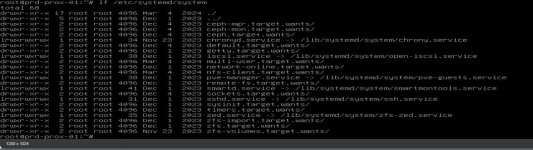
I don't seem to have a USB mounted. At least that file doesn't appear in the directory you listed

ProxmoxIssue.jpg
ProxmoxIssue2.jpg
 
The USB related line in your /etc/fstab is 6th from the top, including empty line preceding it.


Blockbridge : Ultra low latency all-NVME shared storage for Proxmox - https://www.blockbridge.com/proxmox
Can't believe I missed that!

In my own defense, I had a migraine yesterday and my brain is still fuzzy. Plus, it's an HPE and the console interface in the iLo sucks mightily as I'm sure you noticed in the screenshots.

I'm rebooting...and crossing my fingers!
 
The USB related line in your /etc/fstab is 6th from the top, including empty line preceding it.


Blockbridge : Ultra low latency all-NVME shared storage for Proxmox - https://www.blockbridge.com/proxmox

It's up and my server is running! I'm going to run a backup on it now so I don't lose all the changes I made since the previous backup (about a year old....argh!) I know, I had another identical server running in production and this was a copy I made to familiarize myself with Proxmox. A week or so back the bare metal box died and before I backed up the data on this one I needed to save, I rebooted it and here I am....lol This is going to be "production" for a while until I get a new BMB up and running. First things first, backup!

It did show this on bootup:
ProxmoxIssue3.jpg
but did boot to the prompt. I was able to login. Is that something I need to worry about and/or fix?

Thank you! Your help was invaluable.
 
Get a backup first, then see if there are any available BIOS/firmware updates. Even if there are not, what you posted should not bother you too much.
With the large amount of 3rd and 4th tier hardware out there, backed by generic BMC software - the OS is telling you that its not happy with what you have but not enough to fail the boot.


Blockbridge : Ultra low latency all-NVME shared storage for Proxmox - https://www.blockbridge.com/proxmox