

Hi,
I would like to describe how we use Proxmox in our company and share some tricks what we do for making Proxmox better.
We have a lot of nodes with Proxmox and shared storage. Recently we had only one storage and we were worried about this. We decide to make second storage for redundancy.
How looks our first storage:
It's the server which shares virtual volume to Proxmox nodes via FC.
Every Proxmox node works with shared storage volume like with block device. For simplicity I will call this block device /dev/sdx
At the first time we created LVM on this disk. pvcreate vgcreate ...
All nodes where disk is connected works normally with LVM and VMs are migrated etc...
What we do for making redundancy:
We connect the second storage via FC like first storage. All nodes began to see new block device: /dev/sdz
We extend our LVM volume group to the new device. vgextend vgname /dev/sdz
We wanted to make simple LVM volume mirror. All our disks were mirrored: lvconvert -m1 /dev/vgname/vm-100-disk-1
At this stage we already made redundancy and Proxmox works well, almost well)
1. When you will create new VM, this VM will created without mirror -m1.
2. When you will click Storage -> Content in the web interface, mirrored disks will not be displayed.
How fix it:
1. To fix this you only need add -m1 to script which create lvm volumes.
You need edit /usr/share/perl5/PVE/Storage/LVMPlugin.pm
Find function: alloc_image
Find line: my $cmd = ['/sbin/lvcreate'...
my $cmd = ['/sbin/lvcreate', '-aly', '--addtag', "pve-vm-$vmid", '--size', "${size}k", '-m1', '--name', $name, $vg];
We added -m1.
Fixed. All new VMs on LVM will created with mirror. But on the other hand you cannot create VMs without mirror.
2. The problem is that function which responsible for displaying LVM volumes will show you it only if LVM volume attribute will start from "-". If you enter lvs command you get:
vm-225-disk-1 lvmvg rwi-a-r--- 32.00g
vm-226-disk-1 lvmvg -wi-a----- 5.00g
vm225 is 'mirrored' will not shown
vm226 is not 'mirror' will shown
It does not interfere with work. It does not affect anything. But:
Edit /usr/share/perl5/PVE/Storage/LVMPlugin.pm
Find function list_images
Find line: next if $info->{lv_type} ne '-';
Change to: next if $info->{lv_type} ne '-' && $info->{lv_type} ne 'r';
Fixed.
P.S>
Dear Proxmox developers.
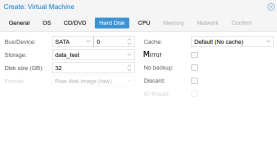
Please add checkbox to web interface that makes Proxmox support LVM mirrors.
If Proxmox node have LVM volume group from more than one disk, when user try to create VM he get "Mirror" checkbox. I have tried to show my thought in image.
Thank you very much.
I would like to describe how we use Proxmox in our company and share some tricks what we do for making Proxmox better.
We have a lot of nodes with Proxmox and shared storage. Recently we had only one storage and we were worried about this. We decide to make second storage for redundancy.
How looks our first storage:
It's the server which shares virtual volume to Proxmox nodes via FC.
Every Proxmox node works with shared storage volume like with block device. For simplicity I will call this block device /dev/sdx
At the first time we created LVM on this disk. pvcreate vgcreate ...
All nodes where disk is connected works normally with LVM and VMs are migrated etc...
What we do for making redundancy:
We connect the second storage via FC like first storage. All nodes began to see new block device: /dev/sdz
We extend our LVM volume group to the new device. vgextend vgname /dev/sdz
We wanted to make simple LVM volume mirror. All our disks were mirrored: lvconvert -m1 /dev/vgname/vm-100-disk-1
At this stage we already made redundancy and Proxmox works well, almost well)
1. When you will create new VM, this VM will created without mirror -m1.
2. When you will click Storage -> Content in the web interface, mirrored disks will not be displayed.
How fix it:
1. To fix this you only need add -m1 to script which create lvm volumes.
You need edit /usr/share/perl5/PVE/Storage/LVMPlugin.pm
Find function: alloc_image
Find line: my $cmd = ['/sbin/lvcreate'...
my $cmd = ['/sbin/lvcreate', '-aly', '--addtag', "pve-vm-$vmid", '--size', "${size}k", '-m1', '--name', $name, $vg];
We added -m1.
Fixed. All new VMs on LVM will created with mirror. But on the other hand you cannot create VMs without mirror.
2. The problem is that function which responsible for displaying LVM volumes will show you it only if LVM volume attribute will start from "-". If you enter lvs command you get:
vm-225-disk-1 lvmvg rwi-a-r--- 32.00g
vm-226-disk-1 lvmvg -wi-a----- 5.00g
vm225 is 'mirrored' will not shown
vm226 is not 'mirror' will shown
It does not interfere with work. It does not affect anything. But:
Edit /usr/share/perl5/PVE/Storage/LVMPlugin.pm
Find function list_images
Find line: next if $info->{lv_type} ne '-';
Change to: next if $info->{lv_type} ne '-' && $info->{lv_type} ne 'r';
Fixed.
P.S>
Dear Proxmox developers.
Please add checkbox to web interface that makes Proxmox support LVM mirrors.
If Proxmox node have LVM volume group from more than one disk, when user try to create VM he get "Mirror" checkbox. I have tried to show my thought in image.
Thank you very much.
