I use Proxmox. I have four virtual machines on SATA SSD drives (the machine's motherboard doesn't support RAID). They were running in a ZFS pool. Using a ZFS data recovery program, I recovered the machine file, but without the extension. Is it possible to access the data on a new machine with Proxmox installed, or import the virtual machines somehow?


Proxmox - crash disc
- Thread starter hiper
- Start date
You are using an out of date browser. It may not display this or other websites correctly.
You should upgrade or use an alternative browser.
You should upgrade or use an alternative browser.
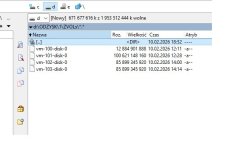
if the original data was a zvol, you can just append .raw to the file. then you can use qemu-img to import the data to your new destination.
Hi, @hiperI recovered the machine file, but without the extension
Is it a Windows file explorer (or whatever it's called in a particular version) in the screenshot?
So maybe files have extension, but the explorer has the usual setting to hide file extensions?
Every time I set up a new account in M$ Windows I'm still unpleasantly surprised that after all these tens of years (*) morons at Micros..t hasn't yet come up with the idea that file extensions should be shown by default!
If not for users' convenience, at least for security, so that a user can see that this random file is named
document.pdf.exe, not document.pdf and that's better not to double-click it!(*) Yes, AI confirms that "This practice dates back to Windows 95". How stupid.

My machine consists of two SSD drives - one failed, and after restarting, Proxmox won't boot from the other.I used a program that analyzes ZFS and found the images and snapshot. I used the recovery option with the most current snapshot and got this file.Should I give it the RAW extension?Can you tell me the syntax for importing such a RAW file?if the original data was a zvol, you can just append .raw to the file. then you can use qemu-img to import the data to your new destination.


the syntax is
qm disk import <vmid> <source> <storage> [OPTIONS]
in your case, source would be /path/to/my/recovered.raw
qm disk import <vmid> <source> <storage> [OPTIONS]
in your case, source would be /path/to/my/recovered.raw