Hi,
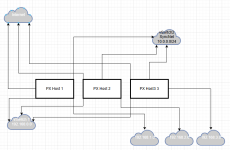
so I reproduced the three node cluster and used VXLan with a router in the cluster. This allowed me to live-migrate machines.
I'll use the following abbreviations:
<cluster-gateway>: gateway the nodes use in their /etc/network/interfaces, e.g. 172.16.0.254
<ip-cn1>: Ip of cluster node 1, e.g. 172.16.0.100
<ip-cn2>: Ip of cluster node 2, e.g. 172.16.0.101
<ip-cn3>: Ip of cluster node 3, e.g. 172.16.0.102
<ip-cnx>: any of the node addresses above.
<ip-router>: Ip address, where the Router-VM should be reachable in the outer network, e.g. 172.16.0.103.
<vm-gateway>: gateway for the VM-network, e.g. 10.0.5.1
<vm-subnet>: subnet of the VM-network, e.g. 10.0.5.0/24 (im your case 192.168.4.0/24) might make sense for transitioning
What I did:
I created a VXLan Zone in the Web Gui, where i added all the <ip-cnx> as Peers.
Then I created a VNet for that Zone with the name 'vxnet' and the Subnet <vm-subnet> with Gateway <vm-gateway>.
Then on on of the cluster nodes i created a Router-VM, which was just a PVE VM, but with two Nics: One to the bridge of the VM (i.e. vmbr0) and one to the VNet (here vxnet).
In my case, the device connected to vmbr0 is nic0 and the device connected to vxnet is nic1.
Inside of the Router-VM I then adjusted the /etc/network/interfaces settings to
Code:
auto vmbr0
iface vmbr0 inet static
    address <ip-router>/24
    gateway <cluster-gateway>
    bridge-ports nic0
    bridge-stp off
    bridge-fd 0

auto nic1
iface nic1 inet static
    address <vm-gateway>/24
    mtu 1450
Here <ip-router> is in the IP Range of the outer network, where the other cluster node IPs also reside.
After that
It is important that this doesn't yield an error as otherwise the settings are not applied.
On the RouterVM I also enabled forwarding using:
Code:
sysctl -w net.ipv4.ip_forward=1
iptables -t nat -A POSTROUTING -s <vm-subnet>  -o vmbr0 -j MASQUERADE
iptables -A FORWARD -i nic1 -o vmbr0 -j ACCEPT
iptables -A FORWARD -i vmbr0 -o nic1 -m state --state RELATED,ESTABLISHED -j ACCEPT
net.ipv4.ip_forward = 1
To make the Cluster-Nodes be able to reach the VMs add a special routing constraint in /etc/network/interfaces:
Code:
iface vmbr0 inet static
    address <ip-cnx>/24
    ...
    post-up ip route add <vm-subnet> via <ip-router>
    pre-down ip route del <vm-subnet> via <ip-router>
or, for temporary testing:
Code:
ip route add <vm-subnet> via <ip-router>
First look into
in your VM and note the Nics (e.g. nic0, ens18).
Then on the VMs in the Hardware overview add a Network Device with Bridge: vxnet.
This should the show up under
as something like ens19.
You can then, in /etc/network/interfaces/, set the bridge-ports of your vmbr0 to your new network device and apply a valid ip-address in <vm-subnet> and <vm-gateway> as gateway.
If ifreload doesn't work, because of wrong mtu also add
Code:
auto ens19
iface ens19 inet manual
    mtu 1450
to the top of /etc/network/interfaces.
If connectivity doesnt, work, you can still revert this using the noVNC interface.
After that you should be able to live migrate the VMs.
Also, on a side note: for your Router-VM it might be better to use something like OPNSense or PFSense.
if you cannot have another IP address for your Router-VM you can also set one of the nodes as gateway. This can be done temporarily by setting the gateway adress as the ip address of the vxnet network device
Code:
ip addr add <vm-gateway>/24 dev vxnet
but you will also need to give similar IPs for the other nodes in the <vm-subnet>, so that they can reach the VMs.
Another option would be to use EVPN as it is a bit more capable but also more complex. See
https://forum.proxmox.com/threads/inter-node-sdn-networking-using-evpn-vxlan.146266/
Just to clarify I did NOT test this out on hetzner only locally, but as VXLan only requires IP connectivity, it should work nevertheless.
I hope this helps; otherwise, please tell me what did not work.
Best regards
Lukas