still no immutability option, without a solid immutability option you still need another backup solution.


Proxmox Backup Server 4.2 released!
- Thread starter t.lamprecht
- Start date
You are using an out of date browser. It may not display this or other websites correctly.
You should upgrade or use an alternative browser.
You should upgrade or use an alternative browser.

For regular datastores this is not easily implemented and requires the underlying storage to provide some mechanism to do so, see https://bugzilla.proxmox.com/show_bug.cgi?id=4293.still no immutability option, without a solid immutability option you still need another backup solution.
For datastores backed by S3, this might get implemented based on the discussion in https://bugzilla.proxmox.com/show_bug.cgi?id=6780 and the there linked forum thread, but I cannot give an ETA.
Edit: FYI, what you can already do is sync to offsite remotes or store to tape if the goal is ransomware protection https://pbs.proxmox.com/docs/storage.html#ransomware-protection-recovery
Last edited:

Adding to your link to the manual I want to point out, that for regular datastores it's not really needed since you canFor regular datastores this is not easily implemented and requires the underlying storage to provide some mechanism to do so, see https://bugzilla.proxmox.com/show_bug.cgi?id=4293.
- Use tapes or usb discs ("removable datastores") as air-gapped backup target
- Setup another PBS behind a firewall so neither the primary PBS nor the PVE nodes can access it. Then the remote PBS can do a pull-sync to the primary PBS.
I had some trouble installing 4.2 on old hardware - it seems the underlying Debian Trixie has dropped support for several components, I could not get the install to complete on a Dell R510 with H700 perc card. I fully understand this is way beyond ideal hardware but what I thought was a full HBA card in a failed newer system turned out to be one of those mini daughter cards (thanks Dell! ), so I have to make do with the H700 in an older chassis as a stop-gap solution. I'm using 2 x fast SSD in hardware raid1 for boot and then the remaining 6 bays each as a RAID0 volume of an enterprise quality SSD which is presented to PBS for ZFS (RAIDZ2) for the data pool. Like I say - not ideal. But I'm also putting in a NAS for 'colder' archive backups in a remote building.
I was getting squashfs errors and it looked like the boot media was faulty. I also suspected it was using EFI rather than Legacy on the older chassis but that wasn't the issue either. I tried a lot of different permutations but came to the conclusion it wasn't possible to install 4.2. What worked was install older PBS 3.2 and upgrade to 4.2 - that was very smooth and no problems. Resulting system seems to be working better than I expected of such old hardware. Smartctl can see the smart data using megaraid so it's reasonably robust.
Anyway, just thought I'd share that 3.2 and upgrading is very smooth if you are using older hardware in a home lab etc. Its my first time trying PBS and I have to say I'm already a huge fan.
I was getting squashfs errors and it looked like the boot media was faulty. I also suspected it was using EFI rather than Legacy on the older chassis but that wasn't the issue either. I tried a lot of different permutations but came to the conclusion it wasn't possible to install 4.2. What worked was install older PBS 3.2 and upgrade to 4.2 - that was very smooth and no problems. Resulting system seems to be working better than I expected of such old hardware. Smartctl can see the smart data using megaraid so it's reasonably robust.
Anyway, just thought I'd share that 3.2 and upgrading is very smooth if you are using older hardware in a home lab etc. Its my first time trying PBS and I have to say I'm already a huge fan.
I’m still playing around with it, but so far I’m happy with it.
I’m coming from Veeam, but Veeam doesn’t seem to work as well with Proxmox as it does with VMware.
I do miss immutability — that’s definitely a must-have — but for now I’m still testing things. Other than that, Veeam seems to work fine so far.
I’m coming from Veeam, but Veeam doesn’t seem to work as well with Proxmox as it does with VMware.
I do miss immutability — that’s definitely a must-have — but for now I’m still testing things. Other than that, Veeam seems to work fine so far.
Last edited:
Hello,
I would like to point out that PBS 4.2 ISO installer seems to not boot on a Hyper-V host (Windows 11 25H2 laptop)
Legacy CSM boot is affected
UEFI boot also affected, regardless if Secure Boot is enabled or not
Symptoms :
Proxmox Backup Server installer Grub menu is displaying just fine
Actual boot using the GUI or Terminal UI options of Grub are not working
The kernel seems to boot fine but the installation media is somehow "not found" ?
Applied workaround :
Install PBS 4.1 and upgrade to 4.2 is OK
Thank you.
I would like to point out that PBS 4.2 ISO installer seems to not boot on a Hyper-V host (Windows 11 25H2 laptop)
Legacy CSM boot is affected
UEFI boot also affected, regardless if Secure Boot is enabled or not
Symptoms :
Proxmox Backup Server installer Grub menu is displaying just fine
Actual boot using the GUI or Terminal UI options of Grub are not working
The kernel seems to boot fine but the installation media is somehow "not found" ?
Applied workaround :
Install PBS 4.1 and upgrade to 4.2 is OK
Thank you.
Follow up. So I noticed an update to the kernel 7 to 7.0.2-2-pve, so I tried it on my PBS with the enterprise subscription (HP, gen 11). It's newer hardware so I figured it might be OK. And it has been fine. So I might try the newer kernel on the HP Microserver Gen 8 again and see what happens. Plus I see the kernel is up to 7.0.2-4-pve. So it may have addressed some issues. We'll see. Wish me luck.So, I noticed the new kernel 7 come up in my (non-enterprise) PBS. So I tried installing it. I have PBS with enterprise license, but this was an extra backup server I had on an old HP Microserver Gen 8.
So the installation went OK, and it rebooted. But then crashed within the day. It looks like it crashed in the middle of a backup job. I was at home when it crashed, so I logged in remotely to the ILO and managed to get it to reboot, but it was clearly having troubles with the 7.0 kernel. I pinned it back to the previous 6.17.13(??) kernel and it seems to be fine again. Just thought I'd provide that feedback.
And that's a hard no. The HP Microserver Gen 8 does NOT tolerate kernel 7.0.2-4-pve. As soon as I attempted a backup, a hard crash requiring power off and back on, reboot, and select a 6.17 kernel. We are now pinned to kernel 6.17.13-7-pve. And that's probably the way it's going to have to be. The HP server gen 11 seems to be tolerating the 7.0.2-4-pve kernel just fine though. Strange.
You can use a similar implementation to what Veeam did: XFS immutable storage located on a hardened server outside of PBS and attached as an XFS immutable repository.For regular datastores this is not easily implemented and requires the underlying storage to provide some mechanism to do so, see https://bugzilla.proxmox.com/show_bug.cgi?id=4293.
For datastores backed by S3, this might get implemented based on the discussion in https://bugzilla.proxmox.com/show_bug.cgi?id=6780 and the there linked forum thread, but I cannot give an ETA.
Edit: FYI, what you can already do is sync to offsite remotes or store to tape if the goal is ransomware protection https://pbs.proxmox.com/docs/storage.html#ransomware-protection-recovery
Having immutable S3 as an option will do, but tape is not a real option. It is not only expensive legacy technology, but it’s also not practical to rely on people to change tapes.
Last edited:

Could you see any telling error messages? Maybe the persistent syslog has saved something so that you do not need to retry booting into 7.0 in your setup to gather those logs.And that's a hard no. The HP Microserver Gen 8 does NOT tolerate kernel 7.0.2-4-pve. As soon as I attempted a backup, a hard crash requiring power off and back on, reboot, and select a 6.17 kernel. We are now pinned to kernel 6.17.13-7-pve. And that's probably the way it's going to have to be. The HP server gen 11 seems to be tolerating the 7.0.2-4-pve kernel just fine though. Strange.
New LTO generations are still being released, autoloaders and libraries handle the swapping, and WORM media gives you actual physical protection-not just a software flag that can be cleared. Tape is cheap per TB over its whole lifetime and, more importantly, it doesn't share a failure domain with the credentials managing it. That's why 3-2-1-1-0 still (should) end in a "1" that's offline. Use immutable S3 by all means, but dismissing tape is how some people end up with a very modern backup set they can't restore when really facing such an attack.tape is not a real option. It is not only expensive legacy technology, but it’s also not practical to rely on people to change tapes.
As for XFS immutable: it's "just" a
chattr +i that root can reverse just as easily. Its real protection comes mostly from it living on a separate box, so an attacker who owns the backup server can't trivially nuke the data. You get basically (rather exactly) the same guarantee in PBS today by pushing to a remote with a user that can create but not delete-no XFS gymnastics required.Tape is certainly not perfect, and its biggest drawback is latency, and somewhat also throughput, but it definitely is still a very valid option.
Could you see any telling error messages? Maybe the persistent syslog has saved something so that you do not need to retry booting into 7.0 in your setup to gather those logs.
I'll do another test and get you that information. The focus at that moment was getting things operating again. But I'll do a more controlled test to get as much information as I can. It's a holiday weekend here, so maybe I can spend some time on that this weekend when the business is closed.
I have more data on the crash. But it's nor really suitable for the forum. Who should I send the screenshots, logs, and explanation to?Could you see any telling error messages? Maybe the persistent syslog has saved something so that you do not need to retry booting into 7.0 in your setup to gather those logs.
Please open a new thread and attach your logs and findings there (you can retract them if you have sensitive information in them)I have more data on the crash. But it's nor really suitable for the forum. Who should I send the screenshots, logs, and explanation to?
Good day congrats on great acheivement, I was wondering if there is any timeframe for the release of a standalone windows client. So we could backup physical windows server directly to a PBS server, I think this is a work in progress but I don't know if you have a release time frame thank you
Hello everyone,
I noticed that support for other operating systems is present on the PBS roadmap, but I could not find any information regarding an estimated release date.
Is there any timeline, target version, or rough estimate for when support for additional operating systems may become available?
Thank you.
I noticed that support for other operating systems is present on the PBS roadmap, but I could not find any information regarding an estimated release date.
Is there any timeline, target version, or rough estimate for when support for additional operating systems may become available?
Thank you.
Hi, no there is currently no active development efforts in this direction and I cannot give an ETA.Good day congrats on great acheivement, I was wondering if there is any timeframe for the release of a standalone windows client. So we could backup physical windows server directly to a PBS server, I think this is a work in progress but I don't know if you have a release time frame thank you
Hi all,
I just upgraded from PBS4.0 to 4.2 and found an issue when trying to edit an exisiting remote after the upgrade. Not sure if this is already being tracked but mentioning it here anyway.
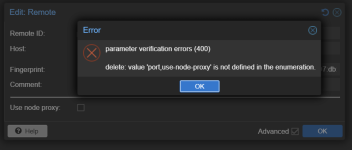
So I made a new 'test' remote to see what changed and in the remote.conf there was a new key 'use-node-proxy' that my old entry did not contain.
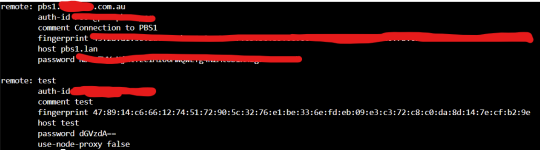
On adding the key manually everything works as expected.
I guess the upgrade does not parse older remote entries in the remote.conf to add this new key.
I just upgraded from PBS4.0 to 4.2 and found an issue when trying to edit an exisiting remote after the upgrade. Not sure if this is already being tracked but mentioning it here anyway.
So I made a new 'test' remote to see what changed and in the remote.conf there was a new key 'use-node-proxy' that my old entry did not contain.
On adding the key manually everything works as expected.
I guess the upgrade does not parse older remote entries in the remote.conf to add this new key.
Thanks for the report! There is a patch to fix this on the developer mailing list https://lore.proxmox.com/pbs-devel/20260623100525.69448-1-c.ebner@proxmox.com/T/#uHi all,
I just upgraded from PBS4.0 to 4.2 and found an issue when trying to edit an exisiting remote after the upgrade. Not sure if this is already being tracked but mentioning it here anyway.
View attachment 98496
So I made a new 'test' remote to see what changed and in the remote.conf there was a new key 'use-node-proxy' that my old entry did not contain.
View attachment 98497
On adding the key manually everything works as expected.
I guess the upgrade does not parse older remote entries in the remote.conf to add this new key.