[SOLVED] Proxmox backup in NAS SYNOLOGY

SamerXtn

New Member
Nov 29, 2024
16
0
1
Italy
Hello everyone

after configuring that my proxmox server connect to a Synology NAS via (SMB/CIFS) , and created backup job , checking my NAS LOG found that inside overview > last 50 logs
each 30 seconds i get in the LOG :
INFO
User [bkuser] from [PROXMOX(192.168.x.x)] via [CIFS(SMB3)] accessed shared folder [bk_server].

any one faced this ?

there's any solution
 
You can use the grep tool to exclude certain things when viewing logs. Eg.
'grep -v "bk_server" /var/log/messages' will exclude those notices from your logs.
Alternatively look into GrayLog or something similar where you can do more extensive queries on your logs.
 
You can use the grep tool to exclude certain things when viewing logs. Eg.
'grep -v "bk_server" /var/log/messages' will exclude those notices from your logs.
Alternatively look into GrayLog or something similar where you can do more extensive queries on your logs.
Sorry, im talking about the logs inside LOG CENTER of NAS Synology, not the logs of proxmox server.
 
but this making my log full of them and cant check important things when they arrive to last 50 logs
I understand the desire to keep the log clean, but this is one of those cases where "more is more." Some of these NAS devices are intended for small to medium businesses, where 100-200 users might be accessing them. The log will naturally fill with similar messages, which are important for troubleshooting and forensics.

Keep in mind that PVE is simply making a standard protocol connection. If your NAS cannot filter INFO-level messages from ERROR or WARNING, that’s more of a NAS limitation than a PVE issue.

Along the lines of @guruevi suggestions - look into your NAS remote logging capabilities, so you can filter/ignore there.

Cheers


Blockbridge : Ultra low latency all-NVME shared storage for Proxmox - https://www.blockbridge.com/proxmox
 
  • Like
Reactions: SamerXtn
I understand the desire to keep the log clean, but this is one of those cases where "more is more." Some of these NAS devices are intended for small to medium businesses, where 100-200 users might be accessing them. The log will naturally fill with similar messages, which are important for troubleshooting and forensics.

Keep in mind that PVE is simply making a standard protocol connection. If your NAS cannot filter INFO-level messages from ERROR or WARNING, that’s more of a NAS limitation than a PVE issue.

Along the lines of @guruevi suggestions - look into your NAS remote logging capabilities, so you can filter/ignore there.

Cheers


Blockbridge : Ultra low latency all-NVME shared storage for Proxmox - https://www.blockbridge.com/proxmox
Thank you
 
Having migrated plenty of Synology to proper storage systems, the Synology logs are also located in /var/log - it's a Linux system after all, you don't need to use the GUI, the CLI is much more flexible.
 
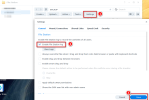
Afaik there‘s a setting within Syno‘s File Station app where you can untick the option to log SMB access on shared folders. But this will apply to all users/accounts which access your NAS.
 
  • Like
Reactions: SamerXtn
File Station -> Settings -> "Enabe File Station log" -> untick

synology.png
 
I have to find a solution because I have 5 nodes and they all access to SMB shares. I get 5 log entry every 10 seconds, so in the last month I got 1.296.000 entry. Why Proxmox continues to login/access rather than keep the session live ? thanks
 
Hi @macmino,

There are a few possible approaches here:
  • Enable/disable the storage as needed. If it’s strictly used for backups, this might be sufficient, though I haven’t personally tested it (see man pvesm).
  • Follow the workaround mentioned in comment #13.
  • Reach out to Synology and request more granular filtering than what is currently possible with the method in comment #13.
  • Wait for the request to reach the top of the queue or gain higher priority within the PVE team.
  • Develop and submit a patch to the PVE team that improves this behavior.
Keep in mind that a high volume of log messages alone is unlikely to justify urgent attention. If you can articulate why this negatively affects paying Enterprise subscription customers, it may help raise the priority.

Cheers


Blockbridge : Ultra low latency all-NVME shared storage for Proxmox - https://www.blockbridge.com/proxmox
 
@macmino: the default session timeout for SMB sessions is 15 minutes. This is the Microsoft recommended behavior in order not to exhaust the maximum number of connections (and license consumption) on large servers.

You can on the file server side increase the deadtime configuration for smb.conf, but it shouldn't matter because the client re-connects when necessary. If you're worried about the logs because users log in, then disable or tune the logs.
 
the default session timeout for SMB sessions is 15 minutes. This is the Microsoft recommended behavior in order not to exhaust the maximum number of connections (and license consumption) on large servers.
I don't think this thread is about the session timeout. It's the fact that PVE uses SMB connect/teardown as a means to probe/healthcheck the CIFS storage.
https://github.com/proxmox/pve-storage/blob/master/src/PVE/Storage/CIFSPlugin.pm#L271


Blockbridge : Ultra low latency all-NVME shared storage for Proxmox - https://www.blockbridge.com/proxmox
 
Last edited:
Hi @macmino,

There are a few possible approaches here:
  • Enable/disable the storage as needed. If it’s strictly used for backups, this might be sufficient, though I haven’t personally tested it (see man pvesm).
  • Follow the workaround mentioned in comment #13.
  • Reach out to Synology and request more granular filtering than what is currently possible with the method in comment #13.
  • Wait for the request to reach the top of the queue or gain higher priority within the PVE team.
  • Develop and submit a patch to the PVE team that improves this behavior.
Keep in mind that a high volume of log messages alone is unlikely to justify urgent attention. If you can articulate why this negatively affects paying Enterprise subscription customers, it may help raise the priority.

Cheers


Blockbridge : Ultra low latency all-NVME shared storage for Proxmox - https://www.blockbridge.com/proxmox
it's only hurting my mind, viewing so many messages give me a lot of stress :)

thanks for the clarification