

Proxmox 9 - IO error ZFS

Tachy

Renowned Member
Aug 4, 2016
19
0
66
31
Hi everyone,

We’ve been deploying several new Proxmox 9 nodes using ZFS as the primary storage, and we’re encountering issues where virtual machines become I/O locked.

When it happens, the VMs are paused with an I/O error. We’re aware this can occur when a host runs out of disk space, but in our case there is plenty of free storage available.
We’ve seen this behavior across multiple hosts, different clusters, and different hardware platforms.

Furthermore, we’ve been running ZFS on Proxmox 8 without any issues, but since these problems started with our Proxmox 9 installations, we’re hesitant to upgrade our existing nodes.

Do you have a checklist or common causes to investigate for this type of I/O error with ZFS on Proxmox?

Thanks in advance.
-
Eliott
 

Attachments

  • image.png
    image.png
    26.9 KB · Views: 17
Hi, i work with @Tachy on the problem.
Here are the logs
Code:
root@prd-prx01-gra:~# lsblk -o+FSTYPE,LABEL,MODEL
NAME        MAJ:MIN RM   SIZE RO TYPE  MOUNTPOINTS FSTYPE            LABEL       MODEL
nvme0n1     259:0    0 894,3G  0 disk                                            SAMSUNG MZQL2960HCJR-00A07
├─nvme0n1p1 259:1    0   511M  0 part              linux_raid_member            
│ └─md1       9:1    0 510,9M  0 raid1 /boot/efi   vfat              EFI_SYSPART
├─nvme0n1p2 259:2    0     1G  0 part              linux_raid_member md2        
│ └─md2       9:2    0  1022M  0 raid1 /boot       ext4              boot      
├─nvme0n1p3 259:3    0    21G  0 part              linux_raid_member md3        
│ └─md3       9:3    0    21G  0 raid1 /           ext4              root      
└─nvme0n1p4 259:4    0 871,8G  0 part              zfs_member        data      
nvme1n1     259:5    0 894,3G  0 disk                                            SAMSUNG MZQL2960HCJR-00A07
├─nvme1n1p1 259:6    0   511M  0 part              linux_raid_member            
│ └─md1       9:1    0 510,9M  0 raid1 /boot/efi   vfat              EFI_SYSPART
├─nvme1n1p2 259:7    0     1G  0 part              linux_raid_member md2        
│ └─md2       9:2    0  1022M  0 raid1 /boot       ext4              boot      
├─nvme1n1p3 259:8    0    21G  0 part              linux_raid_member md3        
│ └─md3       9:3    0    21G  0 raid1 /           ext4              root      
├─nvme1n1p4 259:9    0 871,8G  0 part              zfs_member        data      
└─nvme1n1p5 259:10   0     2M  0 part              iso9660           config-2
 

Attachments

Same here, if it helps here are ours:

Code:
NAME        MAJ:MIN RM   SIZE RO TYPE MOUNTPOINTS FSTYPE     LABEL MODEL
nvme1n1     259:0    0 894.3G  0 disk                              SAMSUNG MZQL2960HCJR-00A07
|-nvme1n1p1 259:5    0  1007K  0 part                             
|-nvme1n1p2 259:6    0     1G  0 part             vfat             
`-nvme1n1p3 259:7    0   893G  0 part             zfs_member rpool
nvme0n1     259:1    0 894.3G  0 disk                              SAMSUNG MZQL2960HCJR-00A07
|-nvme0n1p1 259:2    0  1007K  0 part                             
|-nvme0n1p2 259:3    0     1G  0 part             vfat             
`-nvme0n1p3 259:4    0   893G  0 part             zfs_member rpool


NAME        MAJ:MIN RM   SIZE RO TYPE  MOUNTPOINTS FSTYPE            LABEL                            MODEL
zd0         230:0    0   250G  0 disk                                                                 
|-zd0p1     230:1    0   500M  0 part              ntfs              System Reserved                 
`-zd0p2     230:2    0 199.5G  0 part              ntfs                                               
zd16        230:16   0   200G  0 disk                                                                 
`-zd16p1    230:17   0   200G  0 part              ext4                                               
zd48        230:48   0    32G  0 disk                                                                 
|-zd48p1    230:49   0    31G  0 part              ext4                                               
|-zd48p2    230:50   0     1K  0 part                                                                 
`-zd48p5    230:53   0   975M  0 part              swap                                               
zd80        230:80   0     4M  0 disk                                                                 
zd96        230:96   0   150G  0 disk                                                                 
|-zd96p1    230:97   0   512K  0 part                                                                 
|-zd96p2    230:98   0   146G  0 part              ufs                                               
`-zd96p3    230:99   0     4G  0 part                                                                 
zd112       230:112  0   200G  0 disk                                                                 
|-zd112p1   230:113  0   128M  0 part                                                                 
`-zd112p2   230:114  0 199.9G  0 part              ntfs              MAIL-PO 2021_07_15 13:35 DISK_01
zd128       230:128  0    32G  0 disk                                                                 
|-zd128p1   230:129  0    30G  0 part              ext4                                               
|-zd128p2   230:130  0     1K  0 part                                                                 
`-zd128p5   230:133  0     2G  0 part              swap                                               
zd144       230:144  0    50G  0 disk                                                                 
|-zd144p1   230:145  0    46G  0 part              ext4                                               
|-zd144p2   230:146  0     1K  0 part                                                                 
`-zd144p5   230:149  0     4G  0 part              swap                                               
zd160       230:160  0    32G  0 disk                                                                 
|-zd160p1   230:161  0    31G  0 part              ext4                                               
|-zd160p2   230:162  0     1K  0 part                                                                 
`-zd160p5   230:165  0   975M  0 part              swap                                               
zd176       230:176  0    50G  0 disk                                                                 
|-zd176p1   230:177  0    46G  0 part              ext4                                               
|-zd176p2   230:178  0     1K  0 part                                                                 
`-zd176p5   230:181  0     4G  0 part              swap                                               
zd224       230:224  0    50G  0 disk                                                                 
|-zd224p1   230:225  0   9.3G  0 part              ext4                                               
|-zd224p2   230:226  0     1K  0 part                                                                 
|-zd224p5   230:229  0   9.3G  0 part              swap                                               
`-zd224p6   230:230  0  31.4G  0 part              ext4                                               
nvme3n1     259:0    0 894.3G  0 disk                                                                 MTFDKCC960TGP-1BK1DABYY
|-nvme3n1p1 259:2    0   511M  0 part              linux_raid_member                                 
| `-md1       9:1    0 510.9M  0 raid1 /boot/efi   vfat              EFI_SYSPART                     
|-nvme3n1p2 259:3    0     1G  0 part              linux_raid_member md2                             
| `-md2       9:2    0  1022M  0 raid1 /boot       ext4              boot                             
|-nvme3n1p3 259:4    0    20G  0 part              linux_raid_member md3                             
| `-md3       9:3    0    20G  0 raid1 /           ext4              root                             
|-nvme3n1p4 259:5    0     1G  0 part  [SWAP]      swap              swap-nvme1n1p4                   
`-nvme3n1p5 259:6    0 871.8G  0 part              zfs_member        data                             
nvme2n1     259:1    0 894.3G  0 disk                                                                 MTFDKCC960TGP-1BK1DABYY
|-nvme2n1p1 259:7    0   511M  0 part              linux_raid_member                                 
| `-md1       9:1    0 510.9M  0 raid1 /boot/efi   vfat              EFI_SYSPART                     
|-nvme2n1p2 259:8    0     1G  0 part              linux_raid_member md2                             
| `-md2       9:2    0  1022M  0 raid1 /boot       ext4              boot                             
|-nvme2n1p3 259:9    0    20G  0 part              linux_raid_member md3                             
| `-md3       9:3    0    20G  0 raid1 /           ext4              root                             
|-nvme2n1p4 259:10   0     1G  0 part  [SWAP]      swap              swap-nvme0n1p4                   
|-nvme2n1p5 259:11   0 871.8G  0 part              zfs_member        data                             
`-nvme2n1p6 259:12   0     2M  0 part              iso9660           config-2                         
nvme1n1     259:13   0   1.7T  0 disk                                                                 SAMSUNG MZQL21T9HCJR-00A07
|-nvme1n1p1 259:14   0   1.7T  0 part              zfs_member        DATA                             
`-nvme1n1p9 259:15   0     8M  0 part                                                                 
nvme0n1     259:16   0   1.7T  0 disk                                                                 SAMSUNG MZQL21T9HCJR-00A07
|-nvme0n1p1 259:17   0   1.7T  0 part              zfs_member        DATA                             
`-nvme0n1p9 259:18   0     8M  0 part
 
Last edited:
Please use code blocks so the formatting is preserved and this is readable.
janv. 20 22:13:38 prd-prx01-gra zed[3646576]: eid=3588 class=dio_verify_wr pool='data' size=131072 offset=712418643968 priority=1 err=5 flags=0x100200080 bookmark=260:256:0:882485
I'd take a look at
Bash:
zpool status -vd
Perhaps also run a scrub and check the SMART/NVME data of the disks.
 
Last edited:
Sorry @Impact, will use code blocks going forward:

All look good, scrub ran and no errors:

Code:
pool: DATA
 state: ONLINE
  scan: scrub repaired 0B in 00:07:20 with 0 errors on Thu Jan 22 16:27:43 2026
config:

        NAME                                                 STATE     READ WRITE CKSUM   DIO
        DATA                                                 ONLINE       0     0     0     0
          mirror-0                                           ONLINE       0     0     0     0
            nvme-eui.36344730596012170025383200000001-part1  ONLINE       0     0     0     0
            nvme-eui.36344730596012180025383200000001-part1  ONLINE       0     0     0     0

errors: No known data errors

  pool: data
 state: ONLINE
  scan: scrub repaired 0B in 00:05:25 with 0 errors on Thu Jan 22 16:26:36 2026
config:

        NAME                                                 STATE     READ WRITE CKSUM   DIO
        data                                                 ONLINE       0     0     0     0
          mirror-0                                           ONLINE       0     0     0 10.3K
            nvme-eui.000000000000000100a075254f178769-part5  ONLINE       0     0     0     0
            nvme-eui.000000000000000100a075254f178767-part5  ONLINE       0     0     0     0

errors: No known data errors

Code:
pool: rpool
 state: ONLINE
  scan: scrub repaired 0B in 00:03:06 with 0 errors on Thu Jan 22 16:22:45 2026
config:

        NAME                                                 STATE     READ WRITE CKSUM   DIO
        rpool                                                ONLINE       0     0     0     0
          mirror-0                                           ONLINE       0     0     0 2.94K
            nvme-eui.36344630586029950025384e00000003-part3  ONLINE       0     0     0     0
            nvme-eui.36344630586021170025384e00000003-part3  ONLINE       0     0     0     0

errors: No known data errors


Code:
SMART/Health Information (NVMe Log 0x02)
Critical Warning:                   0x00
Temperature:                        47 Celsius
Available Spare:                    100%
Available Spare Threshold:          10%
Percentage Used:                    1%
Data Units Read:                    19,553,843 [10.0 TB]
Data Units Written:                 64,317,271 [32.9 TB]
Host Read Commands:                 168,614,566
Host Write Commands:                1,721,417,759
Controller Busy Time:               844
Power Cycles:                       23
Power On Hours:                     10,762
Unsafe Shutdowns:                   20
Media and Data Integrity Errors:    0
Error Information Log Entries:      0
Warning  Comp. Temperature Time:    0
Critical Comp. Temperature Time:    0
Temperature Sensor 1:               47 Celsius
Temperature Sensor 2:               55 Celsius


Code:
SMART/Health Information (NVMe Log 0x02)
Critical Warning:                   0x00
Temperature:                        44 Celsius
Available Spare:                    100%
Available Spare Threshold:          10%
Percentage Used:                    0%
Data Units Read:                    15,546,207 [7.95 TB]
Data Units Written:                 21,067,255 [10.7 TB]
Host Read Commands:                 146,773,172
Host Write Commands:                290,796,684
Controller Busy Time:               322
Power Cycles:                       62
Power On Hours:                     12,339
Unsafe Shutdowns:                   58
Media and Data Integrity Errors:    0
Error Information Log Entries:      0
Warning  Comp. Temperature Time:    0
Critical Comp. Temperature Time:    0
Temperature Sensor 1:               44 Celsius
Temperature Sensor 2:               53 Celsius

Code:
SMART/Health Information (NVMe Log 0x02)
Critical Warning:                   0x00
Temperature:                        42 Celsius
Available Spare:                    100%
Available Spare Threshold:          10%
Percentage Used:                    0%
Data Units Read:                    33,610,163 [17.2 TB]
Data Units Written:                 53,127,739 [27.2 TB]
Host Read Commands:                 964,622,855
Host Write Commands:                627,731,478
Controller Busy Time:               888
Power Cycles:                       10
Power On Hours:                     1,166
Unsafe Shutdowns:                   8
Media and Data Integrity Errors:    0
Error Information Log Entries:      0
Warning  Comp. Temperature Time:    0
Critical Comp. Temperature Time:    0
Temperature Sensor 1:               42 Celsius
Temperature Sensor 2:               52 Celsius


SMART/Health Information (NVMe Log 0x02)
Critical Warning:                   0x00
Temperature:                        40 Celsius
Available Spare:                    100%
Available Spare Threshold:          10%
Percentage Used:                    0%
Data Units Read:                    33,562,157 [17.1 TB]
Data Units Written:                 53,068,208 [27.1 TB]
Host Read Commands:                 965,949,415
Host Write Commands:                633,064,455
Controller Busy Time:               894
Power Cycles:                       10
Power On Hours:                     1,166
Unsafe Shutdowns:                   8
Media and Data Integrity Errors:    0
Error Information Log Entries:      0
Warning  Comp. Temperature Time:    0
Critical Comp. Temperature Time:    0
Temperature Sensor 1:               40 Celsius
Temperature Sensor 2:               52 Celsius

SMART/Health Information (NVMe Log 0x02)
Critical Warning:                   0x00
Temperature:                        37 Celsius
Available Spare:                    100%
Available Spare Threshold:          10%
Percentage Used:                    0%
Data Units Read:                    21,549,368 [11.0 TB]
Data Units Written:                 34,764,777 [17.7 TB]
Host Read Commands:                 295,421,046
Host Write Commands:                413,208,555
Controller Busy Time:               330
Power Cycles:                       26
Power On Hours:                     1,196
Unsafe Shutdowns:                   24
Media and Data Integrity Errors:    0
Error Information Log Entries:      0
Warning  Comp. Temperature Time:    0
Critical Comp. Temperature Time:    0
Temperature Sensor 1:               43 Celsius
Temperature Sensor 2:               38 Celsius
Temperature Sensor 3:               37 Celsius

SMART/Health Information (NVMe Log 0x02)
Critical Warning:                   0x00
Temperature:                        35 Celsius
Available Spare:                    100%
Available Spare Threshold:          10%
Percentage Used:                    0%
Data Units Read:                    21,440,915 [10.9 TB]
Data Units Written:                 34,731,755 [17.7 TB]
Host Read Commands:                 292,334,431
Host Write Commands:                410,621,630
Controller Busy Time:               329
Power Cycles:                       26
Power On Hours:                     1,196
Unsafe Shutdowns:                   24
Media and Data Integrity Errors:    0
Error Information Log Entries:      0
Warning  Comp. Temperature Time:    0
Critical Comp. Temperature Time:    0
Temperature Sensor 1:               41 Celsius
Temperature Sensor 2:               37 Celsius
Temperature Sensor 3:               35 Celsius
 
Thanks.

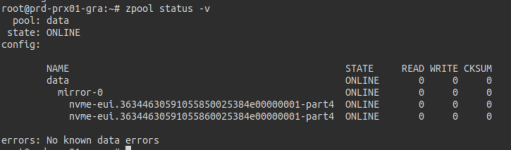
Here is the output of `zpool status -vd`:


Code:
root@prd-prx01-gra:~# zpool status -vd
  pool: data
 state: ONLINE
config:

    NAME                                                 STATE     READ WRITE CKSUM   DIO
    data                                                 ONLINE       0     0     0     0
      mirror-0                                           ONLINE       0     0     0 3.34K
        nvme-eui.36344630591055850025384e00000001-part4  ONLINE       0     0     0     0
        nvme-eui.36344630591055860025384e00000001-part4  ONLINE       0     0     0     0

errors: No known data errors
 
I don't see much concerning in the SMART data other than the unsafe shutdowns which are likely unrelated.
I did a little research into dio_verify_wr/dio_verify_rd and the DIO column but can't find that much useful (to me) information.
You might be able to work around this by disabling the direct prop to get 2.2x/PVE 8 behavior: https://openzfs.github.io/openzfs-docs/man/master/7/zfsprops.7.html#direct
I don't know much about this part of ZFS and don't want to waste your time or say something wrong so I'll step back until I have something more useful to tell.
 
Thanks for the idea, we’ll try this and see whether we still get IO errors and ZFS errors.
This feature could indeed be related to our issue since it was introduced in 2.3x / PVE 9.

However, I don’t think the application running in the VM is performing O_DIRECT writes, as it’s a Grafana Mimir server using remote S3 storage.

We’ll give it a try and come back to you.

Cheers