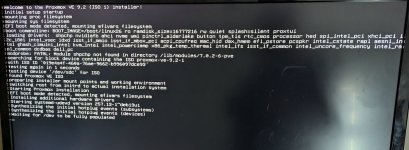
I also tried DEBUG mode.
Below, the output from debug boot log:
```
I'm booting Proxmox installer on Dell Precision workstaiton,
I'm using nomodeset parameter.
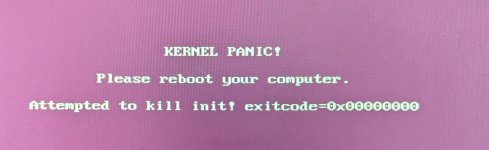
It starts and hangs.
Here is logs:
```
Proxmox VE 9.2 (iso release 1) -
https://www.proxmox.com/
Loading Proxmox TUI Installer (debug) ...
Loading initial ramdisk ...
Welcome to the Proxmox VE 9.2 (ISO 1) installer!
UEFI boot mode detected, mounting efivars filesystem
modprobe: FATAL: Module shpchp not found in directory /lib/modules/7.0.2-6-pve
nvidiafb: Device ID: 10de2685
nvidiafb: unknown NV_ARCH
searching for block device containing the ISO proxmox-ve-9.2-1
with ISO ID '019e4a4f-460a-76ae-9662-b996097dce93'
found Proxmox VE ISO
preparing installer mount points and working environment
GPT: Primary header thinks Alt. header is not at the end of the disk.
GPT:3332379 != 488570879
GPT: Alternate GPT header not at the end of the disk.
GPT: Use GNU Parted to correct GPT errors.
sdc: sdc1 sdc2 sdc3 sdc4
[10.338541] nouveau: Unknown symbol drm_atomic_get_old_mst_topology_state (err -2)
[10.338714] nouveau: Unknown symbol drm_dp_mst_put_port_malloc (err -2)
[10.338879] nouveau: Unknown symbol drm_dp_atomic_release_time_slots (err -2)
[10.339037] nouveau: Unknown symbol drm_gpuvm_bo_evict (err -2)
[10.339193] nouveau: Unknown symbol drm_gpuvm_sm_unmap_ops_create (err -2)
[10.339347] nouveau: Unknown symbol drm_gpuva_link (err -2)
[10.339503] nouveau: Unknown symbol ttm_a?sp_unbind (err -2)
[10.339646] nouveau: Unknown symbol drm_dp_lttpr_init (err -2)
[10.339793] nouveau: Unknown symbol drm_gem_ttm_vmap (err -2)
[10.339953] nouveau: Unknown symbol drm_dp_cec_register_connector (err -2)
[10.340107] nouveau: Unknown symbol drm_exec_init (err -2)
[10.340279] nouveau: Unknown symbol drm_dp_mst_detect_port (err -2)
[10.340450] nouveau: Unknown symbol drm_gem_ttm_mmap (err -2)
[10.340603] nouveau: Unknown symbol drm_gpuva_remove (err -2)
[10.341422] nouveau: Unknown symbol drm_dp_read_dpcd_caps (err -2)
[10.341572] nouveau: Unknown symbol drm_atomic_get_mst_topology_state (err -2)
[10.341738] nouveau: Unknown symbol ttm_device_init (err -2)
[10.341896] nouveau: Unknown symbol ttm_device_fini (err -2)
[10.342032] nouveau: Unknown symbol drm_gpuvm_exec_lock (err -2)
[10.342190] nouveau: Unknown symbol drm_dp_check_act_status (err -2)
[10.342341] nouveau: Unknown symbol drm_gpuvm_sm_map_ops_create (err -2)
[10.342493] nouveau: Unknown symbol drm_gpuva_insert (err -2)
[10.342628] nouveau: Unknown symbol drm_edp_backlight_init (err -2)
[10.342774] nouveau: Unknown symbol drm_gem_ttm_dumb_map_offset (err -2)
[10.342923] nouveau: Unknown symbol drm_sched_job_add_dependency (err -2)
[10.343067] nouveau: Unknown symbol ttm_bo_unpin (err -2)
[10.343214] nouveau: Unknown symbol ttm_bo_vm_fault_reserved (err -2)
[10.343395] nouveau: Unknown symbol ttm_pool_free (err -2)
[10.343540] nouveau: Unknown symbol drm_dp_cec_set_edid (err -2)
[10.343688] nouveau: Unknown symbol drm_dp_get_vc_payload_bw (err -2)
[10.343826] nouveau: Unknown symbol drm_gem_ttm_vunmap (err -2)
[10.343988] nouveau: Unknown symbol drm_dp_read_sink_count_cap (err -2)
[10.344124] nouveau: Unknown symbol drm_dp_read_downstream_info (err -2)
[10.344278] nouveau: Unknown symbol drm_dp_cec_irq (err -2)
[10.344476] nouveau: Unknown symbol drm_edp_backlight_set_level (err -2)
[10.344622] nouveau: Unknown symbol drm_sched_fini (err -2)
[10.344822] nouveau: Unknown symbol ttm_bo_setup_export (err -2)
[10.344969] nouveau: Unknown symbol drm_sched_entity_fini (err -2)
[10.345132] nouveau: Unknown symbol ttm_bo_move_to_lru_tail (err -2)
[10.345331] nouveau: Unknown symbol drm_gpuvm_validate (err -2)
[10.345475] nouveau: Unknown symbol drm_gpuvm_bo_extobj_add (err -2)
[10.345658] nouveau: Unknown symbol drm_fbdev_ttm_driver_fbdev_probe (err -2)
[10.345809] nouveau: Unknown symbol drm_dp_read_lttpr_common_caps (err -2)
[10.345958] nouveau: Unknown symbol drm_exec_fini (err -2)
[10.346127] nouveau: Unknown symbol drm_gpuva_unmap (err -2)
[10.346279] nouveau: Unknown symbol ttm_resource_manager_evict_all (err -2)
[10.362333] NovaCore 0000:ac:00.0: NVIDIA (Chipset: AD102, Architecture: Ada, Revision: a.1)
[10.537808] atlantic 0000:02:00.0 enp2s0: renamed from eth0
[10.539157] Creating 1 MTD partitions on "0000:00:1f.5":
[10.539348] 0x000000000000-0x000001000000 : "BIOS"
[10.543348] spi-nor spi0.1: supply vcc not found, using dummy regulator
[10.543564] input: Dell Privacy Driver as /devices/platform/PNP0C14:02/wmi_bus/.../input/input10
[10.544144] input: Dell WMI hotkeys as /devices/platform/PNP0C14:02/wmi_bus/.../input/input11
[10.545196] Creating 1 MTD partitions on "0000:00:1f.5-chip1":
[10.545634] 0x000000000000-0x000002000000 : "BIOS1"
[10.560837] EDAC MC0: Giving out device to module i10nm_edac controller Intel_10nm Socket#0 IMC#0: DEV 0000:fe:0c.0 (INTERRUPT)
[10.561166] EDAC MC1: Giving out device to module i10nm_edac controller Intel_10nm Socket#0 IMC#1: DEV 0000:fe:0d.0 (INTERRUPT)
[10.561599] EDAC MC2: Giving out device to module i10nm_edac controller Intel_10nm Socket#0 IMC#2: DEV 0000:fe:0e.0 (INTERRUPT)
[10.561847] EDAC MC3: Giving out device to module i10nm_edac controller Intel_10nm Socket#0 IMC#3: DEV 0000:fe:0f.0 (INTERRUPT)
[10.562080] EDAC i10nm: v0.0.6
[10.566623] ixgbe: Intel(R) 10 Gigabit PCI Express Network Driver
[10.566953] ixgbe: Copyright (c) 1999-2016 Intel Corporation.
[10.868329] e1000e 0000:00:1f.6 0000:00:1f.6 (uninitialized): registered PHC clock
[10.955640] e1000e 0000:00:1f.6 eth0: (PCI Express:2.5GT/s:Width x1) 00:be:43:be:15:3e
[10.955794] e1000e 0000:00:1f.6 eth0: Intel(R) PRO/1000 Network Connection
[10.955989] e1000e 0000:00:1f.6 eth0: MAC: 15, PHY: 12, PBA No: FFFFFF-0FF
[10.957714] e1000e 0000:00:1f.6 enp0s31f6: renamed from eth0
```