Proxmox 8.3 Installation Issue on ProLiant DL380 Gen9

nhtossyi

New Member
Feb 21, 2025
6
0
1
Hello,
I am trying to install Proxmox 8.3 on a ProLiant DL380 Gen9. I created a USB installation media using Rufus and successfully installed the OS, but after rebooting, the OS did not start, and the installer appeared again.

In the One-time Boot menu, there was an option for Proxmox, so I selected it, but the System Utilities screen appeared immediately, and the OS did not boot.

How can I boot the installed Proxmox?

ProLiant configuration:​

  • CPU: Xeon E5-2630 v3 × 1
  • Memory: 16GB
  • Storage: 4 × 2TB SSD (RAID10)
This text was created using a translation tool...
 
Hello nhtossyi! Most probably the boot order in the BIOS is set to boot from the USB stick first, so the installer starts again. In your case it is probably the easiest if you simply unplug the USB stick from the system - if the installation was successful, Proxmox VE should then start correctly.
 
What is configured in the boot order menu of the BIOS?

At this point, it probably either means that booting from the disk is disabled for whatever reason, or the installation has failed. But checking the boot order is important, just to be sure.

In the One-time Boot menu, there was an option for Proxmox, so I selected it, but the System Utilities screen appeared immediately, and the OS did not boot.
I thought that the "option for Proxmox" was the USB stick with the Proxmox VE installer. So you tried to boot from the disk (while the USB stick was unplugged), but it failed?
 
The current boot options are as follows:

  • proxmox
  • Generic USB Boot
  • Embedded FlexibleLOM 1: Port 1: HP Ethernet 1Gb 4-port 331 FLR Adapter - NIC (PXE IPv4)
  • Embedded LOM: Port 1: HP Ethernet 1Gb 4-port 331 FLR Adapter - NIC (PXE IPv4)
  • Embedded FlexibleLOM 1: Port 1: HP Ethernet 1Gb 4-port 331 FLR Adapter - NIC (PXE IPv6)
  • Embedded LOM: Port 1: HP Ethernet 1Gb 4-port 331 FLR Adapter - NIC (PXE IPv6)
  • Front USB 2: (USB with the installer)
I selected proxmox, thinking that it was the boot option for the installed OS.
 
What is configured in the boot order menu of the BIOS?

At this point, it probably either means that booting from the disk is disabled for whatever reason, or the installation has failed. But checking the boot order is important, just to be sure.


I thought that the "option for Proxmox" was the USB stick with the Proxmox VE installer. So you tried to boot from the disk (while the USB stick was unplugged), but it failed?
Yes, I tried operating with the USB removed, but it failed.
(I have deleted the posts that were not translated.)
 
Alright, thanks for the information. Yes, proxmox is the correct option to select when booting. Being the first in the boot order list means that it should theoretically boot correctly. Don't you see any other error or anything?

Could you please give us some information about:
  1. What filesystem did you select during the installation?
  2. Are you using hardware RAID? This is especially important if you use ZFS, because the documentation states that
ZFS on top of any hardware RAID is not supported and can result in dataloss.
 
Alright, thanks for the information. Yes, proxmox is the correct option to select when booting. Being the first in the boot order list means that it should theoretically boot correctly. Don't you see any other error or anything?

Could you please give us some information about:
  1. What filesystem did you select during the installation?
  2. Are you using hardware RAID? This is especially important if you use ZFS, because the documentation states that
Thank you for your response.

No errors are displayed, but if the USB is inserted when the server starts, the installer launches. If the USB is removed, the system attempts to boot from the LAN or DVD drive. However, since there is nothing available, the UEFI page is eventually displayed.

From there, I tried selecting Proxmox to boot, but it did not work. The file system selected during installation was EXT4.

Additionally, I am using four SSDs configured in a RAID 10 hardware array.
 
Could you please check if:
  1. It makes any difference whether 'Legacy boot' or CSM is enabled or disabled in the BIOS.
  2. If disabling Secure Boot in the BIOS improves the situation (note: while Proxmox VE supports Secure Boot, it can be worth trying to disable it and see if it helps).
  3. If it works to install and boot the latest version of Debian. It would be interesting for testing whether it improves the situation, but if it works, you can also install Proxmox VE on Debian - see the docs and the wiki page.
 
Could you please check if:
  1. It makes any difference whether 'Legacy boot' or CSM is enabled or disabled in the BIOS.
  2. If disabling Secure Boot in the BIOS improves the situation (note: while Proxmox VE supports Secure Boot, it can be worth trying to disable it and see if it helps).
  3. If it works to install and boot the latest version of Debian. It would be interesting for testing whether it improves the situation, but if it works, you can also install Proxmox VE on Debian - see the docs and the wiki page.
Currently, I am attempting to boot with Legacy Boot disabled.

Secure Boot was originally disabled. I tried enabling it and booting, but the result was the same.

Additionally, I attempted to install Debian, but I encountered the exact same situation.

Is it likely that this is an issue on the ProLiant side?
 
Hi, I had the same issue with a ProLiant XL170r Gen9.
My solution turned out to be pretty simple:

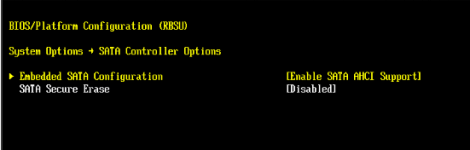
Navigate to the SATA Controller Options in BIOS and enable SATA AHCI Support.

1769090857557.png
 
Further update to this.....
DL380 GEN9

This assumes you got the DL380 machine /reset or without drives.


boot order does not matter, it will hit any boot medium it can boot off.
however to ensure "prox" comes up, it should be first..
but note in the DL380 , you cannot set boot order in the ilo4 until the system already posted (booted)

ZFS cannot be used reliably with the raid controller Smart Array P440ar, just don't do it in a production environment.
also you need to ensure al lyour systems are updated with firmware ESP. the SSD or hard drives

HP dropped the ball on several drives & SSD's, so badly that if you don't update the internal firmware on certain drives they become totally unrecoverable.
full spec details on HP site..

ok...
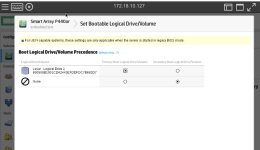
fix for non boot.

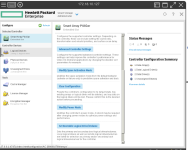
you need to go into the RAID controller card.

find this page... and there it is:
set bootable logical drive.

1780032628263.png

then pop right over to this sub menu.

1780032684431.png

cos... if you don't the default is "NONE" and you can mess about till the cows come home with other methods and it won't work
becasue the UFI cannot see the array to boot from.

fix this up , save it and reboot and it will come right up.

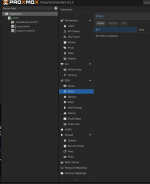
and here is the proof....

1780032865318.png


without this , it will loop at teh HP screen & other boot methods for ever...
 
Anyone wanting to use ZFS or CEFT..with SAS drives, you have to put your controller into HBA mode, basically this removes the RAID configs and functions and puts the card into pass thru mode.

Be aware you should only do this from cold, since it usually destroys the data on the drives due to the configs not being compatible.
RAID on say mirrored setup handles it internally, when you put it into HBA mode you loose that black box functionality.

Then you have the whole nightmare of if you have the advanced cache license & battery backup.

ZFS needs to have complete control of the drives, without any black boxes in the data-paths screwing with caching and out of order reads/writes and such like.

Really there are so many different setups , simply saying DL380 Gen9 in not enough information.
since you may have ether SATA or SAS drives and they are radically different controllers & systems.