

I'm used to the Proxmox web GUI. I like it. My muscle memory is built around it. But every once in a while the shit hits the fan (network's borked, a bridge network config went sideways, the web UI won't load...) and I end up on the local console trying to remember the right qm/pct/pvesh incantations, with the pressure of getting that Plex server back online fast.
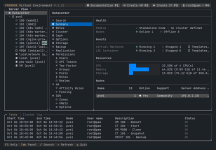
So I built Proxhawk-tui: a text-based console that looks and navigates like the Proxmox web GUI. Same resource tree, same per-object menus, same panels, just rendered in your terminal with box drawing, braille graphs and (optionally) Nerd Font icons.
Full disclosure: this is vibecoded. I built it with Claude Code. I directed it, reviewed it and tested it on a real node, using an integration test script that hits every panel and verifies writes through the API. Still, I'd rather be upfront about it.
What it does:
bash
bash -c "$(curl -fsSL https://raw.githubusercontent.com/Mrdindon/proxhawk-tui/main/install.sh)"
Repo: https://github.com/Mrdindon/proxhawk-tui
Credit where it's due: I took some inspiration from other projects, especially pvetui by devnullvoid, which is great and worth checking out. (Mine was actually called pvetui at first, I renamed it to avoid confusion.)
What's next: right now it runs locally on a node only. I'm working on a remote version so you can manage multiple hosts/clusters from one place.
I'd really love feedback: what breaks, what's missing, what panels you'd actually use when things go wrong, whether the keybindings make sense. Issues and PRs welcome. Be gentle, but honest
So I built Proxhawk-tui: a text-based console that looks and navigates like the Proxmox web GUI. Same resource tree, same per-object menus, same panels, just rendered in your terminal with box drawing, braille graphs and (optionally) Nerd Font icons.
Full disclosure: this is vibecoded. I built it with Claude Code. I directed it, reviewed it and tested it on a real node, using an integration test script that hits every panel and verifies writes through the API. Still, I'd rather be upfront about it.
What it does:
- Same layout and menus as the PVE 9 web UI (Datacenter / Node / VM / CT views, tasks & cluster log panel)
- Read and write: Add/Edit/Remove dialogs are generated from the API schema, so you get the same options and defaults as the GUI
- Covers most of the GUI: storage, backups, HA, permissions, SDN, firewall, network (with apply/revert), disks/ZFS/LVM, Ceph, snapshots, clone, migrate, cloud-init...
- Consoles: qm terminal, SSH into Linux VMs without a serial port (finds the IP through the guest agent / neighbour table), pct enter, node shell
- Community Scripts integration: browse and launch the awesome community-scripts.org helper scripts right from the menu (plugin, enable it in F4 > Plugins)
- Batch start/stop/backup, keyboard + mouse, 10 themes, CLI mode (pvetty guests list -o table)
- Tiny footprint: pure bash + the Perl/pvesh already on the node. No daemon, nothing to install besides itself
bash
bash -c "$(curl -fsSL https://raw.githubusercontent.com/Mrdindon/proxhawk-tui/main/install.sh)"
Repo: https://github.com/Mrdindon/proxhawk-tui
Credit where it's due: I took some inspiration from other projects, especially pvetui by devnullvoid, which is great and worth checking out. (Mine was actually called pvetui at first, I renamed it to avoid confusion.)
What's next: right now it runs locally on a node only. I'm working on a remote version so you can manage multiple hosts/clusters from one place.
I'd really love feedback: what breaks, what's missing, what panels you'd actually use when things go wrong, whether the keybindings make sense. Issues and PRs welcome. Be gentle, but honest
Attachments
Last edited:
