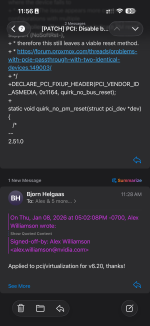
Problems with PCIe passthrough with two identical devices

Figured I'd chime in to add myself to the list of people having this problem. My newly-acquired UGreen DXP8800 Plus has the two ASMedia ASM1164 controllers in it, and the second one is not visible to a VM (tried Unraid and DSM/Arc Loader) no matter what kind off passing through I try. I tried the solutions on this page of the thread and nothing works. Like @elvito noticed, the controllers disappear from the host UI once the VM is started, but the VM cannot see any drives attached to it.

I have not put this node into "production" (it's just a homelab, really) yet, so I am still at a point where I can experiment with any potential solutions there are. Hoping someone has the magic one for all of us!
 
If you try a reset on a device, that has problems with a reset (during operation), then the logical consequence is, that the device will no longer be accessible.

So, either someone is actually willing to try out, what was proposed, or most likely nothing will happen.
If everyone is just waiting for someone else to fix the issue, this could take a LONG time. :)
You all obviously chose to use Open Source Software, so now you actually have the chance to contribute.
 
If you try a reset on a device, that has problems with a reset (during operation), then the logical consequence is, that the device will no longer be accessible.

So, either someone is actually willing to try out, what was proposed, or most likely nothing will happen.
If everyone is just waiting for someone else to fix the issue, this could take a LONG time. :)
You all obviously chose to use Open Source Software, so now you actually have the chance to contribute.
I'm happy to try just about anything (especially while still in the return period for the UGreen ), but after looking at your kernel quirk and firmware suggestions I decided they were over my head without a step by step guide.
 
I'm happy to try just about anything (especially while still in the return period for the UGreen ), but after looking at your kernel quirk and firmware suggestions I decided they were over my head without a step by step guide.
My answer was not directed at any one person in particular. So, it is completely fair to say, that you cannot do this.

Main point is:
Someone will have to try it. My suggestion is far from being proven. Only way however, in order to find out, is someone actually trying it, or coming up with another idea.
As long as everyone just says "same here", it will stay the way it is. Which is not working, if I am not mistaking. So, if someone knows how to do this and is actually affected, maybe think about it. If I had the time, currently, I would build you a test kernel. However, currently I sadly have bigger fish to fry.
 
Hello,

I did test the early isolation, also in combination with boot option
Code:
pcie_aspm=off
and ressource mapping, but the suspend still happens after Proxmox booted up and the HDDs of the second controller won't spin up again. Maybe the suspend could be avoided with different BIOS settings (e.g. turn off the power saving/hot plugging) or the quirk solution? My device is in a cabinet (no monitor/no keyboard) and because of effort and downtime I didn't want to take it out to test it with different BIOS settings. In the meantime I also added a 6th HDD and passed it to the Truenas VM (like the 5th HDD) as a single device, which is also working without problems.
I tried the early isolation method this morning - same results. Even though it does seem to force vfio-pci to grab the device at host boot, the second SATA controller still doesn't show in the VM. And on subsequent attempts, the VM fails to boot because the PCI device (SATA controller) can't be reset. As we know, this can only be fixed with a host reboot. I tried tinkering with any BIOS settings I thought would be related, but it still produces the same result. Hoping that maybe you see a BIOS setting that I didn't, but I'm pretty sure @celemine1gig is right in that this has to be fixed at the firmware and/or kernel level - both of which are above my pay grade, currently.