

Hey, ich wollte heute mal wieder meine LXC sichern. Das hat so weit bei den meisten auch geklappt. Bei zwei Stück bekomme ich allerdings einen Fehler und er bricht ab.
Dann dachte ich okay, machst mal eine kopie davon. LXC runter gefahren, clonen, auch das schlägt fehl. Nun kam mir das ganze etwas komisch vor. Hab dann mal in die Logs der Node geschaut. Da kam mir dann die Meldungen "critical medium error, dev nvme0n1" komisch vor. Hab dann auch mal in Disks rein geschaut. Und das sieht glaub auch nicht all zu gut aus. In all den Jahren hatte ich bisher allerdings noch nie eine sterbende Festplatte, daher ist hier meine Erfahrung gleich Null... Hoffe einer von euch kann mir hier weiterhelfen. Ist wirklich die Festplatte kaputt?
LXC Backup:
Log Node:
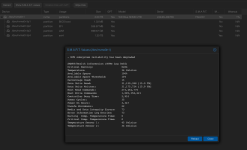
Dann dachte ich okay, machst mal eine kopie davon. LXC runter gefahren, clonen, auch das schlägt fehl. Nun kam mir das ganze etwas komisch vor. Hab dann mal in die Logs der Node geschaut. Da kam mir dann die Meldungen "critical medium error, dev nvme0n1" komisch vor. Hab dann auch mal in Disks rein geschaut. Und das sieht glaub auch nicht all zu gut aus. In all den Jahren hatte ich bisher allerdings noch nie eine sterbende Festplatte, daher ist hier meine Erfahrung gleich Null... Hoffe einer von euch kann mir hier weiterhelfen. Ist wirklich die Festplatte kaputt?
LXC Backup:
Code:
INFO: starting new backup job: vzdump 100 --notes-template '2026.05.09_Backup_ID100' --storage Backup-Server --node pve2 --remove 0 --mode snapshot --notification-mode auto
INFO: Starting Backup of VM 100 (lxc)
INFO: Backup started at 2026-05-09 13:16:53
INFO: status = running
INFO: CT Name: APServer
INFO: including mount point rootfs ('/') in backup
INFO: excluding bind mount point mp0 ('/home/samba') from backup (not a volume)
INFO: backup mode: snapshot
INFO: ionice priority: 7
INFO: create storage snapshot 'vzdump'
  WARNING: You have not turned on protection against thin pools running out of space.
  WARNING: Set activation/thin_pool_autoextend_threshold below 100 to trigger automatic extension of thin pools before they get full.
  Logical volume "snap_vm-100-disk-1_vzdump" created.
  WARNING: Sum of all thin volume sizes (<1.76 TiB) exceeds the size of thin pool pve/data and the size of whole volume group (651.61 GiB).
INFO: creating Proxmox Backup Server archive 'ct/100/2026-05-09T11:16:53Z'
INFO: set max number of entries in memory for file-based backups to 1048576
INFO: run: /usr/bin/proxmox-backup-client backup --crypt-mode=none pct.conf:/var/tmp/vzdumptmp46437_100/etc/vzdump/pct.conf root.pxar:/mnt/vzsnap0 --include-dev /mnt/vzsnap0/./ --skip-lost-and-found --exclude=/tmp/?* --exclude=/var/tmp/?* --exclude=/var/run/?*.pid --backup-type ct --backup-id 100 --backup-time 1778325413 --entries-max 1048576 --repository root@pam@192.168.170.22:PVE-Backup
INFO: Starting backup: ct/100/2026-05-09T11:16:53Z
INFO: Client name: pve2
INFO: Starting backup protocol: Sat May  9 13:16:54 2026
INFO: Downloading previous manifest (Thu Mar 12 21:57:19 2026)
INFO: Upload config file '/var/tmp/vzdumptmp46437_100/etc/vzdump/pct.conf' to 'root@pam@192.168.170.22:8007:PVE-Backup' as pct.conf.blob
INFO: Upload directory '/mnt/vzsnap0' to 'root@pam@192.168.170.22:8007:PVE-Backup' as root.pxar.didx
INFO: unclosed encoder dropped
INFO: closed encoder dropped with state
INFO: unfinished encoder state dropped
INFO: finished encoder state with errors
INFO: catalog upload error - channel closed
INFO: Error: error at "var/log/journal/b7efb09e3cd0455aa3371e07198cdc17/system@000650ffc35ecf3c-3c6235afc2d98ecd.journal~"
INFO: Caused by:
INFO:     Input/output error (os error 5)
INFO: cleanup temporary 'vzdump' snapshot
  Logical volume "snap_vm-100-disk-1_vzdump" successfully removed.
ERROR: Backup of VM 100 failed - command '/usr/bin/proxmox-backup-client backup '--crypt-mode=none' pct.conf:/var/tmp/vzdumptmp46437_100/etc/vzdump/pct.conf root.pxar:/mnt/vzsnap0 --include-dev /mnt/vzsnap0/./ --skip-lost-and-found '--exclude=/tmp/?*' '--exclude=/var/tmp/?*' '--exclude=/var/run/?*.pid' --backup-type ct --backup-id 100 --backup-time 1778325413 --entries-max 1048576 --repository root@pam@192.168.170.22:PVE-Backup' failed: exit code 255
INFO: Failed at 2026-05-09 13:17:38
INFO: Backup job finished with errors
INFO: notified via target `mail-to-root`
TASK ERROR: job errors
Log Node:
Code:
May 09 13:17:01 pve2 cron[1325]: (*system*vzdump) RELOAD (/etc/cron.d/vzdump)
May 09 13:17:01 pve2 CRON[46570]: pam_unix(cron:session): session opened for user root(uid=0) by (uid=0)
May 09 13:17:01 pve2 CRON[46571]: (root) CMD (cd / && run-parts --report /etc/cron.hourly)
May 09 13:17:01 pve2 CRON[46570]: pam_unix(cron:session): session closed for user root
May 09 13:17:36 pve2 kernel: nvme0n1: I/O Cmd(0x2) @ LBA 233504256, 128 blocks, I/O Error (sct 0x2 / sc 0x81) MORE DNR
May 09 13:17:36 pve2 kernel: critical medium error, dev nvme0n1, sector 233504256 op 0x0:(READ) flags 0x80700 phys_seg 1 prio class 2
May 09 13:17:36 pve2 kernel: nvme0n1: I/O Cmd(0x2) @ LBA 233504368, 8 blocks, I/O Error (sct 0x2 / sc 0x81) MORE DNR
May 09 13:17:36 pve2 kernel: critical medium error, dev nvme0n1, sector 233504368 op 0x0:(READ) flags 0x0 phys_seg 1 prio class 2
May 09 13:17:36 pve2 kernel: nvme0n1: I/O Cmd(0x2) @ LBA 233504368, 8 blocks, I/O Error (sct 0x2 / sc 0x81) MORE DNR
May 09 13:17:36 pve2 kernel: critical medium error, dev nvme0n1, sector 233504368 op 0x0:(READ) flags 0x0 phys_seg 1 prio class 2
May 09 13:17:37 pve2 kernel: EXT4-fs (dm-34): unmounting filesystem 8833290b-d51e-4881-8dbb-1332e44b9332.
May 09 13:17:38 pve2 pvedaemon[46437]: ERROR: Backup of VM 100 failed - command '/usr/bin/proxmox-backup-client backup '--crypt-mode=none' pct.conf:/var/tmp/vzdumptmp46437_100/etc/vzdump/pct.conf root.pxar:/mnt/vzsnap0 --include-dev /mnt/vzsnap0/./ --skip-lost-and-found '--exclude=/tmp/?*' '--exclude=/var/tmp/?*' '--exclude=/var/run/?*.pid' --backup-type ct --backup-id 100 --backup-time 1778325413 --entries-max 1048576 --repository root@pam@192.168.170.22:PVE-Backup' failed: exit code 255
May 09 13:17:38 pve2 pvedaemon[46437]: INFO: Backup job finished with errors
May 09 13:17:38 pve2 perl[46437]: notified via target `mail-to-root`
May 09 13:17:38 pve2 pvedaemon[46437]: job errors
May 09 13:17:38 pve2 postfix/pickup[1314]: 4433D402C9: uid=0 from=<root>
May 09 13:17:38 pve2 postfix/cleanup[46916]: 4433D402C9: message-id=<20260509111738.4433D402C9@pve2.lan>
May 09 13:17:38 pve2 pvedaemon[1400]: <root@pam> end task UPID:pve2:0000B565:00061D58:69FF17A4:vzdump:100:root@pam: job errors
May 09 13:17:38 pve2 postfix/qmgr[1315]: 4433D402C9: from=<root@pve2.lan>, size=8865, nrcpt=1 (queue active)
May 09 13:17:39 pve2 postfix/smtp[46918]: 4433D402C9: to=<marcel@meine-email>, relay=mail.xxx.de[188.68.47.222]:25, delay=1.2, delays=0.05/0.02/0.13/0.96, dsn=2.0.0, status=sent (250 2.0.0 Ok: queued as 7BA3D80F6A)
May 09 13:17:39 pve2 postfix/qmgr[1315]: 4433D402C9: removed
May 09 13:19:22 pve2 kernel: nvme0n1: I/O Cmd(0x2) @ LBA 50408696, 192 blocks, I/O Error (sct 0x2 / sc 0x81) MORE DNR
May 09 13:19:22 pve2 kernel: critical medium error, dev nvme0n1, sector 50408696 op 0x0:(READ) flags 0x80700 phys_seg 2 prio class 2
May 09 13:20:20 pve2 postfix/qmgr[1315]: CAC3640760: from=<root@pve2.lan>, size=1116, nrcpt=1 (queue active)
May 09 13:20:20 pve2 postfix/qmgr[1315]: B8DA040703: from=<root@pve2.lan>, size=900, nrcpt=1 (queue active)
May 09 13:20:20 pve2 postfix/qmgr[1315]: A21A84037B: from=<root@pve2.lan>, size=606, nrcpt=1 (queue active)
May 09 13:20:20 pve2 postfix/qmgr[1315]: 12A634038A: from=<root@pve2.lan>, size=1116, nrcpt=1 (queue active)
May 09 13:20:20 pve2 postfix/qmgr[1315]: 6714940719: from=<root@pve2.lan>, size=606, nrcpt=1 (queue active)
May 09 13:20:20 pve2 postfix/local[48434]: error: open database /etc/aliases.db: No such file or directory
May 09 13:20:20 pve2 postfix/local[48434]: warning: hash:/etc/aliases is unavailable. open database /etc/aliases.db: No such file or directory
May 09 13:20:20 pve2 postfix/local[48434]: warning: hash:/etc/aliases: lookup of 'root' failed
May 09 13:20:20 pve2 postfix/local[48435]: error: open database /etc/aliases.db: No such file or directory
May 09 13:20:20 pve2 postfix/local[48435]: warning: hash:/etc/aliases is unavailable. open database /etc/aliases.db: No such file or directory
May 09 13:20:20 pve2 postfix/local[48435]: warning: hash:/etc/aliases: lookup of 'root' failed




