

Problem with MegaRAID SAS3508 controller
- Thread starter admingsi
- Start date
-
- Tags
- megaraid sas
You are using an out of date browser. It may not display this or other websites correctly.
You should upgrade or use an alternative browser.
You should upgrade or use an alternative browser.
We got a test system with a Broadcom / LSI Fusion-MPT SAS38xx we are currently trying to reproduce the issues here, and the other issues we've encountered, on.
Code:Serial Attached SCSI controller [0107]: Broadcom / LSI Fusion-MPT 12GSAS/PCIe Secure SAS38xx [1000:00e6] Subsystem: Broadcom / LSI 9500-16i Tri-Mode HBA [1000:4050]
So we've tried to reproduce it on a test system provided to us, but couldn't so far.
Could you detail your setups, the workload and any steps necessary to trigger this?
Since we have confirmed that no issues occur with the LSI 9500-16i Tri-Mode HBA, I believe testing with the SAS3808 (LSI 9500-16i) or SAS3816 (LSI 9500-8i) operating in IT mode would not be meaningful.
* I use the LSI 9500-16i and LSI 9400-16i, and I have never had any problems with them.
Although they are the same SAS3808 and SAS3816 models, I believe testing will not be effective unless they are the iMR 9540-16i and 9540-8i versions.
The driver they use that causes the problem always appears to be `megaraid_sas`.
* Since I don't have these devices myself, this is based on what I observed in their logs.
* The LSI 9500-16i Tri-Mode HBA is an mpt3sas.
Attachments
Last edited:

The testsystem in question has aSince we have confirmed that no issues occur with the LSI 9500-16i Tri-Mode HBA, I believe testing with the SAS3808 (LSI 9500-16i) or SAS3816 (LSI 9500-8i) operating in IT mode would not be meaningful.
* I use the LSI 9500-16i and LSI 9400-16i, and I have never had any problems with them.
Although they are the same SAS3808 and SAS3816 models, I believe testing will not be effective unless they are the iMR 9540-16i and 9540-8i versions.
The driver they use that causes the problem always appears to be `megaraid_sas`.
* Since I don't have these devices myself, this is based on what I observed in their logs.
* The LSI 9500-16i Tri-Mode HBA is an mpt3sas.
Broadcom MegaRAID 9540-8i. It is one of the affected controllers.As mentioned, we weren't able to trigger the issues yet, so please provide details about the setups (including controller firmware and connected disks + firmware), the RAID configuration, filesystems/usage and the steps that usually trigger it.

Hello,
I have an affected system also: Supermicro MB, model #: H11DSi rev 2.x
BIOS: v3.5
Firmware: v1.52.23
MegaRAID 9660-16i
- Firmware: v8.17.1 (but also had issues on an older version)
- I tried the Proxmox-delivered driver and updated to the Broadcom driver: v8.17.1 (verified that the new driver was in use via "modinfo".
The controller has 4, 3.8TB Micron NVMe drives connected.
(This worked for the past year on ESXi v7 perfectly, so I know the controller and drives are working in this server.)
Proxmox v9.1.9, Enterprise repo. Fully patched.
I have tried configuring the drives as "JBOD", using ZFS raidz. Fails after any data migration.
Now, I have it configured back to hardware RAID5 and LVM on Proxmox.
I can reproduce the error every time via a simple VM clone operation. I get about 40GB copied, and the controller basically shuts down.
I also tried the kernel parameters "iommu=pt" and "amd_iommu=on". THIS IS WEIRD. Before the parameters, the controller would die after copying 47GB. Now, with the parameters, is has a long 2-3 minute pause, then continues for another 40-50GB, rinse, repeat. Nothing in dmesg this time.
This is a long running and hard to detect/fix issue. What are my other options? I read the downgrading the kernel to an older version helps, but I do not know the exact steps for that.
-Brian
I have an affected system also: Supermicro MB, model #: H11DSi rev 2.x
BIOS: v3.5
Firmware: v1.52.23
MegaRAID 9660-16i
- Firmware: v8.17.1 (but also had issues on an older version)
- I tried the Proxmox-delivered driver and updated to the Broadcom driver: v8.17.1 (verified that the new driver was in use via "modinfo".
The controller has 4, 3.8TB Micron NVMe drives connected.
(This worked for the past year on ESXi v7 perfectly, so I know the controller and drives are working in this server.)
Proxmox v9.1.9, Enterprise repo. Fully patched.
I have tried configuring the drives as "JBOD", using ZFS raidz. Fails after any data migration.
Now, I have it configured back to hardware RAID5 and LVM on Proxmox.
I can reproduce the error every time via a simple VM clone operation. I get about 40GB copied, and the controller basically shuts down.
I also tried the kernel parameters "iommu=pt" and "amd_iommu=on". THIS IS WEIRD. Before the parameters, the controller would die after copying 47GB. Now, with the parameters, is has a long 2-3 minute pause, then continues for another 40-50GB, rinse, repeat. Nothing in dmesg this time.
This is a long running and hard to detect/fix issue. What are my other options? I read the downgrading the kernel to an older version helps, but I do not know the exact steps for that.
-Brian
Last edited:
Did you install storcli already ?
storcli /call show # show number and model of controllers, first is 0, second is 1
In cmd set "x" to your controller number and try the available profiles, a profile change need a controller restart !
storcli /cx show profile
storcli /cx set profile profileid=<value> ; storcli /cx restart
storcli /call show # show number and model of controllers, first is 0, second is 1
In cmd set "x" to your controller number and try the available profiles, a profile change need a controller restart !
storcli /cx show profile
storcli /cx set profile profileid=<value> ; storcli /cx restart
Last edited:
Hello, since I have a 9600 series Tri-mode adapter, I am using the storcli2 utility.
There is no "profile" command (it was removed for some reason).
But, thanks for turning me to digging into the options of storcli2!
I ran './storcli2 /c0 show events', and saw many 'consistency' errors that were being corrected during an initialization of the single VG.
Then, a few hours later, the controller was logging hi-temp errors. Hmmm. The server case is huge, many fans, no load on the controller or host. Seems like I need to dig into what is happening there.
-Brian
There is no "profile" command (it was removed for some reason).
But, thanks for turning me to digging into the options of storcli2!
I ran './storcli2 /c0 show events', and saw many 'consistency' errors that were being corrected during an initialization of the single VG.
Then, a few hours later, the controller was logging hi-temp errors. Hmmm. The server case is huge, many fans, no load on the controller or host. Seems like I need to dig into what is happening there.
-Brian
In my case :So we've tried to reproduce it on a test system provided to us, but couldn't so far.
Could you detail your setups, the workload and any steps necessary to trigger this?
- 2 x Supermicro SuperServer 2U 2014S-TR
For each system :
- EPYC 7313 DP/UP
- 8 x 32 GB of Registered DDR4 3200 ECC (brand supermicro)
- 2 x 400 GB of Micron 7450 MAX on Broadcom MR 9540-2M2 JBOD mode as plain disks for RAID 1 ZFS
- 8 x Samsung PM897 3.84TB on Broadcom HBA 9500-16i
- Supermicro AOC-STGF-I2S-O dual port 10 GbE SFP+
As for motherboard firmware :

| 01.08.01 |
|---|---|
|
| 12/17/2025 |

| 1.21.1 |

| BIOS Date: 12/17/2025 Ver 3.6 |

| F0.A6.44 |
Controller specs and firmware :
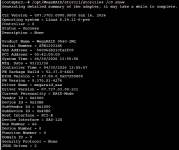
I use "2 x 400 GB of Micron 7450 MAX on Broadcom MR 9540-2M2 JBOD mode as plain disks for RAID 1 ZFS" for my boot FS where Proxmox Backup server currently version 4.2.0 with pinned kernel 6.14.11-7-pve (2026-04-30T09:27Z).
There is not much "workload" on these disks as they are boot drives and "8 x Samsung PM897 3.84TB on Broadcom HBA 9500-16i" combo seems to be working fine (even when I was using kernel 6.17 or 7.0.0-3-pve).
Steps to reproduce :
> Case 1 : fresh installation
- Download latest proxmox ISO with kernel 6.17 or 7 ;
- Write ISO to USB Stick ;
- Boot from USB Stick ;
- Go until the end of installation process ;
=> 50% of the time, process freezes on writing EFI ;
> Case 2 : OS upgrade from kernel >= 6.17
- Install system with kernel 6.17 ;
- Try upgrading system to PBS 4.2.X with kernel 7 ;
=> System crashes 100% of the time with similar errors to : https://forum.proxmox.com/threads/problem-with-megaraid-sas3508-controller.179378/post-842596
What's strange is that sometimes writing works for one disk but not the other, sometimes it crashes on the first one (but mostly when writing second one).
I would like to confirm that I am seeing what appears to be the same issue on my system.
Hardware:
Controller: Broadcom / LSI MegaRAID SAS-3 3008 [Fury]
PCI ID: 1000:005f
Subsystem: 1000:9341
The controller is currently configured in JBOD mode
Two disks are connected directly to onboard SATA and are visible
Two disks are connected through the MegaRAID controller and are not visible in Proxmox
System:
proxmox-ve: 9.2.0
pve-manager: 9.2.2
kernel: 7.0.2-6-pve
lspci output:
05:00.0 RAID bus controller [0104]: Broadcom / LSI MegaRAID SAS-3 3008 [Fury] [1000:005f] (rev 02)
Subsystem: Broadcom / LSI Device [1000:9341]
Kernel modules: megaraid_sas
There is no Kernel driver in use: megaraid_sas line shown for the controller.
Relevant dmesg messages:
megaraid_sas 0000:05:00.0: FW now in Ready state
megaraid_sas 0000:05:00.0: controller type : iMR(0MB)
megaraid_sas 0000:05:00.0: Secure JBOD support : Yes
megaraid_sas 0000:05:00.0: JBOD sequence map support : Yes
megaraid_sas 0000:05:00.0: megasas_get_ld_map_info DCMD timed out, RAID map is disabled
megaraid_sas 0000:05:00.0: DCMD(opcode: 0x200e102) is timed out, func:megasas_issue_blocked_cmd
megaraid_sas 0000:05:00.0: megasas_sync_pd_seq_num DCMD timed out, continue without JBOD sequence map
megaraid_sas 0000:05:00.0: DCMD(opcode: 0x2010100) is timed out, func:megasas_issue_blocked_cmd
megaraid_sas 0000:05:00.0: Ignore DCMD timeout: megasas_get_pd_list
megaraid_sas 0000:05:00.0: DCMD(opcode: 0x3010100) is timed out, func:megasas_issue_blocked_cmd
megaraid_sas 0000:05:00.0: Ignore DCMD timeout: megasas_ld_list_query
megaraid_sas 0000:05:00.0: failed to get LD list
megaraid_sas 0000:05:00.0: megasas_init_fw: megasas_get_device_list failed
megaraid_sas 0000:05:00.0: Failed from megasas_init_fw
The controller itself is detected by PCI, but the disks behind it do not appear in lsblk.
I have not yet tested with an older Proxmox kernel, but this looks similar to the issue reported here with MegaRAID SAS-3 3008 / JBOD disks not being detected on newer kernels.
Hardware:
Controller: Broadcom / LSI MegaRAID SAS-3 3008 [Fury]
PCI ID: 1000:005f
Subsystem: 1000:9341
The controller is currently configured in JBOD mode
Two disks are connected directly to onboard SATA and are visible
Two disks are connected through the MegaRAID controller and are not visible in Proxmox
System:
proxmox-ve: 9.2.0
pve-manager: 9.2.2
kernel: 7.0.2-6-pve
lspci output:
05:00.0 RAID bus controller [0104]: Broadcom / LSI MegaRAID SAS-3 3008 [Fury] [1000:005f] (rev 02)
Subsystem: Broadcom / LSI Device [1000:9341]
Kernel modules: megaraid_sas
There is no Kernel driver in use: megaraid_sas line shown for the controller.
Relevant dmesg messages:
megaraid_sas 0000:05:00.0: FW now in Ready state
megaraid_sas 0000:05:00.0: controller type : iMR(0MB)
megaraid_sas 0000:05:00.0: Secure JBOD support : Yes
megaraid_sas 0000:05:00.0: JBOD sequence map support : Yes
megaraid_sas 0000:05:00.0: megasas_get_ld_map_info DCMD timed out, RAID map is disabled
megaraid_sas 0000:05:00.0: DCMD(opcode: 0x200e102) is timed out, func:megasas_issue_blocked_cmd
megaraid_sas 0000:05:00.0: megasas_sync_pd_seq_num DCMD timed out, continue without JBOD sequence map
megaraid_sas 0000:05:00.0: DCMD(opcode: 0x2010100) is timed out, func:megasas_issue_blocked_cmd
megaraid_sas 0000:05:00.0: Ignore DCMD timeout: megasas_get_pd_list
megaraid_sas 0000:05:00.0: DCMD(opcode: 0x3010100) is timed out, func:megasas_issue_blocked_cmd
megaraid_sas 0000:05:00.0: Ignore DCMD timeout: megasas_ld_list_query
megaraid_sas 0000:05:00.0: failed to get LD list
megaraid_sas 0000:05:00.0: megasas_init_fw: megasas_get_device_list failed
megaraid_sas 0000:05:00.0: Failed from megasas_init_fw
The controller itself is detected by PCI, but the disks behind it do not appear in lsblk.
I have not yet tested with an older Proxmox kernel, but this looks similar to the issue reported here with MegaRAID SAS-3 3008 / JBOD disks not being detected on newer kernels.
Hello.
I wanted to mention, since we had a very similar issue.
We have many huawei 1288H v5 servers, and many having IO issues.
I followed this thread because it looked like our issue.
But at the end it was a faulty Firmware on Micron SSDs
We updated around 30+ disks and the problem went away.
Just in case anyone encounters this.
I wanted to mention, since we had a very similar issue.
We have many huawei 1288H v5 servers, and many having IO issues.
I followed this thread because it looked like our issue.
But at the end it was a faulty Firmware on Micron SSDs
We updated around 30+ disks and the problem went away.
Just in case anyone encounters this.
The solution itself is simple, I flashed the controller in IT-mode.
https://github.com/EverLand1/9300-8i_IT-Mode
hard drives determined, zraid, production.
https://github.com/EverLand1/9300-8i_IT-Mode
hard drives determined, zraid, production.
So far our reproducer was fixed by kernel 7.0. Some people mentioned it fixed it in their situation.
We are currently trying to use the RAID controller for the root fs, to see if we can somehow reproduce an issue there.
In some cases reducing the max_sectors_kb helped, similar to the workaround for mpt3sas before a fix was provided:
But to be sure, we would first need a reproducer ourselves that's not fixed by kernel 7.0.
We are currently trying to use the RAID controller for the root fs, to see if we can somehow reproduce an issue there.
In some cases reducing the max_sectors_kb helped, similar to the workaround for mpt3sas before a fix was provided:
Code:
cat /sys/block/sdX/queue/max_sectors_kbTested 7.0.14-4-pve kernel today on our hardware, same problem.
Flashed one of our production servers to IT mode (Supermicro SAS 3808 iMR + 2x 400GB Micron 7450) ...same problem.
Edit: screenshot removed (wrong HBA, will upload correct one later)
Edit: screenshot removed (wrong HBA, will upload correct one later)
Last edited:
I included this just in case it might be relevant.
It looks like it has been fixed.
https://github.com/proxmox/pve-kernel/commit/a3a4eaeeb9b11091bfc93262b878ea289aeda8e3
https://github.com/proxmox/pve-kernel/commit/46a6f4fba78c58c80a17ef04ba3f331e05187d44
This appears to be the megraid_sas version of the following mpt3sas modification.
https://github.com/proxmox/pve-kernel/commit/9b3a90f1768cf5a8a7d00b7a98a625bc8a492f0d
https://github.com/proxmox/pve-kernel/commit/a3a4eaeeb9b11091bfc93262b878ea289aeda8e3
https://github.com/proxmox/pve-kernel/commit/46a6f4fba78c58c80a17ef04ba3f331e05187d44
This appears to be the megraid_sas version of the following mpt3sas modification.
https://github.com/proxmox/pve-kernel/commit/9b3a90f1768cf5a8a7d00b7a98a625bc8a492f0d
@uzumo : seems you are right!
The new 7.0.14-15-pve kernel with the mentioned fix appeared in the enterprise repository this morning. We're currently running it on one of our impacted production servers after some initial tests looked promising.
The new 7.0.14-15-pve kernel with the mentioned fix appeared in the enterprise repository this morning. We're currently running it on one of our impacted production servers after some initial tests looked promising.
Good morning,
I have a Fujitsu PRAID CP400i controller based on the LSI SAS3008 chipset (equivalent to the LSI SAS 9300-8i HBA).
Proxmox is installed on a SATA SSD connected to the motherboard's onboard controller, while the PRAID CP400i controller hosts a RAID 1 array (configured as a directory) containing VMs and LXC containers on SAS disks.
Unfortunately, I missed this discussion earlier; however, I am reporting system freezes after several hours of operation—specifically, the logs show an issue at 4:30 AM last night (after the system had been running under low load for six hours).
The server is currently in the setup phase—a basic installation with just a couple of VMs and a few auxiliary LXC containers—so I am open to any solutions. I updated the firmware to version 24.21.0-0076 yesterday afternoon (which resulted in a slight improvement, as it previously used to freeze after 2–3 hours).
I am running the latest version of Proxmox with all recent updates (9.2.21 and Kernel 7.0.14-22-pve) and I start form new Proxmox 9.2 ISO.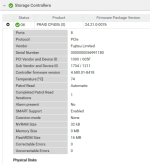
I have a Fujitsu PRAID CP400i controller based on the LSI SAS3008 chipset (equivalent to the LSI SAS 9300-8i HBA).
Proxmox is installed on a SATA SSD connected to the motherboard's onboard controller, while the PRAID CP400i controller hosts a RAID 1 array (configured as a directory) containing VMs and LXC containers on SAS disks.
Unfortunately, I missed this discussion earlier; however, I am reporting system freezes after several hours of operation—specifically, the logs show an issue at 4:30 AM last night (after the system had been running under low load for six hours).
The server is currently in the setup phase—a basic installation with just a couple of VMs and a few auxiliary LXC containers—so I am open to any solutions. I updated the firmware to version 24.21.0-0076 yesterday afternoon (which resulted in a slight improvement, as it previously used to freeze after 2–3 hours).
I am running the latest version of Proxmox with all recent updates (9.2.21 and Kernel 7.0.14-22-pve) and I start form new Proxmox 9.2 ISO.
Attachments
Last edited: