

Hi Dear PMG Admins,
I've been running PMG for a while, and the one thing that always bugged me was managing the spam quarantine from my phone. The admin interface works fine, but it's not built for a small screen - and there are days I need to check something quickly without sitting down at my computer.
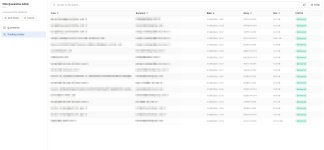
So I built a small admin panel for it: talks to the PMG API, handles quarantine (list/view/deliver/whitelist/block) and Tracking Center (read-only), mobile-first UI, installable as a PWA, runs as a single Docker container next to PMG - doesn't touch the appliance itself. Policies (welcome/blocklist management) is intentionally out of scope for now, PMG's own UI handles that fine.
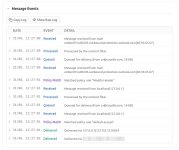
One detail I'm particularly happy with: instead of raw syslog output, each message's detail view in Tracking Center breaks down its journey through PMG into a clean, timestamped timeline - Received, Processed,Queued, Policy Match, Delivered, and so on - so you can see exactly what happened to that message at each step without parsing log syntax. Raw log is still one click away if you need it.
Also, one thing worth mentioning in case it saves someone else the trouble: each admin logs in with their own PMG account - it works with any role that has API access, root@pam included. But for a tool like this I'd recommend creating a dedicated account per admin with the "Help Desk"role instead - it's the least-privilege option that still covers both screens. Quarantine Manager alone won't work, though: it can't see Tracking Center, only Help Desk combines both permissions.
Happy to hear if it's useful to anyone else running PMG.
github.com/ikrsdo/pmg-quarantine-admin
Screenshots (Mobile):
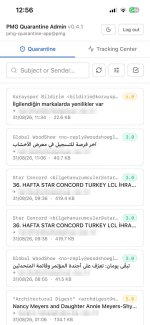
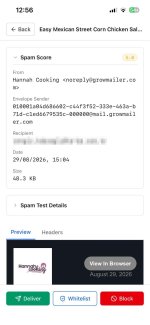
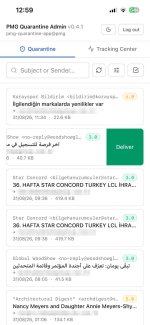


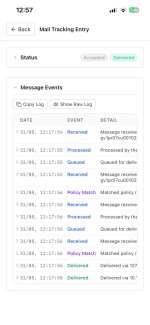
Screenshots (Desktop):


Happy to hear if it's useful to anyone else running PMG.
Thanks for reading
I've been running PMG for a while, and the one thing that always bugged me was managing the spam quarantine from my phone. The admin interface works fine, but it's not built for a small screen - and there are days I need to check something quickly without sitting down at my computer.
So I built a small admin panel for it: talks to the PMG API, handles quarantine (list/view/deliver/whitelist/block) and Tracking Center (read-only), mobile-first UI, installable as a PWA, runs as a single Docker container next to PMG - doesn't touch the appliance itself. Policies (welcome/blocklist management) is intentionally out of scope for now, PMG's own UI handles that fine.
One detail I'm particularly happy with: instead of raw syslog output, each message's detail view in Tracking Center breaks down its journey through PMG into a clean, timestamped timeline - Received, Processed,Queued, Policy Match, Delivered, and so on - so you can see exactly what happened to that message at each step without parsing log syntax. Raw log is still one click away if you need it.
Also, one thing worth mentioning in case it saves someone else the trouble: each admin logs in with their own PMG account - it works with any role that has API access, root@pam included. But for a tool like this I'd recommend creating a dedicated account per admin with the "Help Desk"role instead - it's the least-privilege option that still covers both screens. Quarantine Manager alone won't work, though: it can't see Tracking Center, only Help Desk combines both permissions.
Happy to hear if it's useful to anyone else running PMG.
github.com/ikrsdo/pmg-quarantine-admin
Screenshots (Mobile):
Screenshots (Desktop):
Happy to hear if it's useful to anyone else running PMG.
Thanks for reading
Last edited:
