

[SOLVED] Physical NICs (nic0/nic1) not displayed in WebUI Network page, get error 400 iface: interface already exists when trying to add interfaces

teresaj

New Member
Dec 18, 2025
6
0
1
Hello everyone, I have a weird network issue on my single-node Proxmox VE host.

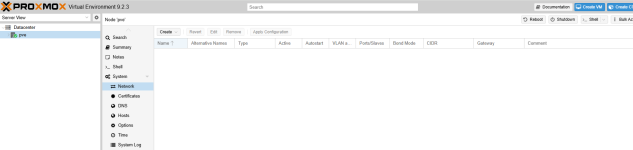
In the node's System > Network page, only the bridge vmbr0 is shown; my two physical ethernet adapters nic0 and nic1 never appear in the WebUI list.

If I try to add a new network interface via the WebUI, it throws a validation error:

Parameter verification failed. (400) iface: interface already exists

My environment
pve-9.2.3

My /etc/network/interfaces full config
Code:
# network interface settings; autogenerated
# Please do NOT modify this file directly, unless you know what
# you're doing.
#
# If you want to manage parts of the network configuration manually,
# please utilize the 'source' or 'source-directory' directives to do
# so.
# PVE will preserve these directives, but will NOT read its network
# configuration from sourced files, so do not attempt to move any of
# the PVE managed interfaces into external files!

auto lo
iface lo inet loopback

auto nic0
iface nic0 inet manual

auto nic1
iface nic1 inet manual

auto vmbr0
# ipv4 config
iface vmbr0 inet static
        address 192.168.1.100/24
        gateway 192.168.1.1
        bridge-ports nic0 nic1
        bridge-stp off
        bridge-fd 0

source /etc/network/interfaces.d/

1782121662705.png
 
This is not valide, im my opinion.
Code:
auto vmbr0
# ipv4 config
iface vmbr0 inet static
        address 192.168.1.100/24
        gateway 192.168.1.1
        bridge-ports nic0 nic1 # <===
        bridge-stp off
        bridge-fd 0
 
Can you post the output of

Code:
ip a
pvesh get /nodes/localhost/network --output-format json
 
This is not valide, im my opinion.
Code:
auto vmbr0
# ipv4 config
iface vmbr0 inet static
        address 192.168.1.100/24
        gateway 192.168.1.1
        bridge-ports nic0 nic1 # <===
        bridge-stp off
        bridge-fd 0
Are you referring to a problem with the VMBR0 bridge binding two network ports? That was the configuration before.
 
Last edited:
Can you post the output of

Code:
ip a
pvesh get /nodes/localhost/network --output-format json
1: lo: <LOOPBACK,UP,LOWER_UP> mtu 65536 qdisc noqueue state UNKNOWN group default qlen 1000
link/loopback 00:00:00:00:00:00 brd 00:00:00:00:00:00
inet 127.0.0.1/8 scope host lo
valid_lft forever preferred_lft forever
inet6 ::1/128 scope host noprefixroute
valid_lft forever preferred_lft forever
2: nic0: <BROADCAST,MULTICAST,UP,LOWER_UP> mtu 1500 qdisc mq master vmbr0 state UP group default qlen 1000
link/ether c8:ff:bf:08:87:bb brd ff:ff:ff:ff:ff:ff
altname enp2s0
altname enxc8ffbf0887bb
3: nic1: <BROADCAST,MULTICAST,UP,LOWER_UP> mtu 1500 qdisc mq master vmbr0 state UP group default qlen 1000
link/ether c8:ff:bf:08:87:bc brd ff:ff:ff:ff:ff:ff
altname enxc8ffbf0887bc
4: vmbr0: <BROADCAST,MULTICAST,UP,LOWER_UP> mtu 1500 qdisc noqueue state UP group default qlen 1000
link/ether c8:ff:bf:08:87:bb brd ff:ff:ff:ff:ff:ff
inet 192.168.1.100/24 scope global vmbr0
valid_lft forever preferred_lft forever
inet6 fd00:60fe:87fa:0:caff:xxxx:xxxx:xxxx/64 scope global dynamic mngtmpaddr proto kernel_ra
valid_lft forever preferred_lft forever
inet6 2408:8256:1475:f21:caff:xxxx:xxxx:xxxx/64 scope global dynamic mngtmpaddr proto kernel_ra
valid_lft 180119sec preferred_lft 93719sec
inet6 fe80::caff:xxxx:xxxx:xxxx/64 scope link proto kernel_ll
valid_lft forever preferred_lft forever
5: tap100i0: <BROADCAST,MULTICAST,PROMISC,UP,LOWER_UP> mtu 1500 qdisc fq_codel master fwbr100i0 state UNKNOWN group default qlen 1000
link/ether 2e:04:68:65:15:41 brd ff:ff:ff:ff:ff:ff
6: fwbr100i0: <BROADCAST,MULTICAST,UP,LOWER_UP> mtu 1500 qdisc noqueue state UP group default qlen 1000
link/ether 5e:6a:2f:a6:0b:89 brd ff:ff:ff:ff:ff:ff
7: fwpr100p0@fwln100i0: <BROADCAST,MULTICAST,UP,LOWER_UP> mtu 1500 qdisc noqueue master vmbr0 state UP group default qlen 1000
link/ether 22:d5:39:4c:38:da brd ff:ff:ff:ff:ff:ff
8: fwln100i0@fwpr100p0: <BROADCAST,MULTICAST,UP,LOWER_UP> mtu 1500 qdisc noqueue master fwbr100i0 state UP group default qlen 1000
link/ether 5e:6a:2f:a6:0b:89 brd ff:ff:ff:ff:ff:ff


[{"active":1,"address":"192.168.1.100","autostart":1,"bridge_fd":"0","bridge_ports":"nic0 nic1","bridge_stp":"off","cidr":"192.168.1.100/24","families":["inet","inet6"],"gateway":"192.168.1.1","iface":"vmbr0","method":"static","method6":"auto","netmask":"24","options6":["accept-ra 2"],"priority":5,"type":"bridge"},{"active":1,"altnames":["enp2s0","enxc8ffbf0887bb"],"exists":1,"families":["inet"],"iface":"nic0","method":"manual","method6":"manual","priority":3,"type":"eth"},{"active":1,"altnames":["enxc8ffbf0887bc"],"exists":1,"families":["inet"],"iface":"nic1","method":"manual","method6":"manual","priority":4,"type":"eth"}]
 
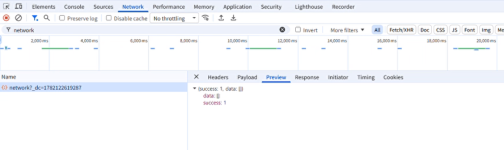
When opening the network tab in the UI, can you open the developer console (F12) and check if there are any errors logged there?